Kicking around in technology since 2002. I like to write about technology products and ideas, but at the consumer level understanding. Some tech, but not too techie.
Police dogs have yet another smell they must detect. Tactical Detection K9 company now trains dogs to sniff out SD cards and USB sticks. The training is in response to better assisting law enforcement in child pornography investigations.
The percentage of a dog’s brain which is devoted to analyzing smells is 40 times greater than humans. For example, humans can detect about 5 million scents and a German Shepherd can detect around 225 million smells.
In a recent investigation a dog was used in the FBI raid of the home of the former Subway spokesman Jared Fogle in Hancock County, Indiana.
What could take investigators hours to find an SD card or USB stick in a house would take a trained dog considerably less time, probably no more than 30 minutes.
According to Tactical Detection K9 it took scientists over four years to isolate the odor associated with memory devices. Now that a specific odor has been identified it takes 8-9 months for a dog to be trained in picking up that scent.
A dog which can sniff out SD and USB sticks can cost upwards of $9,000.
Lake Forest, CA — July, 2015 — Nexcopy Inc. introduces a new software suite which supports data locking content to secure digital media. The software function supports both full-size Secure Digital card media and microSD card media. The data locking feature will turn the SD card into a read-only card so data cannot be deleted or formatted off the device.
Write Protection for SD Card: Why It Matters
As data security becomes increasingly critical, write protection for SD cards is a key feature that prevents unauthorized data modification or deletion. Nexcopy’s new software and duplicator hardware empower users to permanently lock content at the controller level—making it impossible to erase, overwrite, or format the card’s data.
Write protecting, or data locking content to flash memory is an important security feature. With the Nexcopy software and duplicator, data can be copied to the memory card and as a final step the device will be write protected at the controller level. Performing the data lock at the controller level blocks any third party from manipulating, hacking or tampering with the original content.
With the Nexcopy duplication software and hardware solution, a content owner has the following benefits:
Protect bootable operating systems which run from SD cards
Block viruses or malware from being transferred to the memory device
Eliminate users from deleting or formatting content off the SD card
“Several of our customers with global data distribution requirements asked for this feature,” says Greg Morris, President of Nexcopy Inc. “The ability to write protect Secure Digital media was the added security measure they required, and we delivered.” Morris continues, “In addition, I am happy to announce current Nexcopy customers with SD Duplicators will also benefit from our updated duplication software.”
With optical drives disappearing from laptops, netbooks, and most tower-styled computers, the requirement to disseminate information via flash memory is becoming more popular now than ever. As content owners make their data available on flash memory, there is an added responsibility to ensure the memory is secure from malware and viruses. One way to prevent suspicious files from “jumping” onto the memory is making the flash memory write protected (or read-only). Using read-only Secure Digital media is a dual benefit because files cannot be added to the card and files cannot be removed from the card.
The software suite is compatible with the PC-based SD200PC duplicator and microSD200PC duplicator by Nexcopy. The two SD duplicator models are twenty target systems and require a Windows host PC to run. The write protection is performed at the controller level. It is not the mechanical switch found on the outside of Secure Digital media. This means the write protection setting done by the Nexcopy duplication software is the most secure method to make SD and microSD media read only.
Nexcopy’s complete line of USB Duplicators, CF Duplicators, SD Duplicators, and microSD Duplicators are available through a worldwide network of authorized resellers.
About
Nexcopy Incorporated specializes in developing and manufacturing the finest and most feature-rich flash memory duplicators in the market. Pioneering the solid-state memory duplication market, Nexcopy supplies Central and South America, Europe, India, Asia, Pacific Rim and serves the U.S. market through its U.S. headquarters at: 13 Orchard Road Suite 102, Lake Forest, CA 92630.
Computers on a stick will begin to gain popularity over the next two years. Lenovo is the most recent to offer a compu-stick. The Ideacentre 300 Stick is a 2GB of RAM computer with an Intel Atom Z3735F processor (2M cache + 1.83 Ghz) and runs Windows 8.1.
The Compu-Stick can be plugged into any computer and when you reboot, the hardware now uses the OS of the compu-stick.
Alternatively you may connect the device to a TV and sync a keyboard and mouse and now you have a fully functioning PC with your TV as the monitor.
This is a great step in the right direction as all technology will move towards solid state memory. The Lenovo product has 32GBs of memory which is fine for a first generation product. If they can house a microSD slot in there for expanded memory, it would be an inexpensive solution to a possible data storage problem.
The only caveat left is that unless true Grade A memory is used in these devices the data retention and stability is the week point. With Grade A NAND memory you have a re-write of about 100,000 cycles. SLC memory will help this issue and improve reliability.
Reports indicate the Compu-Stick will run about $150.
With the single USB-C port of the new MacBook laptop we knew a power station and/or dock station was right behind. Here is a Kickstarter compaign to address the single port computer and connecting all your peripheral gadgets to your new computer.
The ultimate dock station will power and charge your system using USB’s new Power Delivery specification, while providing an additional alternate mode video output up to 4K resolution, gigabit Ethernet, audio input/output, and 4 USB ports. The tall slender design of the dock station packs a number of sockets to support any type of peripheral you need to connect.
In addition, the USB 3.1 Type-C specification supports a feature called “VESA Alternate Mode” which works with the built-in graphics processor on supported systems to provide video output at resolutions up to 4K. This is particularly important given the up-tick in TVs and monitors which are being released with a 4K specification. The other two display outputs in the Ultimate Dock are enabled by the DisplayLink DL-3900 graphics processor, which can support two additional 1080P displays at 60Hz. The DisplayLink driver is still in development, but the Kickstarter campaign claims the driver will have a final release by the time the dock station hits full production.
The Plugable Ultimate USB-C Universal Docking Station supports:
Yes, there are million flash drives in the market. This one is a bit clever don’t you think? Buy the 4GB drive off Urban Outfitters. Create your own multimedia message with audio, video or text and save it to this flash drive. Throw it into the ocean and see what happens.
Infinite USB is a concept which dates back five years. The concept is brilliantly simple. The USB cable design allows multiple devices to be charge from an extending USB plug, and at the same time, allow data transfer through that one original USB port.
Today, Infinite USB has released a new version for the Mac computer. One which supports Apple’s Type C connector. This is a really smart move on Infinite USB’s part because the Mac computer only has one USB port. So additional sockets is very important.
Like the original design from years back, the connection is simple and straight forward.
Using the original USB port of the computer, the Infinite USB creates a pass through, or extended USB port. They do this so that once the Infinite USB cable is connected, you still have access to the data transfer ability of that original Mac USB port. However, Infinite USB was ultra-clever and created a design to steam off some power form the USB buss so you can charge additional devices.
The USB connector builds upon this concept with module cables and connectors so you may continue to high-jack power off the original USB socket, while still having the original USB port with data transfer capabilities.
To be perfectly clear, the Infinite USB will only transfer data to one USB device… it will not transfer data to all the devices connected. It is important to understand the Infinity USB concepts is a creative charging station, not a USB hub.
The product can be found on Kickstarter for $20. There is only one day left at the time of this writing, after that you can order product through the company website.
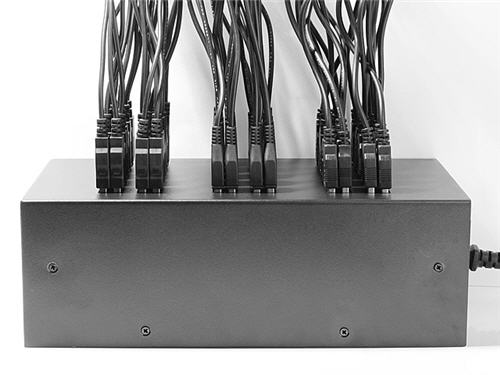
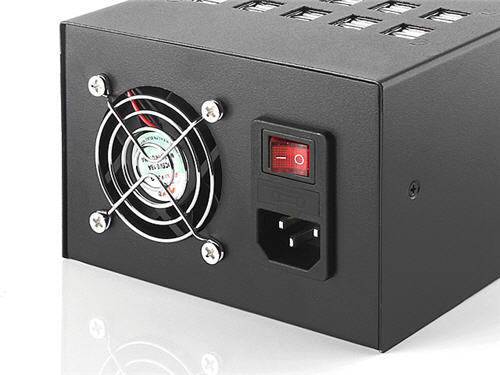
Brando, a USB gadget distributor located in Hong Kong, now has available a massive USB charging station.
The 60 port charging station can charge sixty devices at 1A or charge 30 devices at 2A. It is not clear if the 2A charge would require a USB Y-Cable. The box does not support data transfer capability so don’t purchase the unit if you are looking to sync your digital device or USB data load a bunch of flash drives.
At $199 USD this is worth considering.
Imagine what kind of bird’s nest would be created with all those cables!
Sometimes you will connect a USB to the PC and get an error message saying the drive has a GPT Protective Partition and you cannot format the drive. Here is the fix to resolve the issue:
First, what is a GPT USB stick? The GUID Partition Table (GPT) is the successor to the Master Boot Record. The MBR was created by IBM back in the early 90s. The problem with MBR is the limitation to partition table sizes which is 2 Terabytes.
Since there are no 2T USB flash drives (at the time of this post), there is no need to use GPT as your partition table.
Removing the GPT Protected Partition can be accomplished through the Windows Diskpart program.
Determine the Disk Number for the USB GPT-protected drive. To do this, perform the following:
Right-click on (My) Computer.
Choose Manage.
Select Disk Management (listed under Storage).
Look for the drive that is identified as GPT and note the Disk number (such as Disk 1).
Format USB GPT Protected Partition
Now, open a Command Window. From the command prompt, type diskpart and press Enter.
The diskpart prompt will open.
From the diskpart prompt, type list disk and press Enter. A list of disks will appear in a text format. You will return to the diskpart prompt.
From the diskpart prompt, type select disk disknumber (in this example from the screen shot above, you would type select disk 1)and press Enter. A message appears saying that the disk is selected. You will return to the diskpart prompt.
From the diskpart prompt, type clean and press Enter. At this point the drive’s partition and signature a removed. You will return to the diskpart prompt.
From the diskpart prompt, type exit and press Enter. Type exit once more to close the Command Window.
There are two ways to make a USB read only. One method will make the USB read-only on anything it is connected to, so you could say this is a universal way of making a flash drive write protected.
The other way is a PC-specific solution where some registry edits are required on any computer the USB flash drive is connected to.
When we say 100% permanent, this means the USB stick is read only (write protected) on all devices, whether it be computers like a Mac, Windows PC, Linux box, or non-processor based products like a car stereo. This permanent solution also means the status of the drive cannot be changed. The other method flags a USB device to be read only in relation to the PC it is connected to, so whenever that USB stick is connected to that computer, it makes the USB read only and blocks all write commands to the device.
Most times an IT manager or content owner wants the USB stick to be read only so the files cannot be deleted or formatted off the drive. Another reason for making a USB read only is for the original files to remain the same and block the ability for files to be changed or manipulated. Finally, it’s smart to have USB drives set to read only so that viruses don’t jump onto the drive and possibly spread to other computers.
Let us start with the less permanent way because it’s easier to do and doesn’t require any specific hardware.
You will need a Windows 7 machine or higher. Windows 7 includes the DiskPart utility, which allows us to perform useful tasks on flash drives, like setting write protection.
Connect the USB to your Windows computer.
To begin, go to your Windows Start menu and in the search field type cmd.
This will run your Command Prompt.
Next, you will want to get to the C root of the Command Prompt. If you are signed in as a user you can simply type cd\ – this will get you back to the root of the C drive.
Type DISKPART.
Type LIST DISK.
Now you will need to find the USB stick connected to your PC. Most likely it’s DISK 1.
With the iPhone in its 8th iteration of the product and most likely you have some older models laying around. Those older models can be put to use, but chances are, you don’t keep them charged up. So after a couple of days without connection, they are dead. I currently use an older iPhone to stream my music at work. I don’t stream from my phone, because I always seem to get disconnect to the Bluetooth speakers after I take a call.
This is why I like the 10 port charging station from USBFever. It’s got a logical design for holding ten devices. With the USB ports on the bottom, it keeps the plugs from hanging off the wall. Just above the USB ports are hollow channels you can bundle up the USB cable and stash it away. On top are vertical channels to hold your iPhone, iPad, Smartphone or tablet. The vertical channels are tall enough the devices will sit sturdy and proper.
Finally, the design includes a good balance of power output for the devices. There are a total of 10 USB ports. Eight of which push out a 2.5amp power supply and the remaining two are 1amp. This means the charging dock station will power the tablets as well as the larger iPhone and Samsung product while you can leave the smaller phones to the 1amp channels.
The default color is
Continue Reading
This is a great video that explains how flash memory works. Granted, the video is very technical but does work through the concept of reading and writing data to flash. So if you have the 17 minutes to use, I suggest giving this a watch. The video does cover SLC, MLC and TLC memory and how each of these technologies read and write with the different layers of a floating gate device like NAND.
Source: YouTube.
Continue Reading







 This is why I like the 10 port charging station from USBFever. It’s got a logical design for holding ten devices. With the USB ports on the bottom, it keeps the plugs from hanging off the wall. Just above the USB ports are hollow channels you can bundle up the USB cable and stash it away. On top are vertical channels to hold your iPhone, iPad, Smartphone or tablet. The vertical channels are tall enough the devices will sit sturdy and proper.
Finally, the design includes a good balance of power output for the devices. There are a total of 10 USB ports. Eight of which push out a 2.5amp power supply and the remaining two are 1amp. This means the charging dock station will power the tablets as well as the larger iPhone and Samsung product while you can leave the smaller phones to the 1amp channels.
The default color is
This is why I like the 10 port charging station from USBFever. It’s got a logical design for holding ten devices. With the USB ports on the bottom, it keeps the plugs from hanging off the wall. Just above the USB ports are hollow channels you can bundle up the USB cable and stash it away. On top are vertical channels to hold your iPhone, iPad, Smartphone or tablet. The vertical channels are tall enough the devices will sit sturdy and proper.
Finally, the design includes a good balance of power output for the devices. There are a total of 10 USB ports. Eight of which push out a 2.5amp power supply and the remaining two are 1amp. This means the charging dock station will power the tablets as well as the larger iPhone and Samsung product while you can leave the smaller phones to the 1amp channels.
The default color is