
Pet Snake with USB Leash
New pet ???????? pic.twitter.com/s3BWd08zTg
— Coralina Aiazzi (@Cora_Mat) March 21, 2019

New pet ???????? pic.twitter.com/s3BWd08zTg
— Coralina Aiazzi (@Cora_Mat) March 21, 2019
SD cards are so popular today because the gigabyte capacity in relation to the form factor size is such a great trade off. The average user on the street would associate an SD card with a camera, but we know heavy users of SD cards use them for embedded operating systems, GPS systems and hand-held point of sale systems.
With that said, for those who need to mass data load content to Secure Digital cards, you might be looking for options on where to buy the gear. The following article, which has no affiliate links for commissions, lists some house-hold names who offer on-line purchasing of SD duplication gear.
SD card duplicators manufactured by Nexcopy are available from a variety of different on-line retailers. The models available from the manufacturer range in different sizes. The models also range between systems running from a host computer and systems which are stand alone. The following content will talk about both, PC based and standalone duplicators.
Wal-Mart is a growing on-line destination for purchasing technology equipment. Yes, Wal-Mart. For example, a user can buy a 20 target SD card duplicator from Wal-Mart.

This system is PC based and requires a very minimal Windows computer to run the software. You might ask, why a PC based system? What advantages are there with a system like this? Here are some bullet points on why a PC based system is a benefit:
We’ve read online that Microsoft’s May 2019 update might not install on systems that have USB flash drives or SD cards connected. According to Microsoft, the update is intentionally blocked when removable storage is detected because the operating system may reassign drive letters during the upgrade process.

At first glance, drive letter reassignment doesn’t sound like a serious issue, especially for removable devices. However, Microsoft also noted that internal hard drives could be affected by this drive letter shuffle.
That’s the red flag.
The newly published Windows 10 support documentation explains that systems already running the April 2018 update (version 1803) or the October 2018 update (version 1809) may receive the error message: “This PC can’t be upgraded to Windows 10.” This happens specifically when USB storage devices or SD cards are detected during the upgrade process.
Microsoft’s documentation does not indicate that internal drives will be reassigned when no removable media is present. That’s why the company chose to block the update entirely if a USB device or SD card is connected. Microsoft understands how critical mounted internal drives are to system stability, so this preventative block is their way of avoiding a potentially serious issue.
The Gatling gun is one of the earliest known rapid-fire, hand-cranked weapons. The Gatling design is a forerunner of the modern machine gun and rotary cannon. Invented by Richard Gatling, it saw limited use by Union forces during the American Civil War in the 1860s.
Megan Kening of Etsy has taken this historic concept and transformed it into a steampunk USB flash drive. The Gatling gun USB features remarkable detail, vivid LED illumination during operation, and a rotating barrel assembly when powered on.

Megan’s set includes the Gatling gun USB flash drive and a matching ballpoint pen, both presented in a wooden display case. Each piece is completely handmade using materials such as copper, brass, glass tubing, USB electronics, and a small motorized gear assembly.
Megan Kening has been featured previously on GetUSB, and his work continues to impress. With a near-perfect five-star rating from buyers, it is safe to say any purchase from Megan delivers both craftsmanship and originality. Additional photos appear below.
This is our second post in a series of eight featuring steampunk USB flash drives. Using classic steampunk materials such as brass, copper, glass, and stainless steel gears, this rocket ship–themed USB drive really comes to life.
Alex Slotzkin is based in Hawaii and has been a master craftsman for more than 30 years. He originally started in ceramics, spent time working in jewelry, and has since branched out into new mediums including digital technology and steampunk-inspired USB flash drives.

This rocket ship USB drive is priced at $125 USD and uses a SanDisk flash memory module for storage. The capacity is 32GB, and the drive illuminates when connected, blinking during data transfer just like a traditional USB flash drive.
Alex has accumulated more than 1,000 positive reviews, so if you are considering a purchase, chances are you will not be disappointed. Additional photos are shown below.
Who doesn’t love a steampunk flash drive, or steampunk anything for that matter?
Over the next few weeks, this site will be highlighting some truly outrageous steampunk USB creations.
First up is the Tesla Generator USB drive by Megan Kening from Israel. Crafted from materials such as copper, brass, glass, and paper, this is a fully handmade USB drive you simply will not find anywhere else. Megan’s work has received consistently strong reviews from buyers.
A handmade piece like this is available exclusively through Etsy.

Additional photos after the jump.
In a battle so old most users no longer think about it, Microsoft has moved away from requiring safe removal for USB flash drives. The original intent behind safe removal was to prevent data loss if a user unplugged a drive before an active write operation had completed.

In practice, data loss was uncommon unless a large file was actively being transferred, but it is notable to see Microsoft finally adapt to real-world user behavior.
The update that introduced this change arrived with Windows 10 version 1809. If you are unsure which version of Windows you are running, right-click the Windows icon in the lower-left corner of your screen and select System.

From the resulting screen, you can view the installed version of your operating system.
If you found this post, chances are you are trying to delete the System Volume Information folder from a USB flash drive.
Thanks to a reader who shared additional details, we now have a solution that works universally across Windows PCs. This approach prevents the recurring message, “There’s a problem with this drive. Scan the drive now to fix it.” To apply the universal fix, scroll to the bottom of this article and look for Updated Solution.
There are several common reasons people want to remove this folder:
You can skip ahead to the instructions if you prefer, but understanding what this folder does may help you decide whether removing it makes sense.
Any storage device connected to Windows will contain a System Volume Information folder. It is hidden by default, which is why you may not see it unless hidden files are enabled.
This folder typically contains two files used for restore points and indexing. Windows uses this information to speed up searching and to associate drives with internal search databases.
The files are usually IndexerVolumeGuid and WPSettings.dat. The GUID assigns a unique identifier to the drive so Windows knows which index database to use when the device is reconnected.
The WPSettings.dat file is related to Windows Phone storage settings. On a hard drive this may be useful, but on a USB flash drive it serves little purpose.
If this were a system hard drive, deleting the folder would not be recommended. For removable storage such as USB flash drives, removing it generally carries very little risk.
So how do you remove this folder?
And how do you stop it from coming back?
The process has two parts. First, remove the folder from the drive. Second, configure Windows so it does not recreate the folder in the future.
Connect the USB flash drive to your computer. Open File Explorer, double-click the USB drive letter, type cmd into the address bar, and press Enter.
This opens a command prompt scoped directly to that drive.

At the command prompt, type the following command to remove the folder:
rmdir “system volume information” /s /q
Press Enter. The folder is now removed.
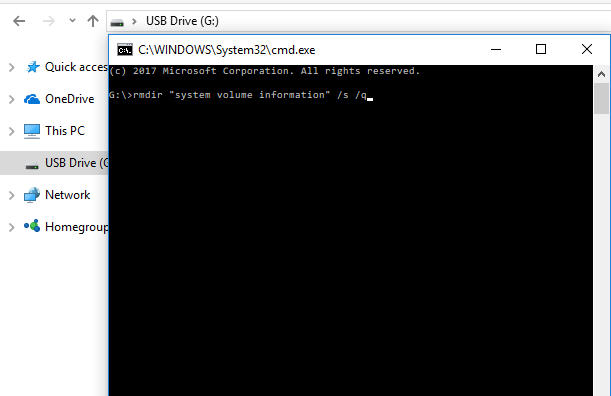
Next, configure Windows so the folder does not return.
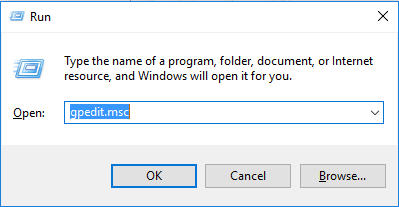
Press the Windows key and R together to open the Run dialog. Type gpedit.msc and click OK.
Navigate to Computer Configuration > Administrative Templates > Windows Components > Search.
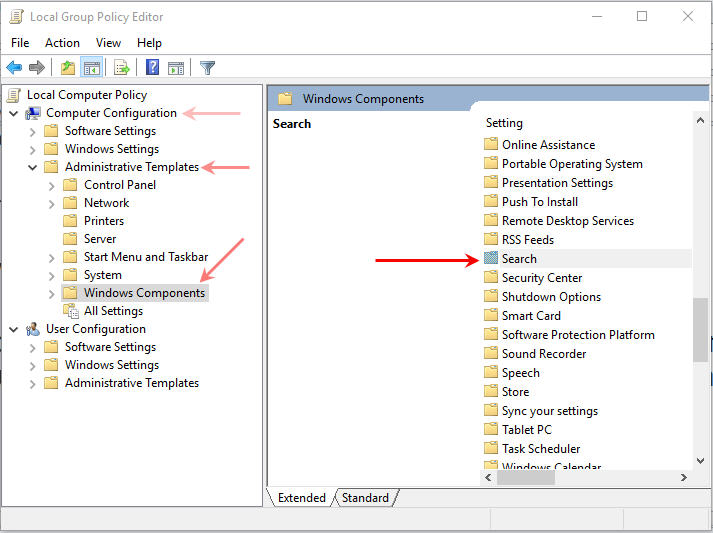
Locate the policy labeled Do not allow locations on removable drives to be added to libraries and double-click it.

Select Enabled, then click Apply and OK.

To ensure indexing does not restart on reboot, press Windows + R again and type services.msc, then click OK.

Scroll down to Windows Search and double-click it. Set the Startup Type to Disabled, then click Apply and OK.
At this point, the System Volume Information folder has been removed and Windows has been configured not to recreate it, providing a permanent solution for USB flash drives.
I have to admit, I like how the description for a “cigarette lighter watch” includes the phrase “environmentally friendly.” Sure, the lighter does not use gas, but one could argue that smoking the cigarette itself is probably the bigger environmental concern.
That said, if you smoke and also like to keep track of time, this novelty product may be right up your alley.
The watch functions as a standard timepiece, while the three smaller sub-dials are included purely for aesthetic purposes.
There is also a digital version available for around $40, with multiple style options listed on the product page.

Specifications:
These are 1450mAh AA batteries that recharge directly through a standard USB port.
This is how more digital devices should be designed. I am not a fan of products, such as portable speakers, becoming unusable simply because an internal battery can no longer hold a charge. A replaceable battery design is far more practical than throwing away an otherwise functional device.
At the time of writing, a four-pack of these AA batteries sells for about $35, which comes out to just under $10 per battery.
The manufacturer claims the batteries support up to 500 charge cycles. Even if that number is optimistic and real-world use delivers closer to 250 cycles, the long-term value still makes sense.
They also state the batteries last two to three times longer than standard disposable AA batteries, which is likely tied to the 1.2V NiMH (nickel metal hydride) cell technology used inside.

In the news, Intel has handed over its specification for high-speed Thunderbolt technology to the USB Implementers Forum (USB-IF), the organization responsible for developing and managing USB standards.
The USB4 specification will follow the current USB 3.2 standard, although an exact public release date had not yet been defined at the time of the announcement.
USB4 doubles the bandwidth of USB 3.2 and supports theoretical maximum transfer speeds of up to 40Gbps.

USB4 also enables multiple data and display protocols to operate simultaneously. This means a single cable can be used to transfer data, drive an external display, and deliver power to connected devices.
The TiSTICK is currently available on Kickstarter. Below is a quick summary update for those who may be interested.
The flash drive features a titanium case built for durability, AES 256-bit hardware encryption, multiple high-capacity storage options, and is nearing full funding on Kickstarter.

We like the overall shape, the magnetic tail design, and the industrial look. The branding and presentation are well done and clearly set the TiSTICK apart from other so-called “durable” flash drives. Credit where it’s due to Jörg Lingg for the execution.
In our humble opinion, the design may be a bit overkill, but that is purely subjective. The comparison below shows a more conventional aluminum flash drive that has survived being run over multiple times by a car and still functions properly using an Alcor controller with encryption support.