Author Archive
Matt Laboff
USB Silent Keystroke Recorder
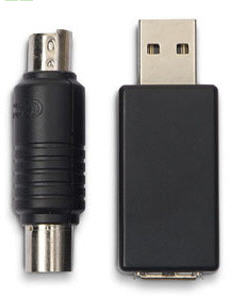
Here at GetUSB.info we are a fan of the USB key logger technology. After all, what better way to find out what employees, girlfriends and such are doing with their spare time. Especially with all the social network, it’s important to know what is, or is not, being said about you.
We have reported about USB key loggers before, but this one is especially nice with the old school PS/2 connector. Great for the older machines.
The device comes with 2MB of internal memory, but check it often as that amount of space will be filled quickly.
Pricing is a bit different depending on the connection type you need. $60-$75.
Here is the USB key logger product page.
Reminder from UberGizmo.
Continue Reading
No Comments
USB IceBox by Windows
The Windows IceBox is an interesting little tool. It’s a software program which runs from a USB stick that locks down partitions on your hard drive. The concept is that you lock down partitions on your hard drive so that other users, like your kids, don’t get in there and start accidentally deleting important files, registry entries, uninstalling software,etc.
We Say Thank You to Thanko For Their USB Record Player
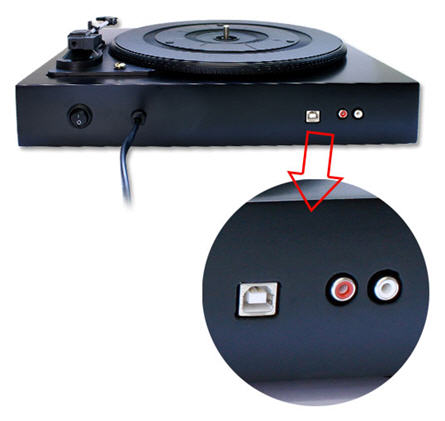
GetUSB has seen the Record to USB players from Ion Audio before and we’ve seen these filter into Costco, Wal-Mart and even Urban Outfitters, and now Thanko has joined the ranks with their new USB Record Player.

How To Create USB Stick with nt60 Boot Sector
USB Tutorial: How to Create a Bootable USB Stick with the Specific NT60 Boot Sector Required for Microsoft Vista
Before we begin the USB tutorial on NT60 boot sector, review the checklist of items needed before you start. Chances are, if you find yourself searching for this tutorial, you already have everything needed to make a USB bootable with NT60 boot sector.
- 4GB flash drive will do the trick
- Your Vista installation disk
- Set BIOS to boot from a USB device
When selecting your flash drive, be sure there is nothing you need on the device as this process to create an NT60 boot sector will clean the drive of all data.
- Put your Vista disk into the optical drive. If the autorun starts, close it all down and exit without performing any tasks.
- Plug in your USB stick that you want to make bootable with NT60.
- Open Command Prompt with Administrator rights.
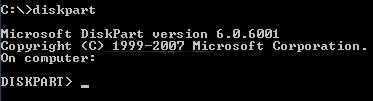
- Type ‘diskpart‘ and press Enter.
- Now type ‘list disk‘ and press Enter. All the storage devices connected to your computer will be displayed. Make sure the size of the disk you plan to select is the USB flash drive you intend to use!
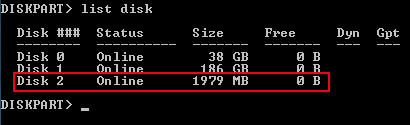
- Now type ‘select disk [number here]‘ (example: ‘select disk 2‘).
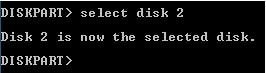
- Next, type ‘clean‘ and press Enter.
- Once this is done, type ‘create partition primary‘ and press Enter.

- Type ‘select partition 1‘ and press Enter.

- Type ‘active‘ and press Enter. This step is key to making the stick bootable.

- Format the device by typing ‘format fs=fat32‘ and press Enter. This will take 6–9 minutes for a 4GB drive.
- Now type ‘exit‘ to close diskpart.
- To finish the process, load up the boot sector from your Vista DVD to the USB stick. Type: ‘D:\boot\bootsect.exe /nt60 L:‘
- Exit out of the Command Prompt.
- As the last step, go to your Vista DVD and copy ALL the content to your NT60 bootable flash drive.


Once you get 100% complete, type ‘assign‘ and press Enter. This will assign a drive letter (e.g., Drive L).

Note: ‘D’ is the drive letter of the optical drive with the Vista disk. Adjust if yours differs.

Congratulations, you have just created a bootable USB flash drive with the NT60 boot sector.
Note: If you are a Microsoft publisher, OEM or OED, please contact Nexcopy for more information about NT60 boot straps and related Microsoft specifications.
2025 Relevance Note
As of 2025, creating an NT60 bootable USB stick is rarely required. NT60 was designed for Windows Vista and early Windows 7 installations. Modern systems primarily use UEFI boot loaders and GPT partition tables, making this manual NT60 process mostly obsolete. The only common scenarios for creating an NT60 bootable USB today are for legacy system maintenance, forensic recovery, or historical testing environments.
Modern Alternative
For modern bootable USB creation on Windows 10, Windows 11, or newer operating systems, you can use dedicated tools that automatically handle boot sectors, partitions, and formatting. One of the most popular options is Rufus, which simplifies the process and supports both BIOS and UEFI systems without manual diskpart commands.
USB Superspeed Logo Ready For Hand Outs
The USBIF [Implementers Forum] has announced the certification program to get your gear certified for a Highspeed logo. Granted, it’s not a simple process, but at least they’re putting together the documentation needed to make it happen.
Video after the jump: Continue Reading No CommentsAs technology innovation marches forward, new kinds of devices, media formats, and large inexpensive storage are converging. They require significantly more bus bandwidth to maintain the interactive experience users have come to expect. In addition, user applications demand a higher performance connection between the PC and these increasingly sophisticated peripherals. USB 3.0 addresses this need by adding an even higher transfer rate to match these new usage and devices.
USB continues to be the answer to conncectivity for PC, Consumer Electronics, and Mobile architectures, It is a fast, bidirectional, low-cost, dynamically attachable interface that is consistent with the requirements of the PC platforms of today and tomorrow.
SuperSpeed USB brings significant performance enhancements to the ubiquitous USB standard, while remaining compatible with the billions of USB enabled devices currently deployed in the market. SuperSpeed USB will deliver 10x the data transfer rate of Hi-Speed USB, as well as improved power efficiency.
- SuperSpeed USB has a 5 Gbps signaling rate offering 10x performance increase over Hi-Speed USB.
- SuperSpeed USB is a Sync-N-Go technology that minimizes user wait-time.
- SuperSpeed USB will provide Optimized Power Efficiency.No device polling and lower active and idle power requirements.
- SuperSpeed USB is backwards compatible with USB 2.0. Devices interoperate with USB 2.0 platforms. Hosts support USB 2.0 legacy devices.
One Explosive USB Drive
Could this be a military technology booby-trap? Doubt it, but it would be cool that’s for sure.
You Can Do What With This USB Car Cassette Case?
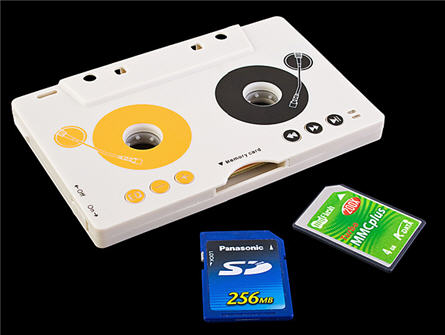
Converging technologies collide. At first, I thought this to be just another MP3 player, but it does more than just play music.
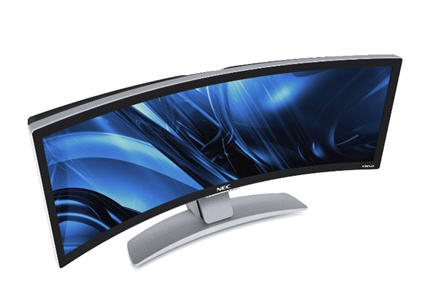
NEC Sweeeetness – 43 Curved Wide Screen
NEC uses the term of “unmatched viewing experience” for their new 43 inch curved wide screen monitor. Lets forget about the $7,000 price tage for a moment.

How Is A USB Stick Made – Video Of Kingston Factory
Do you wonder if a USB stick will drop below $2? I don’t think it ever will, and for several reasons. First, the bare cost of the Flash, Controller and case will keep the price much higher than it’s predecessor [CD/DVD] but also consider the millions of dollars needed in equipment just to make these things in bulk. So let’s find out how a USB stick is made…here is a behind-the-scenes video of the Kingston USB flash memory plant. With step-by-step video it’s an amazing process. Note: The narration is nothing close to an award winning voice over. Source: Engadget. Continue Reading No CommentsInternal USB Expansion Board
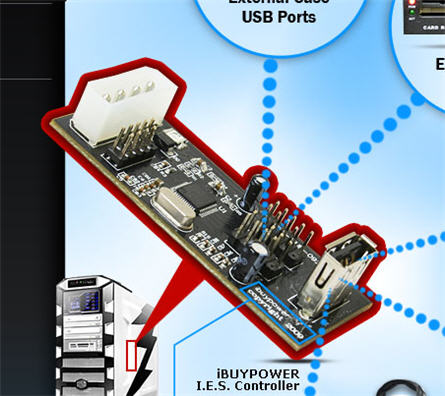
iBUYPOWER is best known for their gaming rigs and powerful laptops, who knew they also dabled in USB board components. Well maybe you did, but I didn’t. iBUYPOWER released this sweet little internal expansion board for USB devices. The point of the expansion board is to provide additional power to those growing number of gadgets you’ve seemed to accumulate.
Friggin Tiny USB Nano Flash Drive
Flash drives are getting so small, they are the size of the USB connector itself. How cool is that? Well, in size it’s cool, but in functionality…it won’t become your favorite flash drive. Take this new 4GB EagleTec USB nano drive…