Disk image files can be confusing because two files may appear to accomplish the same thing while actually being designed for very different purposes. A good example is the difference between a VHD file and an IMG file.
Both formats can contain partitions, file systems, boot information and files. Both can represent what appears to be a complete storage device. However, when the objective is duplicating physical USB flash drivesThe process of copying data from one USB flash drive to multiple USB drives simultaneously or sequentially., SD cards or other flash memory devices, the distinction between these formats becomes important.
The simplest way to explain the difference is this:
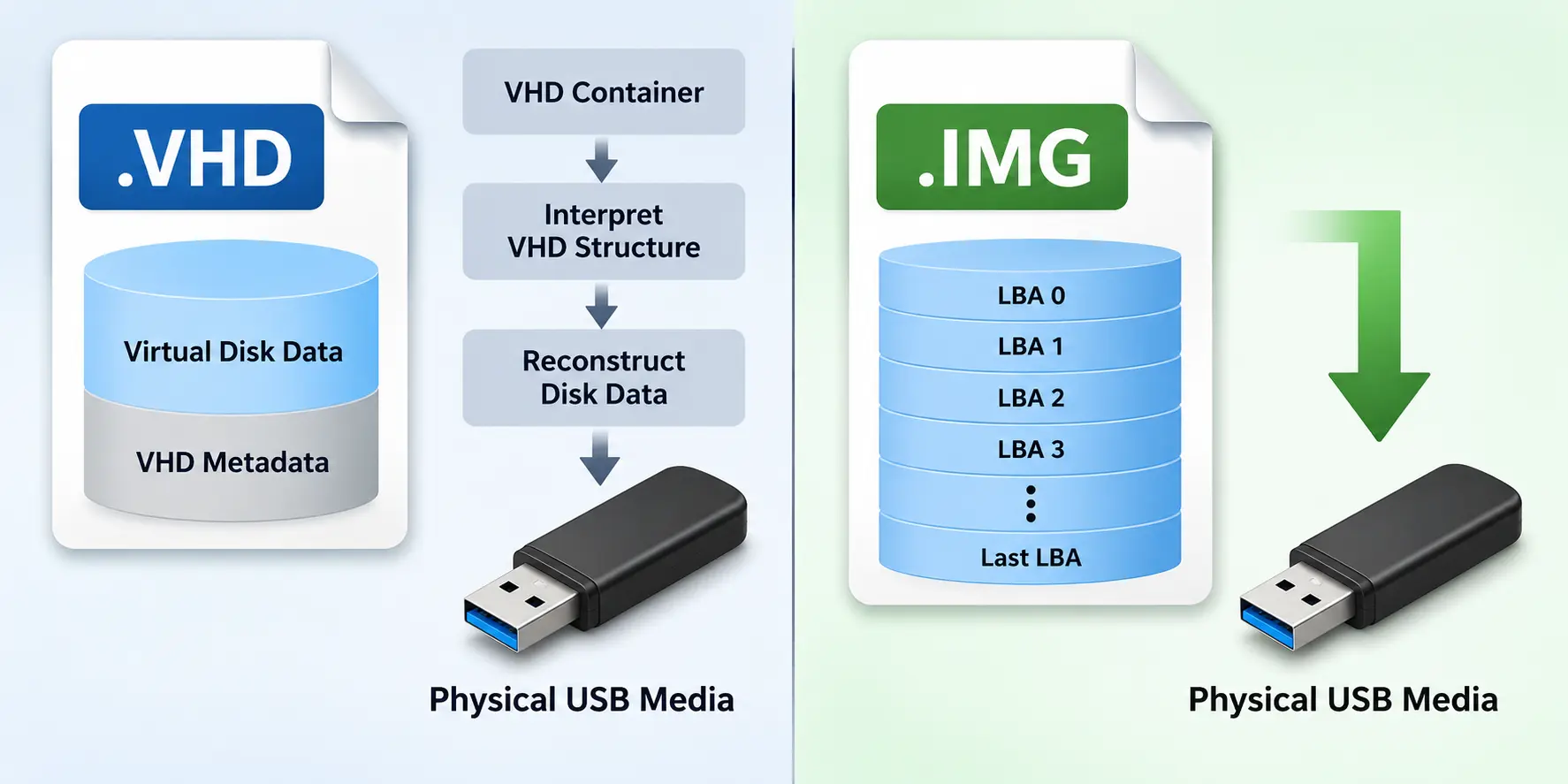
An IMG file represents the sectors of a disk. A VHD file represents a virtual disk inside a container.
For physical media duplication, that distinction is the primary reason an IMG file is the preferred format.
What Is an IMG File?
An IMG file is generally a raw representation of a storage device. Think of the storage device as a long sequence of sectors identified by Logical Block AddressesLogical Block Addresses (LBAs) are numerical identifiers for sectors on a storage device used to locate data., or LBAs.
Physical USB Drive

LBA 0
LBA 1
LBA 2
LBA 3
...
Last LBA

       |
       v

IMG File

LBA 0
LBA 1
LBA 2
LBA 3
...
Last LBA
If the physical device uses 512-byte logical sectors, the IMG file can represent those sectors sequentially from the beginning of the device through the end of the captured image.
This means an IMG file can preserve much more than the files visible in Windows File Explorer. Depending on how the image was created, it can include the MBR or GPT partition structure, boot sectors, partition information, file systems, hidden partitions and other sector-level information.
This direct relationship between the image and physical storage media is exactly what makes the IMG format useful for USB duplication.
What Is a VHD File?
VHD stands for Virtual Hard Disk. As the name suggests, the format was created to represent a hard disk in a virtual computing environment.
A VHD can contain partitions, file systems and files just like a physical disk. An operating system can mount the VHD and interact with it much like another storage device.
The important difference is that the VHD file itself is a container. Information exists within the file that describes and manages the virtual disk.
IMG

[ Raw Disk Sectors ]


VHD

[ Virtual Disk Data ][ VHD Metadata ]
There are also different types of VHD files. A fixed VHD allocates storage for the entire virtual disk, while a dynamic VHD can grow as information is added. Differencing VHD files can reference another virtual disk and store only changes made relative to that parent disk.
These are useful features in virtualization. They are not particularly useful when the objective is making an exact physical USB storage device.
Why the Difference Matters for USB Duplication
A USB duplicationThe process of copying data from one USB flash drive to multiple USB drives simultaneously or sequentially. system ultimately needs to write information to a physical block storage device. At some point, data must become sectors written to the target media.
With a raw IMG file, that relationship is straightforward:
IMG LBA 0     -> USB LBA 0
IMG LBA 1     -> USB LBA 1
IMG LBA 2     -> USB LBA 2
IMG LBA 3     -> USB LBA 3
...
IMG Last LBA  -> USB Last LBA
This is a natural fit for physical media duplication because the image is already expressed in the same basic structure used by the target storage device.
A VHD introduces another layer.
Virtual Disk
     |
     v
VHD Container
     |
     v
Interpret VHD Structure
     |
     v
Reconstruct Disk Data
     |
     v
Physical USB Media
Before the information can be treated as a raw physical disk image, software must understand the VHD format, determine the type of VHD being used and correctly reconstruct the virtual disk represented inside the container.
For USB duplication, this extra layer provides little benefit. It simply introduces another format that must be interpreted before the information can be written to physical media.
Can You Rename a VHD File to IMG?
No. Changing the file extension does not change the structure of the file.
For example, renaming:
master.vhdto:
master.imgdoes not convert the VHD into a raw disk image. It only changes the filename.
The internal VHD structure and metadata remain exactly the same.
This distinction is important because imaging or duplication software expecting raw sector data may interpret those additional structures as part of the physical disk image. A VHD should therefore be properly converted or exported to a raw image format rather than simply renamed.
IMG Makes Disk Capacity Easier to Understand
Another advantage of raw images becomes apparent when dealing with storage capacity.
USB flash drives marketed with the same capacity do not necessarily contain exactly the same number of sectors. Two devices labeled as 64GB, for example, can have slightly different LBA counts depending on the controller, NAND configuration and manufacturing process.
With a raw IMG file, the relationship between sector size, LBA count and image size is predictable.
For a device using 512-byte logical sectors:
Image Size = LBA Count x 512 bytesThis becomes especially important when duplicating an image onto replacement media. If the source image requires more LBAs than exist on the target device, the target is physically too small to contain the complete image even if both products are marketed with the same nominal capacity.
There is another detail worth understanding here: the physical capacity of the device and the size of the partition stored inside an image are not necessarily the same thing. We explain that distinction in more detail in why the partition size matters inside an image file.
Using a raw image makes these relationships easier to identify because there is no virtual disk container sitting between the image file and the physical storage device.
VHD Is Not a Bad Format – It Was Designed for a Different Job
None of this means VHD is an inferior disk imageA disk image is a file that contains a complete copy of the data and structure of a storage device, including partitions, file systems, and boot information. format. It simply solves a different problem.
VHD is useful when working with virtual machines, virtual storage, software development environments, operating system testing and situations where a disk needs to exist as a manageable virtual device.
IMG is better suited to situations where the final destination is physical storage media. Even Windows can sometimes create confusion when working with raw image files because an IMG file is not necessarily handled the same way as a virtual disk container. If that becomes an issue, we have a separate article covering a solution for mounting an IMG file in Windows.
VHD vs IMG for Physical Media Duplication
| Feature | IMG | VHD |
|---|---|---|
| Raw sector representation | Yes | Not directly |
| Contains virtual disk metadata | No | Yes |
| Direct relationship to physical LBAs | Yes | Requires interpretation |
| Designed for virtual machines | No | Yes |
| Good format for USB duplication | Yes | Not preferred |
| Good format for SD and microSD duplication | Yes | Not preferred |
The Short Answer: Use IMG for USB Duplication
If the end product is a physical USB flash drive, SD card, microSD card or similar block storage device, a raw IMG file provides the most direct representation of the information that needs to be written to the media.
VHD adds a virtualization container that provides useful features when working with virtual machines, but those features provide little value during physical media duplication.
There are certainly software tools capable of reading VHD files and converting the virtual disk into another format. However, that conversion step reinforces the underlying point: before the virtual disk can be treated like a raw physical disk image, the VHD container must first be interpreted.
With IMG, that extra translation layer is unnecessary.
For physical USB, SD and microSD duplication, keep the master image simple. Use a raw IMG file.
Let GetUSB.info keep you updated.
Receive article notifications about USB storage, flash memory, and duplication updates in your preferred language. We average a couple of articles per week.