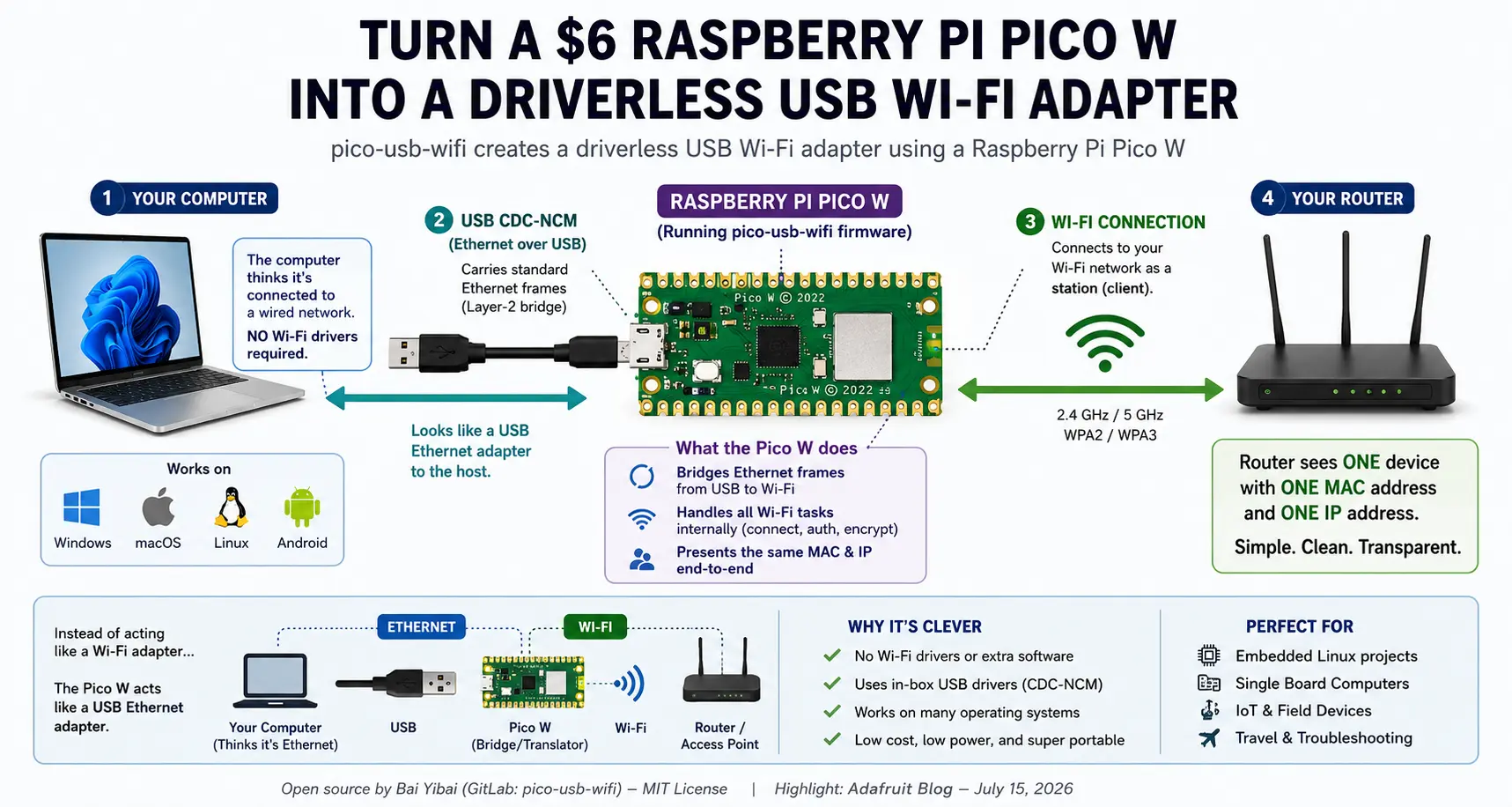
Most people who need a USB Wi-Fi adapter spend about five dollars online and wait a day or two for delivery. Software developer Bái Yìbai decided there had to be a more interesting solution. Instead of buying a Wi-Fi dongle, they spent an entire holiday weekend writing firmware that transforms a six-dollar Raspberry Pi Pico WA low-cost microcontroller board with built-in Wi-Fi, used for versatile USB and wireless projects. into a completely driverless USB Wi-Fi adapter. The project recently caught the attention of Adafruit, who highlighted the firmware and introduced it to a much wider audience.
At first glance that sounds like a lot of work to avoid spending a few dollars, but that’s exactly why this project caught our attention. It isn’t about saving money. It’s about demonstrating just how flexible the USB standard can be when someone is willing to think a little differently.
Normally, when you plug a USB Wi-Fi adapter into a computer, the operating system expects to communicate directly with the wireless hardware. That usually means installing drivers that understand the specific Wi-Fi chipset inside the adapter. Every manufacturer has its own hardware, firmware, and software, which is why driver installation has traditionally been part of owning a USB Wi-Fi adapter.
The Raspberry Pi Pico W takes a completely different approach.
Instead of introducing itself as a Wi-Fi adapter, it tells the computer that it is simply a USB Ethernet adapter. Every modern operating system already understands USB Ethernet devices, so there is nothing new to install. Windows, macOS, Linux, and even many mobile operating systems already include the necessary support.
The clever part happens inside the Pico itself. While the computer believes it is sending ordinary Ethernet traffic over USB, the Pico quietly converts that traffic into Wi-Fi communications using its onboard wireless radio. To the operating system, nothing unusual is happening. From the user’s perspective, the computer suddenly has wireless networking without ever loading a dedicated Wi-Fi driver.
Think of it like hiring a translator.
The computer only speaks Ethernet. The wireless router only speaks Wi-Fi. Rather than teaching the computer an entirely new language, the Raspberry Pi Pico simply listens to one language and speaks the other. Each side continues communicating exactly as it always has, while the Pico performs the translation in the middle.
This idea illustrates one of USB’s greatest strengths. USB devices are not defined by what hardware they contain. They are defined by what they claim to be.
A keyboard announces itself as a keyboard. A mouse identifies itself as a mouse. A flash drive identifies itself as mass storage. A webcam appears as a video device. The operating system generally doesn’t care what processor is inside the enclosure. Instead, it cares how the device identifies itself during USB enumeration.
That flexibility has inspired countless creative USB projects over the years. Security researchers have built devices that identify themselves as keyboards to automate commands. Tiny development boards have become logic analyzersDevices or tools used to capture and display multiple signals from digital circuits for debugging and analysis., oscilloscopesDevices used to capture and display electrical signals for analysis and debugging., serial adapters, MIDI controllers, and debugging interfaces simply by changing the firmware they run. The hardware often stays exactly the same while the USB personality changes completely. We covered a similar concept in an earlier article explaining how changing a USB device’s identity can alter the way an operating system interacts with it.
The Raspberry Pi Pico W project joins that growing collection of clever USB hacks. Rather than pretending to be wireless hardware, it pretends to be something every operating system already understands. By choosing compatibility over complexity, the developer eliminated the need for custom drivers altogether.
Perhaps the funniest part of the entire project is the author’s own explanation. They openly admit that buying a five-dollar USB Wi-Fi adapter would have been faster, cheaper, and considerably easier. Instead, they spent two days and roughly one million AI coding tokens developing firmware simply because they wanted to see if it could be done.
That may not have been the most economical solution, but it perfectly captures the spirit of engineering. Sometimes the goal isn’t building the cheapest device. Sometimes it’s proving that an unconventional idea actually works.
Projects like this are a reminder that USB is far more than a connector on the side of your computer. Behind that familiar rectangular plug is a remarkably flexible communication standard that continues to inspire creative solutions nearly three decades after its introduction.
Further Reading: Adafruit recently covered the project and credited software developer Bái Yìbai for creating the open-source firmware. Their article provides additional background on the project and includes links to the source code. You can read the Adafruit coverage here.
Editorial Note: This article summarizes a community-developed open-source project created by software developer Bái Yìbai. Technical concepts have been simplified to help readers understand the engineering ideas behind the project without requiring an embedded systems background.
Let GetUSB.info keep you updated.
Receive article notifications about USB storage, flash memory, and duplication updates in your preferred language. We average a couple of articles per week.