There is a moment almost everyone experiences with a modern USB flash drive where reality suddenly interrupts the marketing.
You plug in a brand-new USB stick. The package promises blazing-fast performance. Maybe the website says 300MB/s write speed. Maybe a reviewer showed benchmark screenshots proving how fast it is. Everything looks impressive.
Then you copy a large folder onto the drive.
At first, the transfer screams along exactly as advertised. The progress bar flies. Windows reports incredible write speeds. You start thinking storage technology has finally reached the point where tiny USB drives behave like miniature supercomputers.
Then something strange happens.
The speed falls off a cliff.
What started at 300MB/s suddenly becomes 80MB/s. Then 45MB/s. Sometimes even lower. The progress bar slows to a crawl and now you are staring at “18 minutes remaining” wondering what happened to the miracle drive you just bought.
In our earlier article, Why You Should Ignore Every “Best USB Drive” List, we talked about how most USB benchmark articles focus heavily on short burst speeds while ignoring the deeper behavior of the device itself. That article was the broader argument. This article is the technical explanation underneath it.
Because once you understand how BOT and UASP work, how NAND caching behaves, and how modern USB controllers manage sustained writes, you start to see why many “300MB/s” claims only tell part of the story.
Burst Speed and Sustained Speed Are Not the Same Thing
Most USB flash drives today use some form of caching to make the first part of a write operation look much faster than the drive can actually maintain over a long transfer.
Modern NAND flash memory is often based on TLC or QLC technology. Those memory types are excellent for capacity and cost, but they are not always great at writing large amounts of data continuously. To work around that limitation, many drives use a temporary high-speed area often called pseudo-SLC cache.
Think of that cache like the front counter at a busy shipping office. At first, packages are dropped quickly onto the counter and everything feels fast. But if the back room cannot process those packages at the same pace, the counter eventually fills up. Once that happens, the whole operation slows down to the speed of the back room.
That is what happens inside many USB flash drives. The first part of the transfer goes into fast cache. Once the cache fills, the controller must write directly into slower NAND or begin folding cached data into long-term storage while still accepting new data from the computer.
That is when the real sustained write speed appears.
The USB Protocol Also Matters
Now let’s add another layer, because the flash memory is not the only thing controlling performance.
The way the USB device communicates with the computer also matters. Two common transport methods are BOT and UASP. The names are not friendly, but the difference is important.
BOT stands for Bulk-Only TransportAn older USB data transfer protocol where commands are processed sequentially, limiting efficiency.. It is the older method used by many traditional USB flash drives. BOT works in a very straightforward way: the computer sends one command, waits for that command to finish, then sends the next command.
That is simple and compatible, but not very efficient.
UASP stands for USB Attached SCSI ProtocolA modern USB data transfer protocol that improves efficiency by supporting command queuing and parallel processing.. UASP is newer and more efficient because it supports command queuing and parallel command handling. Instead of waiting for one task to fully complete before starting another, UASP keeps the storage pipeline moving more smoothly.
If BOT is a single-lane road with stop signs, UASP is closer to a multi-lane road with better traffic flow. Both roads may lead to the same destination, but one wastes less time between movements.
BOT Can Hold Back Performance
With BOT, the storage device spends more time waiting between commands. That extra waiting may not matter much for a cheap USB 2.0 drive moving small files, but it becomes more noticeable as the storage media gets faster.
This is especially true with mixed workloads, random file transfers, and larger sustained operations where the controller needs to manage many requests efficiently. BOT does not handle that style of traffic particularly well because it was built for an older storage world.
That does not mean BOT is broken. It simply means BOT is limited. It works, but it is not the most efficient way to move data through a modern high-speed USB storage device.
UASP Helps, But It Does Not Fix Everything
UASP improves the communication side of the equation. It lowers latency, supports better command handling, and can reduce overhead between the computer and the storage device. This is one reason many external USB SSDs feel much faster and smoother than ordinary flash drives.
But UASP is not magic.
If the NAND inside the drive is slow, if the controller is weak, if the cache is small, or if the device overheats quickly, UASP cannot turn that hardware into something it is not.
A better transport protocol helps data reach the controller more efficiently. It does not change the physical limits of the NAND memory once the controller has to write data for real.
That is the subtle point many speed claims miss. A drive can support a fast interface and still have poor sustained write behavior after the cache is exhausted.
Why the First 20 Seconds Can Be Misleading
A short benchmark often shows the drive at its best possible moment. The drive is empty. The cache is available. The controller is cool. Garbage collection has not yet become aggressive. The test may use large sequential blocks that make the device look clean and efficient.
That is not the same as copying 80GB of video files, a folder full of mixed documents, or a complete software image onto the drive.
During a long transfer, several things begin happening at the same time. The cache fills up. The controller starts reorganizing data internally. The NAND write speed becomes the real limit. Heat can build. Firmware decisions become more visible. If the drive is built around cost rather than sustained performance, the drop becomes obvious.
This is why a “300MB/s” flash drive may technically hit that speed and still not behave like a 300MB/s drive during a real workload.
Why This Matters More Than Benchmark Screenshots
For casual use, the difference may only be annoying. A person copies vacation photos or a few PDFs, waits a little longer, and moves on.
In professional environments, the difference matters more. If you are duplicating USB drivesThe process of copying data from one USB flash drive to multiple USB drives simultaneously or sequentially., distributing software, preparing field update media, recording data, or moving large image files, sustained write performance becomes the real measure of the device.
A drive that looks impressive in a short benchmark may perform poorly when asked to repeat the same write process hundreds of times. That is where weak NAND, small cache, poor controller design, and thermal limitations become impossible to hide.
This is also why professional USB workflows tend to care about the full behavior of the device, not just the number printed on the package. Speed is part of the story, but it is not the whole story.
The Better Question to Ask
The better question is not simply, “How fast is this USB drive?”
The better question is, “How long can this USB drive maintain that speed?”
That one change in wording moves the discussion from marketing into engineering. It forces you to think about NAND type, controller design, cache size, thermal behavior, transport protocol, firmware quality, and the workload being tested.
Burst speedThe initial high data transfer rate a storage device achieves before slowing down during sustained use. shows what the drive can do under easy conditions. Sustained speed shows what the drive is actually made of.
Did You Notice?
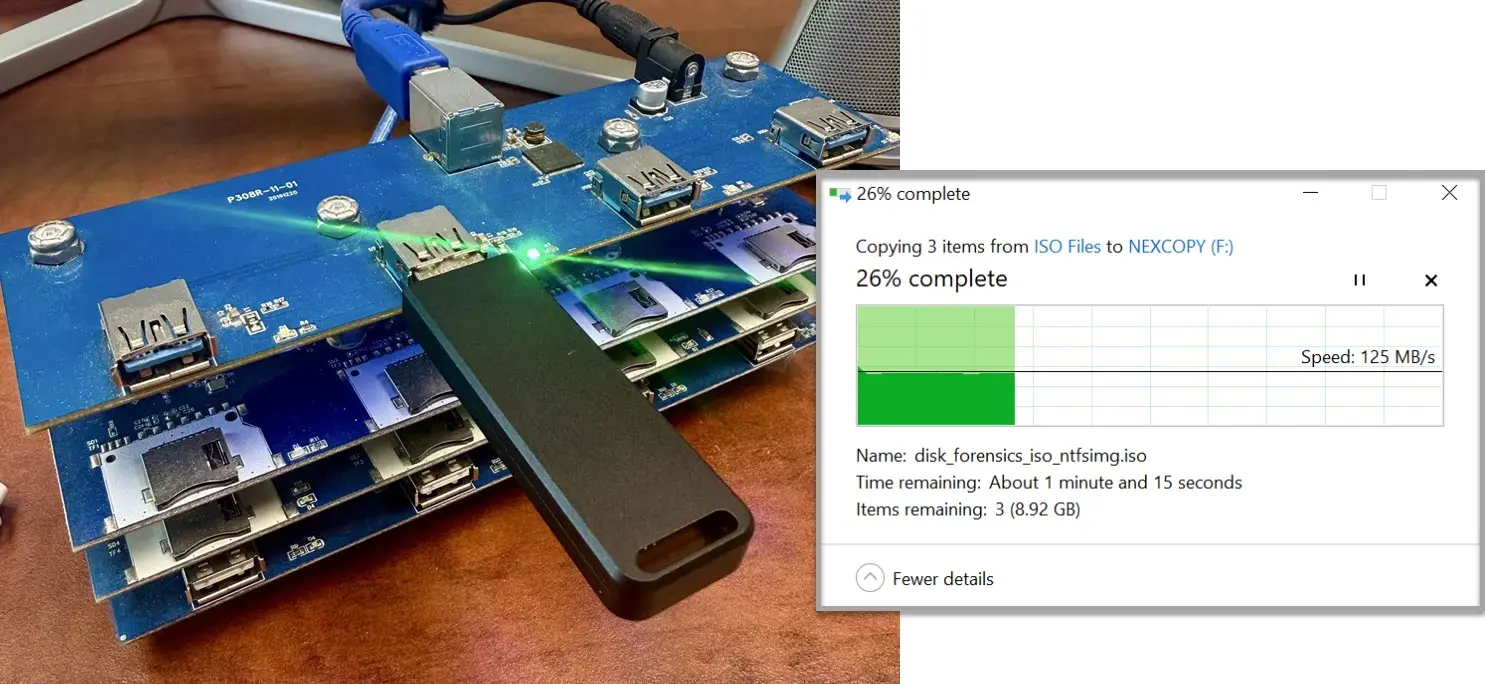
The image used for this article quietly proves the entire point.
The USB flash drive packaging advertises write speeds up to 400MB/s, yet the actual sustained transfer shown during the large file copy operation is closer to 125MB/s. That difference is not necessarily fraud or fake advertising. It is the gap between burst performance and sustained real-world behavior.
USB flash drive marketing still leans heavily on simple speed numbers because simple numbers are easy to print, easy to compare, and easy to sell.
But real USB performance is more layered than that.
BOT versus UASP matters. Cache behavior matters. NAND quality matters. Controller design matters. Sustained write testing matters.
Once you understand those layers, a single “300MB/s” claim starts to look less like a final answer and more like the beginning of a better question.
Because in modern USB storage, the real difference between products is not always how fast they perform for ten seconds. It is how intelligently they behave once the easy conditions disappear.
Editorial Note & EEAT Disclosure: This article was written as an educational technical editorial based on real-world USB storage behavior, controller architecture knowledge, and sustained transfer analysis observed in professional duplication and deployment environments. The discussion reflects hands-on industry experience with USB flash memory, controller-level configuration, write-protection workflows, and performance validation methods used in production settings.
AI-assisted editorial tools were used to help organize, refine, and improve readability, while the technical direction, subject matter review, conclusions, and real-world analysis were guided and verified by a human editor with long-term experience in USB storage technologies and flash memory workflows.
The lead image used in this article was created specifically to demonstrate the difference between advertised burst write speeds and real-world sustained transfer behavior during large file operations.
Let GetUSB.info keep you updated.
Receive article notifications about USB storage, flash memory, and duplication updates in your preferred language. We average a couple of articles per week.