Just the other day, Martin of Digital Reviews Network sent me a product review of the MoGo Bluetooth mouse from Newton Peripherals.
I report on the Mogo Mouse earlier and commented on the slim design and handy storage area, in the PCMCIA slot. Martin’s review proves this point and a whole lot more.
The primary goal of the review was to find out if the MoGo mouse really performed as a functional device, despite the small size and slim design.
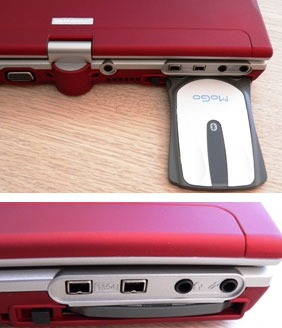
However, Digital Reviews was very surprised to find it’s an elegant design which is very useful.
“one quick flick and the (hind) legs spring out from underneath making the MoGo mouse poised and more comfortable to use! With that “kickstand†it is eminently “holdable and usable” but not as comfortable of course as a normally proportioned rodent.”
Martin continues; here is another beauty: the MoGo doesn’t use additional drivers and works straight away.
There is one proviso — you need to start up Bluetooth and pair the device with the system (easily done using a generic pass code of 0000). Connection is confirmed with a slow blinking blue light.
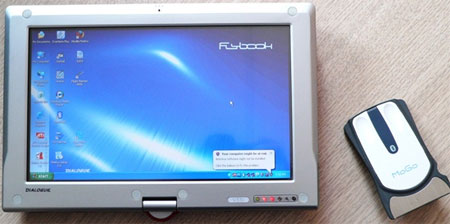
It’s amazing how useful a mouse actually is on a laptop. Even on my FlyBook which has two sets of mouse keys as well as a touch screen so there are plenty of ways to move the cursor.

Sure, it doesn’t have a scroll wheel but if you go for this form factor, portability means you are sacrificing a few of the “luxury†features.
I was pleasantly surprised by the high quality built of the MoGo mouse. There is nothing plasticky or cheap about it. On the contrary; I was proud to show it off to everyone within earshot.
Moving the MoGo around is a very smooth affair, aided by the Teflon strip on the underside. The resolution at 500 DPI is quite sufficient.
The MoGo mouse is constantly charged while in the PC card slot. A red LED turns rather quickly to green to tell you that the charging process is complete. Because of intelligent battery management that switches off the unit when it is not being used (after 10 minutes) it will be very rare to run out of power.
And Our Findings?
Yes, initially you’ll miss the scroll wheel of a regular mouse and that’s probably a good thing as the MoGo mouse feels like a regular mouse. There is no doubt in my mind that the next edition will probably feature some sort of a scroll wheel implementation even if it is in the form of a touch pad. And that would be very cool!
There is already another model out that caters for the smaller PC Express slots. We have requested to have a look at this model as well as the current one is so incredibly small already.
Overall, we found MoGo Bluetooth mouse a most capable device in a highly innovative design and at quite a reasonable price. About $70 USD.
Highly recommended.
Source:Â DigitalReviews.net
Let GetUSB.info keep you updated.
Receive article notifications about USB storage, flash memory, and duplication updates in your preferred language. We average a couple of articles per week.