WHAT IS: DiskPart Clean and/or Clean All Function?
The clean function in DiskPart is a command used to remove all partitions or volumes from a disk, essentially wiping out all existing data on the disk. When you use clean in DiskPart on a particular disk, it performs the following actions:
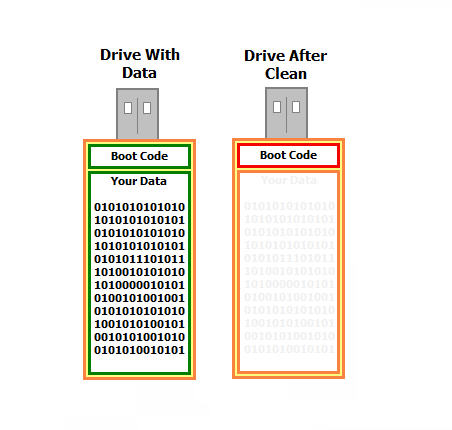
Removal of partitions: Deletes all partition or volume structures from the selected disk. This includes removing any partition tables and file system information — or said another way, it removes the format of the drive.
Data erasure: The clean command deletes the partition table entries and boot code, but it does not overwrite the data itself. That means after using clean, data recovery software could still potentially recover the original files.
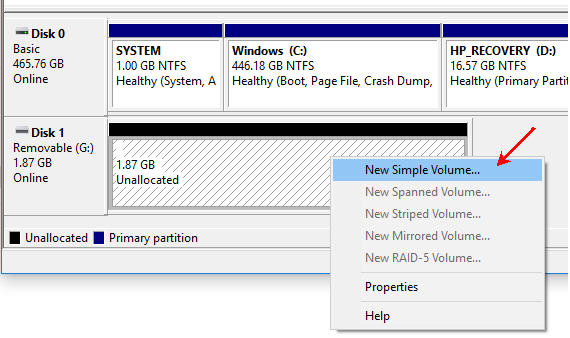
Disk initialization: After executing clean, the disk is left uninitialized. It will appear as raw, unallocated space. To use the drive again, you must open Windows Disk Management and create a new volume. Once that is done, the device will have a file system and be usable again.
The CLEAN function is a practical way to quickly remove partitions and start fresh. For example, if you write a 5GB IMG file to a 32GB USB drive, the drive will often appear as only 5GB usable. The remaining space becomes unallocated. Running the DiskPart CLEAN command resets the device so that, after reinitializing in Disk Management, the full 32GB capacity is available again.
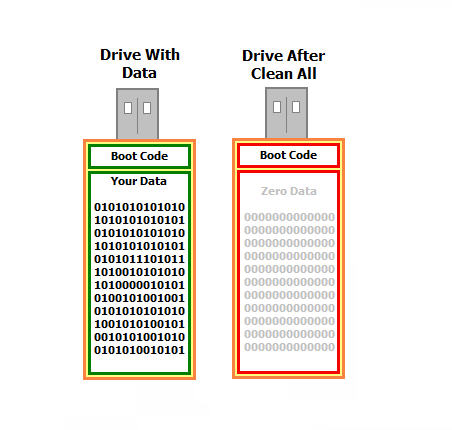
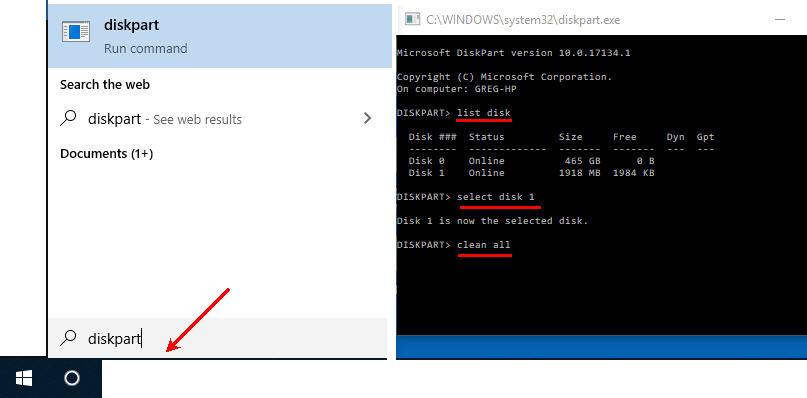
The clean all function in DiskPart is similar to clean but adds an additional step of overwriting the entire disk with zeros. When you use clean all, DiskPart performs the following actions:
Removal of partitions: Like clean, clean all deletes all partition or volume structures from the selected disk, removing existing partition tables, file systems, and metadata.
Data overwriting: In addition to removing partitions, clean all writes zeros to every sector of the disk. This effectively erases all data and makes recovery extremely difficult using standard recovery tools.
Disk initialization: After executing clean all, the disk is left completely wiped and uninitialized. It appears as raw, unallocated space with no recoverable structure.
The clean all command is a more secure method of erasing data than clean, because it actively overwrites every sector. The tradeoff is time — it can take significantly longer to complete, especially on large drives.
Tip: As with clean, always double-check that you have selected the correct disk before running clean all. Running this command on the wrong drive results in permanent data loss.