GetUSB.info Logo

Posts Tagged ‘cable’

Test USB-C Cable For USB 2.0 and USB 3.0x Standards
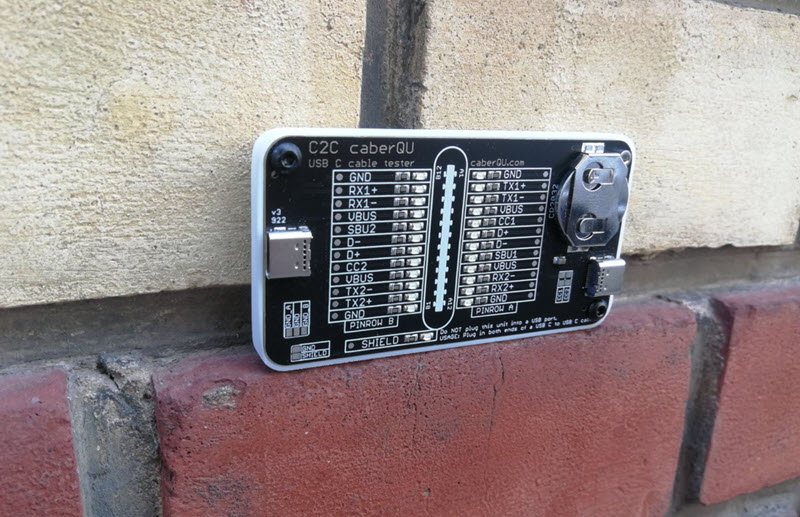
USB-C cable tester board for USB 2.0 and USB 3.x verification

The C2C caberQU is a compact USB-C cable tester board designed to validate USB-C to USB-C cables across a wide range of configurations and use cases.

This tool is particularly useful for IT professionals who need to verify cable quality beyond basic connectivity. It applies voltage to individual pins and detects continuity on the opposite end. With 25 LEDs, the board displays pin behavior across multiple modes, including USB 2.0/1.1, USB Power Delivery, USB 3.0/3.1/3.2, Alternate Mode, Debug Accessory Mode, and Audio Adapter Accessory Mode. A detailed manual is included to explain connectors, operating modes, and pin layouts.

Examples for IT managers:

  1. USB cable verification — An IT manager dealing with a pile of USB-C cables can quickly test each one and identify its capabilities. This helps ensure the correct cables are used for specific devices, reducing performance issues and compatibility problems.
  2. Hardware troubleshooting — In environments such as data centers or technical workspaces, cable faults can cause unpredictable behavior. Using the C2C caberQU board helps isolate issues like broken pins or incorrect wiring and reduces diagnostic time.
  3. Inventory management — Managing stock of USB-C cables can be difficult due to inconsistent labeling. The C2C caberQU board allows verification of cable specifications before deployment, helping teams avoid purchasing or distributing unsuitable cables.

V1 vs. V3 — Which one to choose?

Comparison of C2C caberQU V1 and V3 USB-C cable tester boards

There are two versions of the C2C caberQU board available, V1 and V3, with minor differences:

  • V1 includes a standard battery; V3 uses a higher-quality branded battery
  • V3 supports use with a protective case
  • V1 does not include hanging holes for storage
  • V1 features slightly different printed graphics on the PCB

Functionally, both versions perform the same task. They include the same manual and provide identical LED behaviors for testing.

Why was this board created?

USB-C cables exist in many variations, which makes it difficult to determine what a specific cable actually supports. Using the wrong cable can result in slow data transfer, charging issues, or device incompatibility. USB-C also requires precise pin mapping, grounding, and resistor configurations, which increases complexity.

Why is this a better way to test cables?

Determining whether a cable supports a specific use case can be difficult without specialized tools. Broken pins make troubleshooting even harder because failures are inconsistent. The C2C caberQU simplifies this by visually displaying pin behavior. By flipping the USB-C connectors, corresponding LEDs illuminate according to USB-C specifications. The package includes the PCB, a CR2032 battery, and a detailed manual. The USB-C cable itself is not included.

No external power source is required. The included CR2032 battery powers the board when a cable is connected and should last for an extended period under normal use.

Please note that this product is considered a prototype, is not certified, and is intended primarily for development and testing purposes. Minor quirks or unexpected behavior are possible and are part of its experimental nature.

The USB Implementers Forum (USB-IF) was established in 1995 by companies including Intel and Microsoft to develop and promote USB standards. USB 3.0 (later branded as USB 3.1 Gen 1) was introduced in 2008 and increased data transfer speeds to up to 5 Gbps, while maintaining backward compatibility with USB 2.0 devices.

There is no affiliation or affiliate relationship with this product, but it can be sourced here: C2C caberQU USB-C cable tester, typically priced around $30 USD.

Continue Reading

Inexpensive iPhone Charging Cable – and Smart

Are you looking for an inexpensive iPhone cable? This is a common search on Google because those cables go missing, get taken by your kids or co-workers, or simply break. It’s as though we need an endless supply of them. I don’t recall the last cable I had that lasted more than four months. There is an article out there somewhere that claims for each iPhone made, the user will need at least three cables for charging it. The link to that article escapes me, but from personal experience, it feels accurate.

Typically, one cable lives in the car for charging while driving. One stays at work to charge while you’re at your desk (and yes, for a little TV-background noise {wink}). And one stays at home for overnight charging. That’s the baseline.

iPhone cables, or Lightning cables, are expensive. Go to Amazon and you’ll find a decent six-foot cable costing close to $20. Multiply that by three and you’re looking at a $60 expense just to keep your phone alive. No thanks. We want an inexpensive iPhone charging cable solution.

This cable problem actually gets worse, not better, and here’s why.

You also need microUSB cables to charge your portable battery packs. So now we’ve got three Lightning cables for the iPhone (work, car, home) and at least one microUSB cable to charge the power bank that keeps your phone alive when you’re away from all three. Portable batteries are non-negotiable these days. Kids’ baseball games can stretch to three hours. Softball tournaments stack games back-to-back. A round of golf runs 4.5 hours. The point is, we’re often away from power outlets longer than our phones can handle.

If this feels familiar, you’re not alone. We’ve been writing about USB charging standards and cable sprawl for years, including how USB slowly became the? standardized connection for charging phones and mobile devices in general (related article here).

So how do we solve the problem of finding an inexpensive iPhone charging cable? The answer is a combination of products. This setup charges your iPhone and your portable battery packs without buying multiple expensive Lightning cables.

On Amazon, you can find a pack of five microUSB cables for under $10. Be sure to check the length you want. It’s easy to save a dollar and accidentally buy cables that are too short to be useful.

Pack of microUSB charging cables

The other item you need is a microUSB to Lightning adapter. These small adapters sit on the end of your microUSB connector and convert it into a Lightning connection for your iPhone. A four-pack can usually be found for under $10.

MicroUSB to Lightning adapters

It’s important to note these adapters only supply power to your iPhone. They do not support data transfer. For most people, that’s a non-issue. When was the last time you plugged your iPhone into a computer to sync? Everything happens wirelessly now.

For about $20 total, you now have multiple Lightning charging options for your iPhone and multiple microUSB cables to charge your portable power packs. It’s a simple, flexible, and very inexpensive iPhone charging cable solution. Honestly, it’s hard to justify doing it any other way.

iPhone charging setup using microUSB cables and Lightning adapters

Continue Reading

How USB Cables Affect Charging – Simple Test

I came across an interesting article today from Dr Gough, a tech nerd, and thought it was good enough to summarize here:

The USB specifications for power from a port vary from 100mA to 1.5A, and all the way up to 100W of power for USB Type-C. However, the cables and connectors used in a USB cable don’t always align with the power capabilities of the device being designed or charged. Most everyday USB charging cables are typically rated for about 1.8A of current, which is common for consumer-grade charging scenarios.

USB charging cable showing internal wiring and connector quality

The 1.8A rating is largely based on safety limits related to resistive heating of the cable and connectors. This rating does not guarantee that your +5V at 1.5A setup will actually deliver maximum usable power to your device. The key point is that the cable-and-connector combination is primarily rated to handle heat safely, ensuring nothing melts or becomes a fire hazard. Most specifications go a step further and ensure the cable doesn’t even become noticeably warm to the human touch.

Every wire that isn’t a superconductor has some finite resistance. Put simply, electrical resistance turns energy into heat. Ohm’s Law tells us that E = IR, where E is voltage, I is current, and R is resistance. When power flows through a wire, current multiplied by resistance produces a voltage drop across that wire. That lost voltage becomes heat, meaning it never reaches your phone, tablet, or battery pack.

This also explains why some cables charge devices faster than others, even when using the same charger. Thicker conductors, better materials, and higher-quality connectors reduce resistance and therefore reduce energy loss. Cheap cables often cut corners on copper thickness and connector quality, which directly impacts charging efficiency.

I want to end this blog post with the above explanation because that’s the real takeaway. The more inefficient (or cheap) a cable is, the warmer it will get. If your iPhone cable is warm to the touch, it sucks. If the wire charging your power bank is warm, it sucks. Get a better cable. From what I can tell, there’s no meaningful rating posted on many of the low-cost cables you see on Amazon, so word to the wise: trust your tactile feedback.

Continue Reading

USB Zipper Cable – Great Idea

The Xpower 2 in 1 Zipper USB cable will support all micro USB and lightning devices. With its unique zipper design, it allows the cable to become expandable enough to charge more than one device at any given moment. It also supports iOS 7 and android devices. It is conveniently 36cm in length. The 2 in 1 Zipper USB cable will make multitasking much easier. The design and size make it very practical for transporting with you on the go. Its cable syncsupport is a 2.4A output at max and it has a 30/30 AWG high speed transmission and cable sync with micro UBSs only.
USB ziper cable

USB zipper cable

Source:  Brando. Continue Reading

Peddle to the Metal with USB 3.1 Spec

The Universal Serial Buss Implementers Forum or USB-IF has released their new specification, USB 3.1.  The full spec will be available for download off the USB-IF website on Friday Aug 2, 2013.  The new specification allows for 10Gb/s transfer rate.  Of course this is optimal transfer speed without the incurrence of operating system resources trying to regulate bandwidth for multi device transfers, but none-the-less it’s a huge jump in speed for USB.

USB 3.1 cable

USB is the most versatile connector type in the computer market.  Universal Serial Bus (USB) is an industry standard developed in the mid-1990s that defines the cables, connectors and communications protocols used in a bus for connection, communication, and power supply between computers and electronic devices. Originally USB was specific to connect computer peripherals such as keyboards, pointing devices, digital cameras, printers and network adapters.  With the increased need for bandwidth with digital content and the faster speeds of portable storage devices and smartphones the need to increase the speed of USB has been significant. In addition the USB specification incorporated a Power Delivery or PD protocol which can deliver up to 100watts of power over a USB cable.  The PD technology must use a certified cable with the Power Delivery wiring so not all USB cables will have the PD ability.  The intent is to permit uniformly charging laptops, tablets, USB-powered disks and similarly higher power consumer electronics, as a natural extension of existing European and Chinese mobile telephone charging standards. With the increased 3.1 speeds and the power ability of 100watts per cable it appears USB has made a substantial gain in the cable of choice for manufacturers and consumers a like for connecting their peripherals to their host computers. The USB 3.1 specification is just now in development and products should come to market in the next 8-10 months. Continue Reading

USB Cable Lets You Control Smartphone Screen Through PC

The DN-84254 is a microUSB cable which mirrors your smartphone screen on your PC.  The sync software allows you to click around on the PC screen and control your phone. So what’s it good for, imagine this:   If an app would require you to input letters or characters, you can simply do so by using the PC’s keyboard. Several key shortcut buttons on top of the program also allow you to conveniently make the device do specific commands, or access certain areas instantly. So, aside from being able to record screen activity directly on your PC (for gaming and reviews and the likes), you can also intuitively control the smartphone within the PC’s environment as if it was just a simple Android emulating program or similar. For me, this cable is worth Continue Reading

Dream Cable: iPhone, microUSB And miniUSB All In One

I’m sure we all have our own definition of an ideal cable, meaning a cable which connects to more then one device. For me, the new 3-in-1 cable from USB Fever is it. The 3-in-1 cable works with any iPhone or iPad type product, any device using a microUSB connector or any device which uses miniUSB connector. What is great about this cable is that three different connectors are seamlessly integrated with the end part of the cable. You do not see three wires splitting off for different connectors. All in-line, tight and organized. Here take a look: In addition the iPhone 3-in-1 cable is tethered to a retractable assembly to pull the wires in when not in use. For me, all of the above is ideal because I have one station at home which charges my kids DS, my iPhone and my Nikon point-n-shoot camera. Now I can power all three with only one cable. Continue Reading

String Theory Applied to USB Hub

USB Fever is thinking outside the box on this one.  Going away from standard box USB hubs, this hub is all cable.  To continue along the lines of abstract thinking USB Fever includes a separate power cable to extract juice from the system bus solely for the purpose of powering up those peripherals.

usb cable hub

So we are looking at one upstream USB connection, a 4 port USB hub held together by cables along with a dedicated power line (red cap) for those thirsty gadgets. You should note, one of the four USB ports is a mini USB connection.  All this for just $14 + $3 shipping. USB Cable Hub product page Continue Reading

Copyright

Copyright © 2006 +

USB Powered Gadgets and more...

All Rights Reserved

Advertise with us

GetUSB Advertising

This is a high value website providing great exposure to your product and brand. Visit our advertising page to learn specifics.

For more information
Visit our advertising page.

Nexcopy Ad

Nexcopy Provides

USB copy protection with digital rights management for data loaded on USB flash drives.

Contact us learn more

Resources and References Page

Resources and References Page