GetUSB.info Logo

Posts Tagged ‘apple’

Apple Releases Urgent Software Patch for USB Vulnerability

Apple Releases Urgent Software Patch for USB Vulnerability

Trouble in paradise? Apple released a security update to fix an issue which may expose a security risk. The security risk stems from the USB protocol.

Apple isn’t sharing details about who is being targeted, no surprise there.

The vulnerability, known as CVE-2025-24200, could allow someone with physical access to an iPhone to turn off USB Restricted Mode, even if the device is locked.

USB Restricted Mode is the highest probability of having your device exposed to the security risk. The “restricted mode” is a security feature that stops unauthorized people from accessing an iPhone’s data through the lightning port. When this feature is on, the port only allows charging if the phone has been locked for more than an hour. This makes it harder for hackers to break into a locked phone without the correct login information.

The update is available for iPhone XS and newer models, as well as several iPad models, including iPad Pro 13-inch, iPad Pro 12.9-inch (third generation and later), iPad Pro 11-inch (first generation and later), iPad Air (third generation and later), iPad (seventh generation and later), and iPad mini (fifth generation and later).

If you have one of these devices, please update your software as soon as possible. You can check for updates in your device settings.

These types of security flaws are often used by spyware companies, like Pegasus, to spy on specific people. The average user isn’t at risk right now since the details of the attack haven’t been shared publicly. However, if they do get published, criminals could copy the method, making updates even more important.

A cyberattack on a mobile device happens when hackers try to gain access to a smartphone or tablet to steal information, take control, or cause harm. These attacks can occur in different ways, including malicious apps, phishing scams, security flaws, or even physical access to the device.

Malware is one of the most common threats, where harmful software is installed to steal data, track activity, or take over the device. Phishing attacks trick users into providing personal information or login credentials through fake emails, messages, or websites.

Continue Reading

We Can Solve Apple’s Glucose Testing Issues – Just Do This

It’s been reported for more than four years that Apple has been trying to solve non-invasive blood glucose testing — and continues to run into problems.

Apple has not disclosed the specific technical issues during development, but it’s almost certainly due to inconsistent test readings. In other words, whatever method Apple is using to estimate blood glucose levels is not reliable enough to meet regulatory approval standards.

Hey Apple — if you want to solve your glucose testing problem, listen up.

It is well documented that blood glucose levels correlate directly with blood viscosity, or how thick and fluid the blood is.

Our take is that Apple’s current sensor approach isn’t accurate enough to determine viscosity, which makes reliable glucose readings impossible.

That makes sense when you consider where Apple Watch sensors are located. They’re attempting to measure through skin that’s simply too thick — the wrist.

Here’s the hot tip for Apple (@AppleHCG @tim_cook):

Forget using the Apple Watch itself as the primary sensing device. What Apple should build is a mouthpiece accessory that communicates with the Apple Watch and scans the lingual frenulum.

The lingual frenulum is the thinnest skin on the human body, making it ideal for optical scanning. Measuring opacity in this area would allow for far more accurate assessment of blood viscosity — and therefore glucose levels — than scanning through the wrist.

Lingual frenulum location under the tongue

The mouthpiece would sit under the tongue with a sensor aimed directly at the lingual frenulum. It would scan blood circulation and analyze color and opacity to determine glucose levels in real time.

This under-the-tongue device would only be used when a reading is required. The scan itself would likely take no more than five seconds.

For accuracy, the mouthpiece would read from both the left and right sides of the lingual frenulum. Higher blood viscosity results in darker, denser blood and greater opacity. Lower glucose levels produce lighter, less opaque blood.

The mouthpiece would communicate wirelessly with the Apple Watch to transmit the glucose reading.

Obviously, this is not a finished product design. Engineering, validation, and clinical testing would need to be handled by Apple’s healthcare team. That said, this concept points in a direction far more likely to succeed than wrist-based optical sensing.

Concept illustration of under-tongue glucose sensor

If someone at Apple reads this article, we hope they have the integrity and respect for original ideas to reach out. gmo (at) getusb.info

Continue Reading

USB Fan Resembles Design from Apple Computers

Billy Idol’s Hot in the City is the tune that comes to mind whenever talking about USB gadgets designed to keep you cool.

With summer coming into full swing, it’s a good time to mention a USB fan. While browsing Amazon, this Aikoper product caught our attention. At first glance, it honestly looked like something designed by Apple. The aluminum base, sleek black body, and cool gray vents gave it that unmistakable Apple-like aesthetic. Turns out, it’s not an Apple product at all.

This USB fan includes several features we think most people will appreciate.

Aikoper USB fan with aluminum base and black dual-blade design

There is no physical on/off switch. Instead, the fan is controlled by touching the aluminum base, which feels very Apple-esque. A single tap activates low-speed mode, a double tap switches to high speed, and a third tap turns the fan off. The touch-sensitive base includes four rubber pads to prevent vibration during operation.

The fan itself uses a dual-blade design. There are four blades toward the front of the shell and another four blades toward the rear. This configuration is intended to reduce operating noise while maintaining airflow.

Rear view of Aikoper USB fan showing dual-blade airflow design

The black shell is convex in shape, designed to pull air downward into the system rather than upward. While the pitch angle is limited, this airflow approach may reduce the amount of dust and debris drawn into the fan. The curved shell rests on the aluminum base and allows for slight tilt adjustments to aim airflow higher or lower during use.

The product measures 5.6 × 3.9 × 4.9 inches and sells for $16.99 USD on Amazon at the time of this post.

Side angle view of Aikoper USB fan on desk

The Amazon listing shows over 1,600 ratings, with 61% rated five stars and 13% rated four stars. The remainder appears to come from more critical reviewers. To give a sense of real-world feedback, here are a few testimonials from the listing:

Continue Reading

Hynix Enters US Market With Ultra-Fast SSD Drive

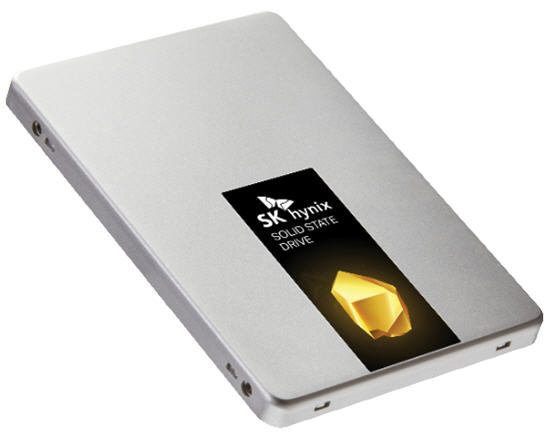
Today, Hynix put out a press release on their Gold S31 solid-state drive (SSD). The SATA III, first generation, is the first of their SuperCore series of products.

With a 560MB/s read speed, this device becomes an ideal SSD for high-demand users such as gamers. What’s also somewhat unique about the new Gold S31 drives is that they are entirely built in-house.

“All key components in Gold S31, from NAND flash and built-in controller to DRAM and firmware, were designed and produced by SK Hynix. The in-house components are built for robust performance and reliability,” SK Hynix says.

SK Hynix G31

What’s more interesting, at least for us right now, is the history of SK Hynix we uncovered while researching the company.

I always wondered what happened to Maxtor, an optical media giant in the early 2000s. It turns out SK Hynix acquired them. Today, SK Hynix is the third-largest conglomerate in South Korea.

Hynix is the world’s second-largest memory chipmaker (after Samsung) and the world’s third-largest semiconductor company. Founded as Hyundai Electronic Industrial Co., Ltd. in 1983, the company has continued to grow steadily ever since.

Hynix memory is well known for quality and is used in products made by Apple, Asus, Google, Dell, Nexcopy, and Hewlett-Packard.

The company also merged with LG Semiconductors in 1999.

These guys reported an operating income of $18 billion for 2018, so this is a company with serious capital and a willingness to spend it to stay competitive. We say good luck with your SSD product in the United States.

Press release source

Source for company history

Continue Reading

Apple Sells Lightning to 30pin Adapter

Apple has added Lightning to micro USB port support to its online store. The new Lightning to micro USB adapter is compatible with the newest iPhone, iPad, and iPod Touch device. The product can be used to sync as well as charge each type of device. The move shows Apple’s willingness to extend its new adapters capabilities. In the past, a 30-pin dock connector to micro USB adapter was only available for sale in Europe. The new adapter, while listed in the United States, is also shown with EU specifications. Apple had refused a micro USB adapter on its 30-pin connector because it wanted to stick with proprietary options that would protect its devices from third party device adapters. The move in the EU, however, allowed for less waste since old adapters from legacy devices could be adapted Apple also chose to forgo micro USB adapters because they didn’t allow the company to make iOS devices as thin and light as they wanted. Micro USB adapters are not as fast as Apple’s Lightning connectors; however, they are also not a standard type of connection option like 30-pin connectors had become over five years of iPhone, iPad, and iPod Touch sales. Apple sells an adapter to convert from Lighting to 30-pin so that most legacy accessories can still function, but some devices have become unavoidably incompatible with the newest iOS devices because of the Lightning connector. In some cases, users have become angered when video capabilities would not operate with the company’s lightning to 30-pin connector adapter. Other adapters already offered by Apple include options for SD card readers, VGA connectors, Lightning to HDMI, Firewire, and eSATA. The new micro USB adapter comes at a cost of $19. Continue Reading

Voltaic – Solar Charger For iPad & The Likes

Voltaic is a company that deals with voltage.  They specialize in the solar charging to create volts.  Their latest entry is the Spark.  The Spark is a solar panel design for tablet and notebooks. Voltaic is marketing the Spark for the iPad – and why not as there’s plenty of marketing spin going on for Apple tablets. The Spark will generate 8watts of solar power.  So for those who don’t have an electrical engineering degree, or simply can’t do the math – one hour of sun to the Spark will generate enough power to run one hour of video off the iPad.  Not bad.
  • Weather:  Panels are waterproof, lightweight and built to withstand abuse.
  • Charge times: About 10 hours in direct sun will fully charge an iPad, other tablets may take less time.
  • Peak Output: 6 Volts, 1,333mA or 12 Volts, 667mA
  • Connector:  USB and 5 standard adapters
So here is the price – $299 USD.  To learn more, visit Continue Reading

Apple 30 Pin Connector Supports USB 3.0

Did you know Apple will license it’s male 30 pin connector technology to just about anyone, but they will never license the female 30 pin portion of their connector?  For most, not a big deal, for some, they’d love to have that ability. Things could get interesting down the road as Apple was just awarded another patent for their 30 pin connector.  This time the pin-out includes support for data and power communication to 3.0 devices and also Thunderbolt devices.  What does this mean? It means Apple will be able to keep their slim line design and proprietary connector interface via their 30 pin connector.  The new design will still communicate with 3.0 devices, but without the traditional USB port interface.  A bit brilliant if you ask me. With the increased sales volume of Apple products, this new connector type could become an industry standard – oh wait – it can’t – because Apple wont license their female part of the connector.  This means tablets like the Motorola Zoom and others could not pivot off the 30 pin design.  But rather stay with traditional power pins and USB interface.  This gives Apple the edge up on keeping their products slimmer and thus more light weight. What do you think? Continue Reading

AirStash Changes The Way You Store Data for Your Apple Products

AirStash The AirStash, in one word, Amazing.  This device solves all the problems of lack of storage with Apple products.  With the AirStash you can now budget down to purchase the cheapest iPad or iPhone because the AirStash gives you the extra storage you need. The AirStash, in simple terms, is a wireless storage dongle you carry around which provides unlimited storage. The AirStash uses self powered WiFi to sync with your iPod, iPad or iPhone.  The AirStash uses an SD slot for unlimited storage.  The controller on the AirStash will recognize up to 32GB SD cards…from there you just swap out memory and keep saving. AirStash for iPhone Since the AirStash is wireless you can stream audio or video from the device to your Apple product.  This means you can run GBs of music or videos without bogging down all the memory on your iPhone or iPad. The only drawback I see is that you cannot dump photo’s from your Apple product to the AirStash [I’ve emailed the company to make sure my info is correct].  But you can easily take pictures using a digital camera [that uses SD cards] and simply pull the SD card from the digital camera and upload those photo’s to your iPhone / iPad. The AirStash [kudos on the creative name] is available for $99 and is well worth the money rather than paying $100s more for a bigger Apple product. If you’re not convinced yet, watch this 3 min YouTube video and get hooked. Continue Reading
MacBook Air Ships With Reinstall USB Drive

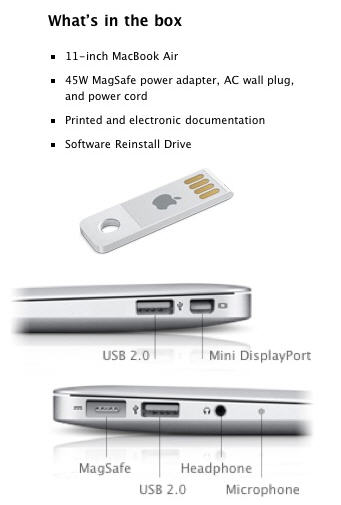
With Apple’s recent news about the MacBook Air being ultra thing, ultra long lasting and ultra cool, what many overlooked was the reinstall software shipping on a USB drive. With companies trying to save energy, reduce cost and reduce product sizes, it’s no surprise [at least to me] that Apple dumped the optical drive in favor of solid state memory…for both the computer and the restore media.

“Even the flash drive looks awesome from Apple,” says my colleague who does a ton of iPhone and iPad applications…with a new one coming out.

Beside the fact of flash being faster than optical, we also save space on the internal SSD drive by not having the reinstallation software loaded, but rather off-line and secure.  Just be sure to wrap a key-chain around it, the Apple restore USB drive looks pretty small.

Apple restore USB

End. Continue Reading

Japanese Company Makes Dock Station An iDream

Yet another “i” product for all those Apple gadgets, but this time we feel it’s a product worth mentioning.  The iPADock is a dock station to power or sync all your Apple gear in one handy location.  The iDevices has designated USB power ports, designated USB-to-PC sync ports and additional flash memory ports for SD cards, SDHC and Compact Flash downloading. So if you haven’t asked yourself how to clean up your sync area at work or home for the Apple gear…don’t worry, that day will come.  For example, at our house we have 4 iPhones, two iPods, a FlipVideo and several cameras.  All of them will receive power via USB.

iPad dock station

First off, we have 4 iPhones because we’ve migrated from 3G or 3GS to the 4.  The iPods are legacy products we had before the phones, yet we still use them for workouts…and the cameras, well those are good anytime. What I like about the iPADock station are all the power and sync options. Continue Reading

USB Hack: Apple USB Trackpad

All of Apple products are designed as a “less is more” philosophy where a user just “knows” how to use the product when they hold it or see it.  The Apple Trackpad is no exception.  Great looking product that works exceptionally well and is bare bone minimum on design features.

USB Hack, Apple Trackpad

One of the beautiful elements of the Trackpad is the wireless freedom you get from using the product.  For the wireless product you need juice.  The Trackpad does this via batteries.  However, some get tired of replacing the batteries [like it’s that hard] and did a simple USB hack to power the Trackpad.  This hack is not used for communication, that is still done through Blue-tooth, but this is only for eliminating the need to swap batteries or constantly recharge them. To accomplish the hack, remove the pad’s batteries, strip a USB cable down to the red and black power wires and attach them to a battery-sized wooden dowel. Finally, push the dowel inside the pad’s battery compartment and presto! It works. Granted this is a USB hack even my 7 year old could do [less the wire stripping] and I’d recommend making something a bit more elegant. Continue Reading

USB Power And The iPad – Don’t Freak – It’ll Charge

It’s fairly well known from user complaints over the weekend the iPad charges a bit differently then the logic used in our brain.  Here is the low down on the iPad USB power issue if you don’t feel like reading 20 paragraphs for these simple points:

iPad USB power

The iPad will power over USB ports with “high power” while in use.
  • The iPad will [obviously] charge when used with the supplied 10 watt power adapter.
  • The iPad will not charge over lower powered USB ports while “in use”  however, they will charge when asleep.
  • If the user gets the iPad message “Not Charging” you must take this literally.  This means the use of the iPad will equal the draw of power and only when it goes to sleep will it recharge…so it’s like a break even.
Do you have an iPad?  How do you like it?  Comment on our Facebook page. Continue Reading

Copyright

Copyright © 2006 +

USB Powered Gadgets and more...

All Rights Reserved

Advertise with us

GetUSB Advertising

This is a high value website providing great exposure to your product and brand. Visit our advertising page to learn specifics.

For more information
Visit our advertising page.

Nexcopy Ad

Nexcopy Provides

USB copy protection with digital rights management for data loaded on USB flash drives.

Contact us learn more

Resources and References Page

Resources and References Page