GetUSB.info Logo

Superhero USB Flash Drive

AI-generated superhero holding a USB flash drive while flying over a city

This image was created during the early days when ChatGPT first began offering AI image generation. At the time, the novelty alone was enough to spark endless experimentation. One of the first ideas we tried was simple: “What would a superhero USB flash drive look like?” The result was this over-the-top, cinematic scene of a caped hero flying across a city skyline, gripping a USB drive like it contained the world’s most important data.

Early AI image tools were wildly inconsistent. Some prompts produced abstract nonsense, others produced accidental masterpieces. Getting something usable meant testing dozens of variations, tweaking descriptions, changing lighting styles, adding camera angles, and sometimes just getting lucky. That unpredictability was part of the fun. You were not just generating images, you were discovering how the system “thought.”

Looking back, this image represents a moment in time when AI visuals felt new, surprising, and slightly magical. Today, image generation is more refined and controllable, but there was something special about those early experiments where every prompt felt like opening a mystery box.

Continue Reading

Transfer Photos from iPhone to PC – Easy

Transfer Photos from iPhone to PC – Easy and Automated

Qubii Pro iPhone photo backup device

iCloud is the default way to store your photos from your Apple device to another location. Once the files are in your iCloud account, you can log in and download those images to your computer.

However, many users do not use iCloud and are looking for an alternative. Here is an option that is easy, automatic, and far less expensive than maintaining an iCloud subscription.

The Qubii Pro is a backup device that works while you charge your phone. There is nothing to configure and no settings to manage. The Qubii Pro holds a microSD card for storage and connects between your iPhone cable and your charging block.

Photo and video transfer from your iPhone to storage happens automatically. Qubii scans your photo and video library and backs up any file not already present on the microSD card. The first backup can take a while because everything must be copied. The total time depends on how many photos and videos you have. On future connections, only new files are backed up.

Since most people charge their phones overnight, the backup process happens without disrupting normal usage.

Apple provides 5GB of free iCloud storage, but that space fills up quickly with high-resolution photos and video. As shown below, iCloud pricing seems inexpensive at first, but the monthly cost increases as storage needs grow.

  • Free: 5GB of storage per iCloud account (not per device)
  • $0.99/month: 50GB of storage (single user)
  • $2.99/month: 200GB of storage (family use)
  • $9.99/month: 2TB of storage (family use)
  • Apple One Family plan ($22.95/month) includes 200GB of iCloud storage
  • Apple One Premier plan ($32.95/month) includes 2TB of iCloud storage

Apple does a very good job of encouraging users to upgrade storage plans, so there is a high likelihood that monthly costs will exceed $20 USD over time (based on pricing in 2023).

There are a few important limitations to understand with Qubii:

  • You cannot choose specific photos or videos to back up; everything is included
  • If a file is deleted from the microSD card but still exists on your phone, it will be backed up again
  • The solution backs up photos and videos only, not contacts or documents
  • If you replace the microSD card, the entire backup process starts over

The last point above is important.

Continue Reading

IronKey USB Flash Drive – Hacks – $235M of BitCoin

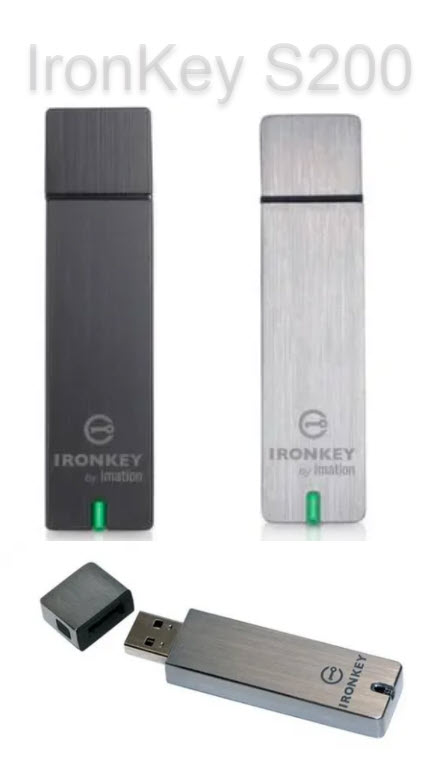
IronKey encrypted USB flash drive

IronKey is considered a bellwether for encrypted USB flash drives. The company, owned by Kingston Digital (a Southern California–based private company), uses dedicated hardware encryption chips to deliver one of the highest levels of security available in mass storage devices.

GetUSB.info came across an interesting story from Wired Magazine in which one of their authors sent an IronKey device to a Seattle-based security firm called Unciphered to see whether the drive could be accessed. They succeeded.

This is not an easy task to accomplish. IronKey devices use strong protections including FIPS 140-2 Level 3 certification, FIPS 197 compliance, and XTS-AES 256-bit encryption. The design allows only 10 password attempts before the controller permanently wipes the device, which creates a high risk if the password is forgotten.

Unciphered reportedly developed a method that allows for more than the standard 10 password attempts. The exact number of attempts is not publicly known, but it is clearly more than the built-in limit.

Why does this matter, beyond the fact that IronKey may have a security issue to address? In early 2021, it was widely reported that over 7,000 Bitcoin were locked inside an IronKey device because the owner forgot the password. The owner, programmer Stefan Thomas, did not use the Enterprise Management Service that could have enabled recovery. As of October 2023, those 7,000 Bitcoin were valued at more than $235 million.

Credit to Wired Magazine for the original reporting. You can read the full story by Andy Greenberg.

Continue Reading

Why Corsair’s Platform:6 Standing Desk is a Game Changer

Corsair Platform:6 modular standing desk

CORSAIR®, known for high-performance gaming peripherals and PC components, has introduced the CORSAIR Platform:6, a modular desk designed for gamers, creators, and professionals who want a more adaptable and ergonomic workspace.

Backed by decades of experience in desktop hardware and accessories, CORSAIR and its subsidiary Elgato designed the Platform:6 to reflect how people actually use modern workstations. The desk combines premium materials, extensive customization options, and practical features such as adjustable height, structured cable management, and modular accessories. The result is a workstation designed to evolve alongside its user.

The Platform:6 spans six feet in width and can be expanded further to support high-end gaming systems, streaming gear, and professional equipment. Users can choose from different configurations that include motorized height adjustment, multiple surface materials, and a flexible rail system. Desk configurations can be built through CORSAIR’s online configurator or selected from pre-built bundles.

At the core of the Platform:6 design is a modular rail system built around an aluminum T-channel structure. This system supports a wide range of accessories, including both CORSAIR components and third-party attachments. CORSAIR also encourages experimentation by supporting custom 3D-printed accessories, giving users freedom to tailor their setup beyond off-the-shelf parts.

For users who value ergonomics, select versions of the Platform:6 include dual electric motors for smooth height adjustment. The controller features an LCD display and memory presets for storing preferred positions. Surface options include dark walnut-stained rubberwood and durable black laminate, offering both visual and practical flexibility.

Practical details are integrated throughout the design. Included dual monitor arms support multi-display setups, while the CORSAIR RapidRoute cable management tray hides cables and power strips. An integrated storage cubby includes USB Type-A and USB Type-C charging ports, helping keep frequently used devices within reach without cluttering the desktop.

Corsair Platform:6 desk with integrated USB charging ports

Expandability is the defining idea behind the Platform:6. Side extensions can be added to increase surface area, and optional hanging pegboards allow further organization. The Elgato Multi Frame, a top-mounted pegboard designed specifically for the Platform:6, adds more mounting flexibility for accessories. Adapters also allow Elgato Multi-Mount and Flex Arm products to integrate cleanly into the desk’s rail system.

The Platform:6 Creator Edition represents the flagship configuration, combining adjustable height with a rubberwood surface and full modular capability. With online customization and modular expansion at its core, the Platform:6 is positioned as a long-term workspace solution rather than a fixed piece of furniture.

Continue Reading

Why Did Microsoft Drop Formatting FAT32 for 64GB and Above?

close up of USB flash drive, picture

Microsoft has not made an official announcement on: Why Did Microsoft Drop Formatting FAT32 for 64GB and Above?

In both Windows 10 and Windows 11 the format option given by Windows is either NTFS (New Technology File System) or exFAT (Extended File System). The option to format FAT32 is no long available in Windows.

Without an official announcement from Microsoft we can only speculate the reason is do to single file sizes averaging a larger size as of 2023.

The largest single file size supported by the FAT32 file system is 4GB. This is due to the limitations of the file system’s design. FAT32 uses a 32-bit file allocation table, which means it can address up to 4,294,967,295 clusters. Since each cluster in FAT32 is typically 4KB in size, the maximum file size is limited to 4GB (4,294,967,295 clusters multiplied by 4KB per cluster).

If you need to store files larger than 4GB, you will need to use a different file system that supports larger file sizes, such as NTFS (New Technology File System), exFAT (Extended File Allocation Table), or others. NTFS, in particular, is commonly used in modern Windows operating systems and supports much larger file sizes, making it suitable for storing large files and operating system installations.

We speculate, to reduce customer inquiries or complaints to Microsoft they have eliminated the option of FAT32 to any device of 64GBs or larger in capacity. The reason is that a user will receive an error message from the device when an attempt to copy a single file of 4GBs or larger to a FAT32 device. To reduce the frequency of error messages, by formatting the device as exFAT will eliminate this error.

The ExFAT (Extended File Allocation Table) file system supports significantly larger file sizes compared to FAT32. The maximum file size supported by ExFAT is a staggering 16 exabytes (EB), which is equivalent to 16 million terabytes (TB) or 16 billion gigabytes (GB). This vast file size limit allows for storing extremely large files, such as high-resolution videos, large databases, or disk images.

ExFAT was specifically designed to overcome the limitations of FAT32, including the maximum file size restriction. It is commonly used in various devices and operating systems, including Windows, macOS, and some embedded systems, for handling large files and providing interoperability between different platforms.

It’s important to note that while ExFAT supports large file sizes, the actual maximum file size might be limited by the specific implementation or the capabilities of the storage medium itself.

If the above information was helpful, please consider looking at some advanced flash drives offered by Nexcopy. Advanced functions include USB copy protection, USB write protection, USB CD-ROM, and HIPAA compliant flash drives. These functions are done at the hardware level and are universal solutions.

Continue Reading

Caravan That Rotates Like a USB Swivel Drive

Caravan swivel design that resembles a USB swivel flash drive

The Romotow T8 is a conceptual caravan that has taken the world of mobile homes by storm for its sleek design and creative form. One of the most intriguing features of the Romotow is its swiveling design, which strongly resembles the USB swivel drives often featured on this website.

It was created by the renowned New Zealand architecture firm W2, and it is unlike any other RV you have likely seen. With its distinctive design, advanced features, and premium materials, the Romotow T8 delivers a unique camping experience for those who want something visually striking and unconventional.

The caravan is built on a fixed chassis with a curved exterior, while the inner living section can rotate up to 90 degrees. This innovative design allows the caravan to expand and contract, offering flexible indoor and outdoor living space. When opened, the Romotow creates a spacious deck area ideal for relaxing outdoors. Large doors open into a sheltered living space, giving the interior an open, modern feel.

Beyond its visual appeal, the Romotow T8 includes features designed to impress. Options include wall-mounted TVs, an outdoor projector, integrated audio, and sleeping configurations with either single or double beds. The caravan runs on a 200Ah lithium battery supported by roof-mounted solar panels, making it well-suited for off-grid use.

Despite its advanced design, the Romotow T8 may present practical challenges at some campgrounds. Many campsites use narrow parking layouts, which could make it difficult or impossible to fully open the rotating structure without interfering with nearby vehicles or RVs. In practice, the Romotow is likely better suited for open environments rather than tightly packed RV parks.

As expected with a design-forward product, the Romotow T8 carries a significant price tag. At approximately $266,000 USD, it sits at the high end of the caravan market. Buyers outside New Zealand may also face additional costs related to international import and compliance.

Romotow T8 rotating caravan exterior

In conclusion, the Romotow T8 is an ambitious and visually distinctive caravan that offers a genuinely different camping experience. Its rotating structure enables adaptable living space, and its feature set positions it as a premium product. While not practical for every campsite and certainly not inexpensive, it is a standout option for those who value design and originality.

Romotow caravan front kitchen interior

Romotow caravan bathroom interior

Rotated Romotow caravan creating porch area similar to a USB swivel drive

The design company behind this project is W2 in New Zealand

Continue Reading

Get USB Flash Drive Serial Number with PowerShell or Command Line

Easily get the hard coded serial number of a USB flash drive with either the Command prompt in Windows or Powershell. Of the two, Powershell is easier. Below are the instructions. After the instructions there is a bit more information about the different types of serial numbers which can be found associated with a Mass Storage Device (USB flash drive) so be sure to read that part as well, so you get what you want!

In the Windows Search bar, type “powershell” and click Enter

The Powershell utility will run and simply copy and past the following:

Get-WmiObject Win32_DiskDrive | select Model, Name, InterfaceType, SerialNumber

The screen shot below shows the hard drive of the system and a USB flash drive. The command doesn’t clearly label each, so be a little aware of the devices connected compared to what is listed. It is suggested to have only one USB device connected while running Powershell so it is easy to identify the device.

get usb serial number using powershell

For the Command prompt, go to the USB flash drive itself. In the navigation field at the top (where you can type things) type in cmd. This will open the Command prompt for the USB flash drive itself. From here, copy and paste the following:

wmic path Win32_USBControllerDevice get Dependent | find “USBSTOR”

The screen shot below shows the same result as the Powershell command, BUT the string does have an extra &0 which is not part of the USB flash drive device. So a bit of parsing is required when looking at the number, or parsing of code if you plan to use the Command prompt to find the device serial number programmatically.

get usb serial number using command line

From the two above the Powershell solution is a bit more elegant.

However; may we suggest a third option? If you find yourself on this page, there is a high probability there are other features you can benefit from, like making an Image file of your USB stick, or speed benchmarking the performance of your flash drive.

If that is the case, then we recommend our free program, no installation required, standalone exe file that will fetch the serial number of a device as well as provide a tool to create image files or speed test your USB flash drive.

usb flash drive utility, image file, speed test, get serial number

You may download the free program here. Again, no installation required, this is a standalone exe file that can run from your flash drive or hard drive:

FREE DOWNLOAD: Nexcopy USBScrub

Continue Reading

Is it worth buying a USB 3.1 Flash Drive?

Is it worth buying a USB 3.1 USB flash drive?

The tech industry, tech nerds and tech blogs will definitely say that buying a USB 3.1 flash drive is worth it. After all, these blogs need something new to write about and new links to generate for affiliate advertising, but are these blogs reporting back valuable information before someone spends their hard earned cash?

Let us compare the write speed difference between a USB 3.1 flash drive and a USB 3.0 flash drive to see what information we can uncover.

Universal Serial Bus (USB) has different transfer speeds based on the version of technology, we did a write about that earlier. The USB 3.1 specification has a transfer rate which taps out at 1,250 MB/second (Megabytes per second). The USB 3.0 specification has a transfer rate which taps out at 625MB/second. Of course this is the theoretical maximum transfer speed. When anyone says “theoretical transfer speed” they are implicating all conditions are ideal. For example, the host computer has the horsepower and bandwidth to push that much data and the receiving device (in this case, flash drive) has equal throughput to receive that data. But is that the real world – is it worth buying a USB 3.1 USB flash drive?

Below are some images and here is the general order of what you will be reading:

  • Screen shots of the USB device type (USB 3.0 and USB 3.1)
  • Screen shots of benchmark software testing both USB technologies
  • Screen shots of a real-world copy jobs using a Windows computer

From the screen shots below you can see a USB 3.0 flash drive and USB 3.1 flash drive. Both flash drives use an SMI controller for the USB 3.0 and 3.1 technology. These are the same high quality and higher performance controllers seen in iPhones and NAND memory used from Micron Technology. The NAND memory type is MLC (multi-layer cell memory) is slower than SLC NAND memory (single layer cell). Note: USB flash drives do not use SLC memory because the NAND memory price is too expensive and the SLC supply is very small. Flash drives are produced at mass scale and meant to be a low cost data transfer and storage tools – speed is not the #1 priority, despit all the marketing we read online.

USB 3.0 flash drive specifications

USB 3.1 flash drive specifications

Here are benchmark speed tests for both USB devices in discussion today.

The program has two test settings for benchmarking a speed test. One test setting is for the theoretical maximum speed of the device and writes data directly to memory without accounting for operating system and device overhead for were the data is stored. Think of this as a random write test to any available sector on the flash drive.

The second test setting is a write sequence which includes the operating system and device overhead cache for placing files in the file allocation table. This means extra time is spend during the data transfer to log where each sector is written along with the calculation required to write the next bit of data. This second test setting is more like a real-world experience.

Speed benchmark software is designed to provide a relatively quick summary of the device capability. So the first test setting is designed to show the theoretical maximum write speed or “burst” write speed. The second test setting is designed to show a more “sustained” write speed. Any benchmark software is designed to provide a quick and easy snap-shot of what the device can do – but can the device do it?

Readers can download the USB Scrub software for speed benchmarking their flash drives. The software is 100% free, no installation or sign-ups, and includes other cool features like registry cleaning and making image files of flash drives. USB Scrub download link
Continue Reading

Test USB-C Cable For USB 2.0 and USB 3.0x Standards

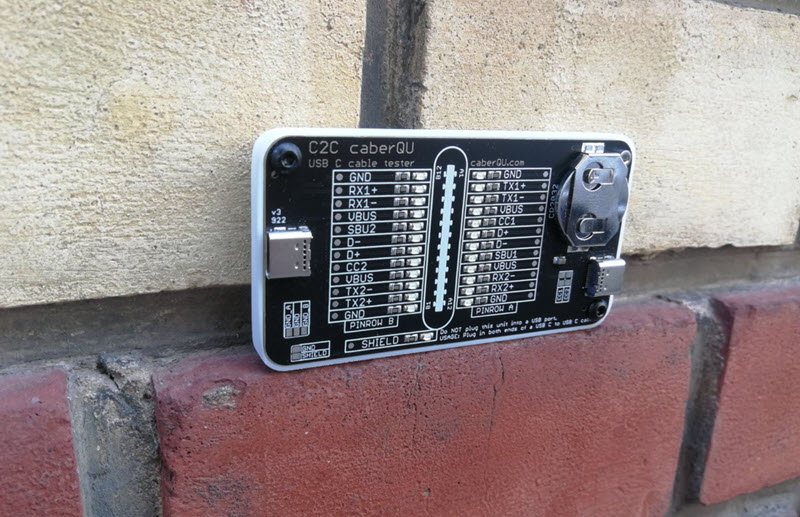
USB-C cable tester board for USB 2.0 and USB 3.x verification

The C2C caberQU is a compact USB-C cable tester board designed to validate USB-C to USB-C cables across a wide range of configurations and use cases.

This tool is particularly useful for IT professionals who need to verify cable quality beyond basic connectivity. It applies voltage to individual pins and detects continuity on the opposite end. With 25 LEDs, the board displays pin behavior across multiple modes, including USB 2.0/1.1, USB Power Delivery, USB 3.0/3.1/3.2, Alternate Mode, Debug Accessory Mode, and Audio Adapter Accessory Mode. A detailed manual is included to explain connectors, operating modes, and pin layouts.

Examples for IT managers:

  1. USB cable verification — An IT manager dealing with a pile of USB-C cables can quickly test each one and identify its capabilities. This helps ensure the correct cables are used for specific devices, reducing performance issues and compatibility problems.
  2. Hardware troubleshooting — In environments such as data centers or technical workspaces, cable faults can cause unpredictable behavior. Using the C2C caberQU board helps isolate issues like broken pins or incorrect wiring and reduces diagnostic time.
  3. Inventory management — Managing stock of USB-C cables can be difficult due to inconsistent labeling. The C2C caberQU board allows verification of cable specifications before deployment, helping teams avoid purchasing or distributing unsuitable cables.

V1 vs. V3 — Which one to choose?

Comparison of C2C caberQU V1 and V3 USB-C cable tester boards

There are two versions of the C2C caberQU board available, V1 and V3, with minor differences:

  • V1 includes a standard battery; V3 uses a higher-quality branded battery
  • V3 supports use with a protective case
  • V1 does not include hanging holes for storage
  • V1 features slightly different printed graphics on the PCB

Functionally, both versions perform the same task. They include the same manual and provide identical LED behaviors for testing.

Why was this board created?

USB-C cables exist in many variations, which makes it difficult to determine what a specific cable actually supports. Using the wrong cable can result in slow data transfer, charging issues, or device incompatibility. USB-C also requires precise pin mapping, grounding, and resistor configurations, which increases complexity.

Why is this a better way to test cables?

Determining whether a cable supports a specific use case can be difficult without specialized tools. Broken pins make troubleshooting even harder because failures are inconsistent. The C2C caberQU simplifies this by visually displaying pin behavior. By flipping the USB-C connectors, corresponding LEDs illuminate according to USB-C specifications. The package includes the PCB, a CR2032 battery, and a detailed manual. The USB-C cable itself is not included.

No external power source is required. The included CR2032 battery powers the board when a cable is connected and should last for an extended period under normal use.

Please note that this product is considered a prototype, is not certified, and is intended primarily for development and testing purposes. Minor quirks or unexpected behavior are possible and are part of its experimental nature.

The USB Implementers Forum (USB-IF) was established in 1995 by companies including Intel and Microsoft to develop and promote USB standards. USB 3.0 (later branded as USB 3.1 Gen 1) was introduced in 2008 and increased data transfer speeds to up to 5 Gbps, while maintaining backward compatibility with USB 2.0 devices.

There is no affiliation or affiliate relationship with this product, but it can be sourced here: C2C caberQU USB-C cable tester, typically priced around $30 USD.


Continue Reading

Disable USB Flash Drive Pop Up Messages in Windows 10

Users can turn disable USB flash drive pop up messages in Windows 10 by performing a very simple step in Settings. While it may seem counterproductive to turn off USB notifications in Windows 10, once you’ve been using Windows for a while you will likely want to reduce the number of pop-up messages.

There are two ways to disable USB flash drive messages in Windows. Performing a RegEdit or modifing a Settings feature in the Windows GUI

Disable the USB flash drive pop up message via Windows Registry Edit

  • Open RegEdit by typing “regedit” in the Search bar
  • Navigate to: HOKEY_LOCAL_MACHINE\SOFTWARE\Miscrosoft\Shell\USB
  • Click the USB folder on the left of the screen to highlight the registry entries for \USB\
  • On the right side of screen select “NotifyOnUsbErrors” by clicking on it
  • Right click and select “Modify”
  • Set the value to “0” (zero). Zero is off, One is on

Disable USB message Windows 10, regedit

NOTE: Most users will receive a message saying they do not have privileges to modify the registry value. That is meant by design, and please see the comments at the end of this article for why.

Disable the USB flash drive pop up message via Settings

  • Type “settings” in the Seach bar of Windows
  • Select “Devices”
  • Select the USB tab near/at the bottom on left
  • Uncheck “Notify me if there are issues connecting USB devices

Disable USB message Windows 10, Settings

The second method via Settings is the preferred method because changing registry entries is not recommended unless the user is very experienced with computers. Windows 10 does a good job of not allowing users make registry changes that would crash their computer or brick the operating system, but the risk is still there.

If you received some sort of permissions message when attempting our regedit method, I would stay away from trying to resolve that security message. The reason Miscrosoft locks downt he registry in certain areas is to provide a more secure computer system for the user and reduce potential risk of malware or hackers getting control of your computer.

Over the years, numerous reports have come out about how hackers will expose certain USB protocols to insert malware or take control of a system. The registry is the main point of focus for hackers.

If you are persistent about changing the registry entries the first thing you can try is running RegEdit as Administrator. If that doesn’t resolve your issue then you may Google search for your specific error message and see if another website offers up a solution.

Continue Reading

How To: Keep 12v ON to Power eCooler or CPAP Machine – For Tesla Cars

How to keep Tesla 12V power on for eCooler or CPAP while camping

Electric vehicles are increasingly popular, and many Tesla owners are discovering the appeal of camping with their cars. With generous interior space, comfortable seating, and advanced features, a Tesla can be a practical option for road trips and overnight stays. However, some owners run into power issues when trying to run devices like electric coolers or medical equipment such as CPAP machines that require continuous power.

Below is a simple, real-world workaround that some owners have used to keep the 12V outlet powered overnight.

One Tesla owner shared their experience attempting to run an eCooler during a camping trip. They tried using Sentry Mode and Camp Mode, but once the vehicle entered sleep mode, the rear 12V outlet on their Model Y stopped supplying power. While troubleshooting, they accidentally left a duffle bag on the driver’s seat. The car interpreted the added weight as an occupied seat, prevented sleep mode from activating, and kept the 12V system active. The cooler continued running without interruption.

This simple trick—placing weight on the driver’s seat—has worked for some owners who need continuous power for devices like coolers or CPAP machines. For users who rely on medical devices overnight, maintaining uninterrupted power can be critical.

That said, this is an informal workaround, not an official Tesla-supported feature. Tesla frequently updates vehicle software and power management behavior, so this method may stop working in the future. Still, for now, many owners report that this approach keeps the 12V outlet active through the night.

Continue Reading

I asked ChatGPT to Write a Thriller with a Flash Drive Holding the Secrets – Here is What Happened Next

Me: ChatGPT — Would you be so kind to write a five-paragraph thriller novel about international espionage where a USB flash drive is used to hide secrets from the KBG?

I asked ChatGPT to write a thriller story involving a USB flash drive

As a renowned international spy, Sasha had faced countless challenges and dangers. But nothing had prepared her for the mission she had been tasked with. She was to retrieve a USB flash drive that held vital information about the KBG’s plans to launch a massive cyberattack on the United States. The stakes were high, and the clock was ticking.

Sasha knew the risks involved in such a mission, and she was willing to go to any lengths to complete it. She flew to Moscow under the guise of a journalist and managed to sneak into the KBG’s headquarters. The flash drive was heavily guarded, and Sasha knew she had to act fast. With her quick reflexes and stealthy moves, she managed to grab the drive and slip away unnoticed.

But the KBG wasn’t going to let go of their secrets so easily. Sasha soon found herself on a secret plane bound for Washington, DC, with KBG agents hot on her heels. With time running out, she had to come up with a plan to keep the flash drive out of their hands.

As the plane took off, Sasha felt a sense of relief. She had managed to outsmart the KBG and keep the flash drive safe. But her relief was short-lived when she realized that the flash drive was corrupted, and she couldn’t access the information it held. Someone had tampered with it.

Sasha knew she had to act fast to uncover the truth. She suspected that there was a mole within her agency who had sabotaged the mission. She had to find the mole before it was too late. With the clock ticking and danger lurking around every corner, Sasha set out on a perilous journey to uncover the truth and protect her country from a devastating cyberattack.

As Sasha raced against time, she found herself embroiled in a deadly game of cat and mouse. With the KBG hot on her heels, she had to stay one step ahead of them to uncover the truth. But with the fate of the country hanging in the balance, Sasha knew she had no choice but to risk everything to protect it.

Me: ChatGPT — Please write a three-paragraph conclusion about what was found on the flash drive and how that information impacted the United States.

Sasha’s investigation eventually led her to uncover the truth about the flash drive. It turned out that the mole within her agency was actually a double agent, working for the KBG all along. They had corrupted the flash drive to hide their tracks and throw Sasha off course. But Sasha’s persistence and instincts ultimately led her to the truth.

The information on the flash drive was shocking. It contained detailed plans for a coordinated cyberattack on critical U.S. infrastructure, designed to disrupt power grids, communications, and transportation systems. If executed, the attack would have caused widespread chaos, economic damage, and risk to human life.

Thanks to Sasha’s courage and quick thinking, the plot was exposed before it could be carried out. The intelligence community credited her with preventing a national crisis. While she was recognized as a hero, Sasha understood the reality of her world: threats would continue to evolve, and vigilance would always be required to protect what mattered most.

Continue Reading

Copyright

Copyright © 2006 +

USB Powered Gadgets and more...

All Rights Reserved

Advertise with us

GetUSB Advertising

This is a high value website providing great exposure to your product and brand. Visit our advertising page to learn specifics.

For more information
Visit our advertising page.

Nexcopy Ad

Nexcopy Provides

USB copy protection with digital rights management for data loaded on USB flash drives.

Contact us learn more

Resources and References Page

Resources and References Page