Doing a bit of research for iPhone chargers I came across the Dynamic8 iPhone and iPad charger. The look is fantastic and is very contemporary. No protrusive charger sticking out half way into the drivers console, but rather flush, stylish looking accessory.
Enjoy full use of your iPhone or iPod during car trips, and arrive with your battery fully charged
Amber/green charging status light
Detachable dock connector to USB Type A cable that you can also use to connect your iPhone or iPad to your computer
Easily replaceable 2 Amp automotive blade-type fuse to protect against spikes and surges
Works with iPhone, iPad models that feature full-size dock connector, and iPad shuffle (1st generation)
The Intel based standard for USB 3.0 was announced nearly 2 years ago and since then, products have slowly trickled in to the market place. Of course there is a cycle to progress…you can’t get peripherals until you have controllers [main stream now] and once you get controllers you expand out to peripherals. That being said, Kingston, one of the largest memory manufacturers on earth, has launched a fairly detailed road map for USB 3.0 products.
Kingston was amongst the first to announce USB 3.0 flash drives into retail under the DataTraveler Ultimate 3.0 drive and HyperX MAX 3.0 external USB hard drive – both launched earlier in 2010. And now, as the first product on their roadmap for the year, have introduced the DataTraveler HyperX 3.0, which will serve as their flagship model and be part of the HyperXperience product line, a family of high-performance Kingston Flash products that will include SSDs, USBs and flash memory cards.
Kingston made the announcement at CES but doesn’t expect to release the less expesnive USB 3.0 flash drives until Q2, 2011 under the DataTraveller DTU30 brand and will include capacities ranging from 16GB to 64GB.
Continue Reading
Every tech guy I know anxiously awaits the CES trade show at the start of each year. I think it’s the only help for getting us through the vacation blues after a long Christmas break. I’ve seen a bunch of news about USB 3.0 gear from CES 2011. Many of them are USB hard drives and here are the most recent five we’ve read about.
Buffalo
Buffalo launches a complete line of USB 3.0 storage devices. The DriveStation Quad USB 3.0 is a four drive, high speed RAID enabled storage solution offering transfer speeds up to 235 MB/s, twice as fast as USB 2.0. Equipped with four hard drives configured in RAID 5, DriveStation Quad USB 3.0 also supports RAID 0, 10 and JBOD modes for flexibility between data redundancy and available storage capacity
Seagate
Seagate introduces some new ‘super slim’ USB 3.0 hard drives. Seagate’s new ultra-portable GoFlex drive comes in a metal case that’s only 9 millimeters thick, which Seagate says is a full 38% thinner than their previous generation. This is made possible by some 7 millimeter thick 2.5″ drives that still manage to deliver 7200 rpm performance via USB power, and you get a solid 340 gigs for
Continue Reading
The iTunes backups for your mobile iPhone device or iPad device will eventually suck up much of your hard drive space. From the source article, this can be as much as 20% or more, depending on the amount of content iTunes is backing up.
To alleviate this problem, you can redirect your iTunes backup location to be an external storage drive, or a 2nd hard drive on your system. By using a Windows symbolic link routine, you can take control of where the backup location will reside.
For this tutorial you’ll need to download NTFS Junction utility [free] and do some CMD prompt edits to bring it all together. If you are not comfortable with the above, yet quest the solution, then I recommend getting someone a bit more knowledgeable with Windows to perform the task.
So to begin, you need to download this free tool to create NTFS Junctions. (This is a tool provided by a Microsoft engineer on Microsoft’s website ironically enough)
When you unzip that file, extract the junction.exe into the C:\Windows folder so that you can run in from anywhere.
Next up, you need to move all of your existing backup files to their new location. This could be secondary hard drive, or another partition, or even an external hard drive. Before we move the files, make sure iTunes is closed.
To move the files, open up a “My Computer†Window and type this into the address bar: “C:\Users\%username%\AppData\Roaming\Apple Computer\MobileSync†(without the quote of course) and press enter. This should take you into your iTunes MobileSync Folder where the Backup folder is located.
You need to right click on the Backup folder and select “Cutâ€.
Now navigate to where you’d like your backups to be located. For me, I wanted them on the D: drive in a folder I created called “iTunes Backupâ€. Paste the Backup folder to this location.
Next you need to open a command prompt. To do this, click on the Start button and type in “cmd†(again, no quotes) and then press enter. A black window should open up that looks like this.
Now for the easy part, creating the junction. All you need to do to create the junction is type in the word “junction†then the path to where Windows stores the files, then the path to where you decided to place your backup. So for me, I typed in: Junction “C:\Users\onelson\AppData\Roaming\Apple Computer\MobileSync\Backup†“D:\iTunes Backup\Backup†(Note that there are quotes around both paths since both paths contain spaces, these quotes are required).
If everything worked correctly, the junction command should indicate that it created the junction
If you decide to use an external storage device be sure the device is powered on before you start the backup process. Ya, some people are knuckleheads and will forget!
GetUSB.info did not write this tutorial, but we’d love to hear your feedback in our community.
We hope you find many USB gadgets in your stockings or under the Christmas tree. Merry Christmas to all our readers, bloggers and fellow gadget lovers.
Samsung is looking to put a new twist to the classic digital camera with multiple USB ports. The idea is simple, once a picture is taken, the folks in the picture can turn over their thumb drives for a quick download of the picture just taken.
Not a bad idea considering most of us now have USB sticks in our pocket, car or computer bag. I think the wifi SD card is a bit better of an idea, but this too will work.
The concept camera from Samsung has three female USB ports to accept mass storage devices [tech term for USB stick] and a male USB for connecting to a computer for downloading.
Continue Reading
With USB flash drives becoming a big threat to companies for spreading viruses and data slerping it’s smart to take some precautions about how employees use USB ports. I think NZXT Bunker understands that.
NZXT introduced the Bunker which is a 5.25 inch bay with 4 USB ports neatly placed behind a locking front door. Now you’ve got physical security against USB abuse. Granted it still wont stop those with access to spread a virus, intentionally or not, or perform some IP data slerping, but at least it’s a strong deturant.
EverythingUSB made a great quote about this:
As anyone who has ever gone to a LAN party knows, you need to watch your stuff or else something is just as likely to go missing! It really is a sad state of affairs, but the truth of the matter is you don’t bring any expensive peripherals to a LAN party unless you are willing to keep them on your person at ALL times.
Parrot is launching their new car stereo receive which has strayed away from the trend of all touch screen interface. The Asteroid is a Google Android based receiver with loads of features and functionality.
The receiver still has a graphical interface to display the content being played, but the navigation is all “old school” buttons and radial dial.
What is most interesting about the new Parrot receive is the many number of USB ports located on the back side. With the four USB ports the Asteroid gives the user plenty of options.
Of course you’ll get the expected RCA jacks for hooking up your car’s stereo system and a 3.5 mm jack for connecting your MP3 player. The Asteroid has three high speed USB ports and one 1.1
Continue Reading
The AirStash, in one word, Amazing. This device solves all the problems of lack of storage with Apple products. With the AirStash you can now budget down to purchase the cheapest iPad or iPhone because the AirStash gives you the extra storage you need.
The AirStash, in simple terms, is a wireless storage dongle you carry around which provides unlimited storage.
The AirStash uses self powered WiFi to sync with your iPod, iPad or iPhone. The AirStash uses an SD slot for unlimited storage. The controller on the AirStash will recognize up to 32GB SD cards…from there you just swap out memory and keep saving.
Since the AirStash is wireless you can stream audio or video from the device to your Apple product. This means you can run GBs of music or videos without bogging down all the memory on your iPhone or iPad.
The only drawback I see is that you cannot dump photo’s from your Apple product to the AirStash [I’ve emailed the company to make sure my info is correct]. But you can easily take pictures using a digital camera [that uses SD cards] and simply pull the SD card from the digital camera and upload those photo’s to your iPhone / iPad.
The AirStash [kudos on the creative name] is available for $99 and is well worth the money rather than paying $100s more for a bigger Apple product.
If you’re not convinced yet, watch this 3 min YouTube video and get hooked.
Continue Reading
Just last week, we reported on a solar panel which rotates with the sun to optimize charging time and power. Today we bring you another method to recharge your life, but this time wearing clothes. Silvr Lining is a start up clothing company which integrates solar panels into your every-day cloths.
The style Silvr Lining embraces is that of a casual fit – as it would be difficult to integrate solar panels into a bikini or fitted top.
The company integrates several 6 x 8 panels into the outside of pocket panels so the lock blends with the style.
The solar panels are the right size to charge most any small USB gadget like MP3 player, phone or PDA device. It also appears the pockets are big enough you might just fit that iPad which is so awkward to carry around.
The solar power pants from Silvr Lining run just under $300. The company is based in Los Angeles and all cloths are made in the USA. Not sure how fashion conscience you are, but if you are
Continue Reading
In a concept design only, Eric Strebel and Jim Nogarian prototyped a solar panel which can rotate with the sun. The case has three angles on the bottom, a flat surface for sunlight directly above around noon time, and two 45 degree angle for morning and afternoon sun. It’s a good idea…I think.
After a little bit of research it appears the direct sunlight approach to solar is a thing of the past. New technology allows diffused light to generate electricity through the solar panels and thus maximizes any solar panel even slightly exposed to sunlight.
Putting this information aside, The Solcar Vox does look like a fresh idea on charging your USB gadgets or other devices which charge via USB like the iPhone.
If you like the idea you can pre-order the prototype which is
Continue Reading
If you are one of the few who rushed out to purchase the MacBook Air, you might have found yourself in a bit of a pinch. How to get the USB Ethernet Adapter working? If this is you, or a friend you know, here is a quick fix until a new Apple update is published.
First, it appears that some have luck plugging the adapter into different ports on the MacBook Air, but it’s not a universal solution.
After a bit of investigative work sifting through the Apple forums, you can do the following for a sure thing fix:
Continue Reading

 Doing a bit of research for iPhone chargers I came across the Dynamic8 iPhone and iPad charger. The look is fantastic and is very contemporary. No protrusive charger sticking out half way into the drivers console, but rather flush, stylish looking accessory.
 The Intel based standard for
 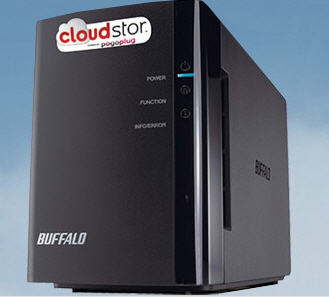 Buffalo launches a complete line of USB 3.0 storage devices. The DriveStation Quad USB 3.0 is a four drive, high speed RAID enabled storage solution offering transfer speeds up to 235 MB/s, twice as fast as USB 2.0. Equipped with four hard drives configured in RAID 5, DriveStation Quad USB 3.0 also supports RAID 0, 10 and JBOD modes for flexibility between data redundancy and available storage capacity
Seagate
Buffalo launches a complete line of USB 3.0 storage devices. The DriveStation Quad USB 3.0 is a four drive, high speed RAID enabled storage solution offering transfer speeds up to 235 MB/s, twice as fast as USB 2.0. Equipped with four hard drives configured in RAID 5, DriveStation Quad USB 3.0 also supports RAID 0, 10 and JBOD modes for flexibility between data redundancy and available storage capacity
Seagate
 Seagate introduces some new ‘super slim’ USB 3.0 hard drives. Seagate’s new ultra-portable GoFlex drive comes in a metal case that’s only 9 millimeters thick, which Seagate says is a full 38% thinner than their previous generation. This is made possible by some 7 millimeter thick 2.5″ drives that still manage to deliver 7200 rpm performance via USB power, and you get a solid 340 gigs for



 NZXT introduced the Bunker which is a 5.25 inch bay with 4 USB ports neatly placed behind a locking front door. Now you’ve got physical security against USB abuse. Granted it still wont stop those with access to spread a virus, intentionally or not, or perform some IP data slerping, but at least it’s a strong deturant.
EverythingUSB made a
NZXT introduced the Bunker which is a 5.25 inch bay with 4 USB ports neatly placed behind a locking front door. Now you’ve got physical security against USB abuse. Granted it still wont stop those with access to spread a virus, intentionally or not, or perform some IP data slerping, but at least it’s a strong deturant.
EverythingUSB made a  What is most interesting about the new Parrot receive is the many number of USB ports located on the back side. With the four USB ports the Asteroid gives the user plenty of options.
Of course you’ll get the expected RCA jacks for hooking up your car’s stereo system and a 3.5 mm jack for connecting your MP3 player. The Asteroid has three high speed USB ports and one 1.1
What is most interesting about the new Parrot receive is the many number of USB ports located on the back side. With the four USB ports the Asteroid gives the user plenty of options.
Of course you’ll get the expected RCA jacks for hooking up your car’s stereo system and a 3.5 mm jack for connecting your MP3 player. The Asteroid has three high speed USB ports and one 1.1
 The AirStash, in one word, Amazing. This device solves all the problems of lack of storage with Apple products. With the AirStash you can now budget down to purchase the cheapest iPad or iPhone because the AirStash gives you the extra storage you need.
The AirStash, in simple terms, is a wireless storage dongle you carry around which provides unlimited storage.
The AirStash uses self powered WiFi to sync with your iPod, iPad or iPhone. The AirStash uses an SD slot for unlimited storage. The controller on the AirStash will recognize up to 32GB SD cards…from there you just swap out memory and keep saving.
The AirStash, in one word, Amazing. This device solves all the problems of lack of storage with Apple products. With the AirStash you can now budget down to purchase the cheapest iPad or iPhone because the AirStash gives you the extra storage you need.
The AirStash, in simple terms, is a wireless storage dongle you carry around which provides unlimited storage.
The AirStash uses self powered WiFi to sync with your iPod, iPad or iPhone. The AirStash uses an SD slot for unlimited storage. The controller on the AirStash will recognize up to 32GB SD cards…from there you just swap out memory and keep saving.
 Since the AirStash is wireless you can stream audio or video from the device to your Apple product. This means you can run GBs of music or videos without bogging down all the memory on your iPhone or iPad.
The only drawback I see is that you cannot dump photo’s from your Apple product to the AirStash [I’ve emailed the company to make sure my info is correct]. But you can easily take pictures using a digital camera [that uses SD cards] and simply pull the SD card from the digital camera and upload those photo’s to your iPhone / iPad.
The AirStash [kudos on the creative name] is available for $99 and is well worth the money rather than paying $100s more for a bigger Apple product.
If you’re not convinced yet, watch this 3 min YouTube video and get hooked.
Since the AirStash is wireless you can stream audio or video from the device to your Apple product. This means you can run GBs of music or videos without bogging down all the memory on your iPhone or iPad.
The only drawback I see is that you cannot dump photo’s from your Apple product to the AirStash [I’ve emailed the company to make sure my info is correct]. But you can easily take pictures using a digital camera [that uses SD cards] and simply pull the SD card from the digital camera and upload those photo’s to your iPhone / iPad.
The AirStash [kudos on the creative name] is available for $99 and is well worth the money rather than paying $100s more for a bigger Apple product.
If you’re not convinced yet, watch this 3 min YouTube video and get hooked.
 The style Silvr Lining embraces is that of a casual fit – as it would be difficult to integrate solar panels into a bikini or fitted top.
The company integrates several 6 x 8 panels into the outside of pocket panels so the lock blends with the style.
The style Silvr Lining embraces is that of a casual fit – as it would be difficult to integrate solar panels into a bikini or fitted top.
The company integrates several 6 x 8 panels into the outside of pocket panels so the lock blends with the style.
 The solar panels are the right size to charge most any small USB gadget like MP3 player, phone or PDA device. It also appears the pockets are big enough you might just fit that iPad which is so awkward to carry around.
The solar power pants from Silvr Lining run just under $300. The company is based in Los Angeles and all cloths are made in the USA. Not sure how fashion conscience you are, but if you are
The solar panels are the right size to charge most any small USB gadget like MP3 player, phone or PDA device. It also appears the pockets are big enough you might just fit that iPad which is so awkward to carry around.
The solar power pants from Silvr Lining run just under $300. The company is based in Los Angeles and all cloths are made in the USA. Not sure how fashion conscience you are, but if you are

