Cell phone standards ditched the AC/DC adapter about a year ago and it’ll be a requirement all cell phones power only via USB. Now it looks like we could do the same for computers. The USB 3.0 Promoter Group introduced a new specification to offer up to 100watts of power over a USB 3.0 cable. How convenient would that be!
Lets ditch the AC/DC power block with most laptops and just plug into one of those USB wall mount power stations. Or recharge your laptop directly off your tower PC. Or easily power an unlimited number of USB devices via your USB laptop USB 3.0 port.
This means more and more peripherals will be powered via USB and not require the extra power adapter. This ultimately mean less cost and less hassle for the average computer user.
“Building on the rapidly increasing industry momentum for using USB bus power to charge a broad range of mobile devices, the new USB Power Delivery specification extends USB’s cable power delivery capabilities beyond simple battery charging,” said Brad Saunders, USB 3.0 Promoter Group chairman, in a statement. “For example, charging the battery of a notebook PC, or simply powering that notebook PC while actively using the USB data connection, would be possible. Conceivably, a notebook PC could rely solely on a USB connection for its source of power.”
The preliminary spec indicated power is bi-directional and therefore no need to switch or swap the USB cable. The new specification would be compatible with
Continue Reading
Voltaic is a company that deals with voltage. They specialize in the solar charging to create volts. Their latest entry is the Spark. The Spark is a solar panel design for tablet and notebooks.
Voltaic is marketing the Spark for the iPad – and why not as there’s plenty of marketing spin going on for Apple tablets.
The Spark will generate 8watts of solar power. So for those who don’t have an electrical engineering degree, or simply can’t do the math – one hour of sun to the Spark will generate enough power to run one hour of video off the iPad. Not bad.
Weather:Â Panels are waterproof, lightweight and built to withstand abuse.
Charge times: About 10 hours in direct sun will fully charge an iPad, other tablets may take less time.
Peak Output: 6 Volts, 1,333mA or 12 Volts, 667mA
Connector:Â USB and 5 standard adapters
So here is the price – $299 USD. To learn more, visit
Continue Reading
There is news running popping up about a new concept design for rechargeable batteries via USB. Well, the concept looks cool from a design standpoint, but nothing new in the market place.
First, lets review the design. Taking a double A battery case, the concept is to attach a USB cable so the internal battery can be recharged. Nice concept if it came out 5 years ago, but why add the additional USB cable. Why not make the tip a USB connector? Oh wait, it’s been done.
So this brings us to what is already in the market place, the USBCell. This is a rechargeable battery which sits inside the double A battery design case. You can recharge the battery
Continue Reading
I’m sure you had to read the title once or twice. Well, you know what they say…a picture is worth a thousand words. Doubt I’ll drum up a thousand words for this post, but you get the point.
The FlipIt is a slick little piece of plastic which fits between your wall prongs and the outlet itself. This way you can high-jack some power off the outlet, while still sharing it with other electronics. The FlipIt then redirects the juice to a USB port where you can plug any device which uses USB for recharging.
It’s a brilliant idea.
It’s $15.
After seeing it, don’t you wish you thought of it?
Source:Â Those guysContinue Reading
Samsung has a new Central Station WLED monitor system in 23 inch or 27 inch format. The wireless solution is very unique in that it automatically detects your devices with in the 1 meter range. So as you approach with your laptop, the monitor will automatically sync up with your PC.
In additional the Samsung WLED includes USB ports on the monitor so as your PC approaches, those peripherals hanging off the side will also become usable with your laptop. I should actually re-edit this post and mention netbook as those screens are way too small and something like this would be ideal.
Samsung didn’t get a change to post lag-time between user input on the PC and the reaction of the monitor for said input, but I’d venture to say it’s minimal – Samsung doesn’t cheat corners.
Continue Reading
Doing a bit of research for iPhone chargers I came across the Dynamic8 iPhone and iPad charger. The look is fantastic and is very contemporary. No protrusive charger sticking out half way into the drivers console, but rather flush, stylish looking accessory.
Enjoy full use of your iPhone or iPod during car trips, and arrive with your battery fully charged
Amber/green charging status light
Detachable dock connector to USB Type A cable that you can also use to connect your iPhone or iPad to your computer
Easily replaceable 2 Amp automotive blade-type fuse to protect against spikes and surges
Works with iPhone, iPad models that feature full-size dock connector, and iPad shuffle (1st generation)
Just last week, we reported on a solar panel which rotates with the sun to optimize charging time and power. Today we bring you another method to recharge your life, but this time wearing clothes. Silvr Lining is a start up clothing company which integrates solar panels into your every-day cloths.
The style Silvr Lining embraces is that of a casual fit – as it would be difficult to integrate solar panels into a bikini or fitted top.
The company integrates several 6 x 8 panels into the outside of pocket panels so the lock blends with the style.
The solar panels are the right size to charge most any small USB gadget like MP3 player, phone or PDA device. It also appears the pockets are big enough you might just fit that iPad which is so awkward to carry around.
The solar power pants from Silvr Lining run just under $300. The company is based in Los Angeles and all cloths are made in the USA. Not sure how fashion conscience you are, but if you are
Continue Reading
In a concept design only, Eric Strebel and Jim Nogarian prototyped a solar panel which can rotate with the sun. The case has three angles on the bottom, a flat surface for sunlight directly above around noon time, and two 45 degree angle for morning and afternoon sun. It’s a good idea…I think.
After a little bit of research it appears the direct sunlight approach to solar is a thing of the past. New technology allows diffused light to generate electricity through the solar panels and thus maximizes any solar panel even slightly exposed to sunlight.
Putting this information aside, The Solcar Vox does look like a fresh idea on charging your USB gadgets or other devices which charge via USB like the iPhone.
If you like the idea you can pre-order the prototype which is
Continue Reading
Do you see something odd about this picture? Maybe the fact an LED is illuminating from a USB connector with no PC in site? Ya that’s it. Good job Sherlock.
So what we have here is a How To or USB Hack on running an LED from a Super-capacitor. If you are non-technical, then we basically mean a very short lived battery to run the LED. A super-capacitor has the ability to store energy for longer periods of time over traditional capacitors – yet still not long enough as with batteries.The concept of this tutorial is to wire a super-capacitor to a USB socket whereby your computer can charge up the capacitor and when disconnected you’ll get about 10 minutes of LED illumination.
Granted there isn’t much day-to-day use with this USB hack, but just a fun little project if you have the time.
Over on the Instructables website there is an updated USB tutorial which includes
Continue Reading
There was a tweet about Windows Phone 7 offering USB tethering. It first started with a claim the feature will be available, and it would be available withour the courier adding additional charges. Unfortunately, that claim has been retracted. However, there is still hope for USB tethering.
I think in all likelyhood, Windows Phone 7 will offer USB tethering so you can get to the internet through your phone, but it’ll be with a data plan surcharge.That’s OK by me for the moment because sometimes it’s critical to get your data while on-site or at a remote location where there just isn’t an option. In addition, this would give WP7 a nice edge on Apple products who don’t let you tether.
What do you think?Continue Reading
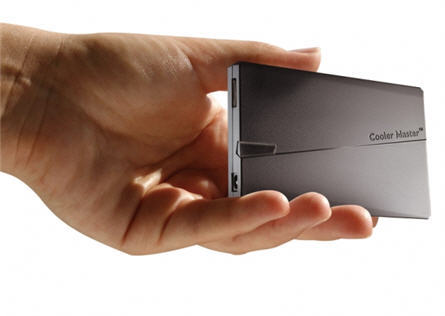
CoolerMaster is definitely taking advantage of the Universal Serial Bus we’ve all come to know as simply USB. CoolerMaster introduces a universal power adapter which connects via USB. The new USNA95 is a 95watt power block. It can easily power your laptop, netbook and USB devices.
The USNA95 has a simple Red and Green LED to indicate whether a device is being power properly so even the tricky GPS units and SmartPhones will get the right amount of juice.
The power cycle time is also faster for peripheral devices as CoolerMaster is stating a 30% faster cycle time to power your devices than a traditional device to PC connection.
The USB power adapter is also the smallest one we’ve seen with a size of 62 x 17 x 104 mm and is texture surfaced to provide a durable case for when taken on the road. Video after the jump
Continue Reading
Just last week GetUSB.info reported on a solar charging USB hub and a USB power strip and for noting more than to recharge your gadgets. It’s clear that USB is the common thread in recharging – and moving forward I only expect this trend to continue.
Speaking of continue, now we have a 13 port USB hub which fits right into your 5.25″ computer bay. I do say, the picture is inviting enough to get this add-on component and integrate it into your tower, but then we’ve got two questions for you. 1) Don’t most people use laptops these days and 2) Imagine all the cables coming out of this thing. I say this because you’ll quickly realize the ports are much too close for anything but cables. Even the most slim USB stick would have a hard time fitting into each port.
What I do like about the design is the power connection you can make to the internal power supply of your PC. This means the 13 port USB hub will support larger devices with more power thurst…say hard drives and large 64GB flash drives.
The 13 port hub isn’t on sale yet, but will be in late August 2010. Pricing was not given. Here is a link you can bookmark to check availability.

 Lets ditch the AC/DC power block with most laptops and just plug into one of those USB wall mount power stations. Or recharge your laptop directly off your tower PC. Or easily power an unlimited number of USB devices via your USB laptop USB 3.0 port.
This means more and more peripherals will be powered via USB and not require the extra power adapter. This ultimately mean less cost and less hassle for the average computer user.
Lets ditch the AC/DC power block with most laptops and just plug into one of those USB wall mount power stations. Or recharge your laptop directly off your tower PC. Or easily power an unlimited number of USB devices via your USB laptop USB 3.0 port.
This means more and more peripherals will be powered via USB and not require the extra power adapter. This ultimately mean less cost and less hassle for the average computer user.
 Voltaic is a company that deals with voltage. They specialize in the solar charging to create volts. Their latest entry is the Spark. The Spark is a solar panel design for tablet and notebooks.
Voltaic is marketing the Spark for the iPad – and why not as there’s plenty of marketing spin going on for Apple tablets.
Voltaic is a company that deals with voltage. They specialize in the solar charging to create volts. Their latest entry is the Spark. The Spark is a solar panel design for tablet and notebooks.
Voltaic is marketing the Spark for the iPad – and why not as there’s plenty of marketing spin going on for Apple tablets.
 The Spark will generate 8watts of solar power. So for those who don’t have an electrical engineering degree, or simply can’t do the math – one hour of sun to the Spark will generate enough power to run one hour of video off the iPad. Not bad.
 First, lets review the design. Taking a double A battery case, the concept is to attach a USB cable so the internal battery can be recharged. Nice concept if it came out 5 years ago, but why add the additional USB cable. Why not make the tip a USB connector? Oh wait, it’s been done.
So this brings us to what is already in the market place, the
First, lets review the design. Taking a double A battery case, the concept is to attach a USB cable so the internal battery can be recharged. Nice concept if it came out 5 years ago, but why add the additional USB cable. Why not make the tip a USB connector? Oh wait, it’s been done.
So this brings us to what is already in the market place, the  Source:Â
Source:  In additional the Samsung WLED includes USB ports on the monitor so as your PC approaches, those peripherals hanging off the side will also become usable with your laptop. I should actually re-edit this post and mention netbook as those screens are way too small and something like this would be ideal.
Samsung didn’t get a change to post lag-time between user input on the PC and the reaction of the monitor for said input, but I’d venture to say it’s minimal – Samsung doesn’t cheat corners.
In additional the Samsung WLED includes USB ports on the monitor so as your PC approaches, those peripherals hanging off the side will also become usable with your laptop. I should actually re-edit this post and mention netbook as those screens are way too small and something like this would be ideal.
Samsung didn’t get a change to post lag-time between user input on the PC and the reaction of the monitor for said input, but I’d venture to say it’s minimal – Samsung doesn’t cheat corners.
 Doing a bit of research for iPhone chargers I came across the Dynamic8 iPhone and iPad charger. The look is fantastic and is very contemporary. No protrusive charger sticking out half way into the drivers console, but rather flush, stylish looking accessory.
 The style Silvr Lining embraces is that of a casual fit – as it would be difficult to integrate solar panels into a bikini or fitted top.
The company integrates several 6 x 8 panels into the outside of pocket panels so the lock blends with the style.
The style Silvr Lining embraces is that of a casual fit – as it would be difficult to integrate solar panels into a bikini or fitted top.
The company integrates several 6 x 8 panels into the outside of pocket panels so the lock blends with the style.
 The solar panels are the right size to charge most any small USB gadget like MP3 player, phone or PDA device. It also appears the pockets are big enough you might just fit that iPad which is so awkward to carry around.
The solar power pants from Silvr Lining run just under $300. The company is based in Los Angeles and all cloths are made in the USA. Not sure how fashion conscience you are, but if you are
The solar panels are the right size to charge most any small USB gadget like MP3 player, phone or PDA device. It also appears the pockets are big enough you might just fit that iPad which is so awkward to carry around.
The solar power pants from Silvr Lining run just under $300. The company is based in Los Angeles and all cloths are made in the USA. Not sure how fashion conscience you are, but if you are