GetUSB.info Logo

USB Sales Expected to Peak Half Trillion By 2015

Global USB Flash Drives Market to Reach 568.98 Million Units by 2015, According to New Report by Global Industry Analysts, Inc.

GIA announces the release of a comprehensive global report on USB Flash Drives. The world market for USB Flash Drives, by volume sales is projected to reach 568.98 million units by 2015. The market currently witnesses challenges manifested in the form of the ongoing recession and resulting erosion in consumer confidence. USB flash driveSan Jose, CA (PRWEB) February 17, 2010 — With data storage needs evolving from “dumb” storage models, such as, compact flash cards, SD cards, floppy drives, CDs, smart media, and other removable storage devices, to more intelligent self-computing portable storage solutions, its USB flash drives’ time in the sun. With a long list of benefits stacked in its favor, USB flash drives are outshining other types of storage devices in the marketplace. The market over the last couple of years witnessed heady growth patterns. The ongoing global economic recession has, however, put the USB Flash Drives market on a “high alert” after forcing a retarded growth in the volume sales, as seen in 2008 and early 2009. Given the intense competition and deceleration in growth in USB flash drives market, innovation will be the name of the game for industry players. Continuous, and effervescent innovation remains critical in ensuring sustained kindling of customer enthusiasm. In short, incorporation of new value-added features and services into USB flash drives, such as, creative industrial designs and form factors will help keep customer interests sufficiently ignited. As stated by the new market research report on USB Flash Drives market, Europe and Asia-Pacific collectively account for a major share of the global USB Flash Drives market. The sluggish growth in the market can primarily be attributed to tightened budgetary conditions and reduced spending triggered by the financial crisis, the impact of which continues to diffuse in the marketplace. The economic slowdown and the resulting erosion in consumer confidence, steadily deteriorating consumer sentiment as a result of falling Continue Reading No Comments

Jungo Releases Zero USB Driver For Mobile Devices

Press Release

jungo logoSAN JOSE, Calif.–(BUSINESS WIRE)–Jungo Ltd., a leading provider of connectivity systems and driver development tools, today announced the release of its ZeroDriver software, which enhances the user experience by enabling seamless connectivity between USB data cards (both 3G and 4G) and any laptop or PC, without the need to install drivers or applications on the host PC. “We are pleased Jungo supports USB technology, by extending the simplicity and broad capabilities of USB to its customers.” ZeroDriver supports all data card features that in the past have required drivers or additional applications, including dial-up and high speed browsing, voice calls, SMS, diagnostics, network statistics and more. Equipping a data card with ZeroDriver is a highly cost-effective and user-friendly solution, for example, it reduces installation support calls to a minimum, maximizing user satisfaction and in turn, increasing ARPU. With support for HSPA+ bandwidth standards, ZeroDriver is fast and extremely flexible – it is easily ported to a variety of hardware mobile platforms. ZeroDriver is currently available for Windows XP, Vista and Windows 7 and is compatible with a wide range of PC applications, including Internet Explorer, Firefox, MS Office, Thunderbird and more. Future versions will support Mac and Linux. ZeroDriver is also available in “installation mode” for operators who want to offer enhanced system support. “Due to its ease of use and global availability, USB has become the standard interface between mobile broadband modems and PCs,” said Jeff Ravencraft, president and chairman, USB Implementers Forum. “We are pleased Jungo supports USB technology, by extending the simplicity and broad capabilities of USB to its customers.” Continue Reading No Comments

How To: Turn Off USB Auto Play in Windows 7

How To: Turn off USB Autoplay in Windows 7

Windows 7 is much like XP in accessing the feature to turn off the USB auto play function.  We don’t have a Window’s 7 machine, but I did find a great tutorial from DemoGeek.  Here is the info you need to turn off USB Auto Play in Windows 7. Go to:  START > SEARCH > type “group policy” From there Windows 7 will narrow down your options, select the “Edit group policy” option.  Should be the first one listed.

autoplay windows 7

From here, it’s virtually the same as Windows XP. Go to: > COMPUTER CONFIGURATION > ADMINISTRATIVE TEMPLATES > WINDOWS COMPONENTS > AUTOPLAY POLICIES With having “AutoPlay Policies” highlighted, you will see on the right side of the dialogue box, “Turn off Autoplay” option.  Click That!

turn off autoplay usb

On the dialogue box which pops up, select the “Disable” radial button to Continue Reading No Comments

Apple’s USB Adapter for iPad

Yup, today was the day that Apple announced their iPad product.  The very first thing we noticed was a lack of USB ports for storage and connection; however, Job’s didn’t forget it.

Apple iPad USB adapter

The iPad camera connection kit comes with a male adapter card to connect either USB or SD cards.  Given the slim dimensions of the iPad we can understand the lack of design integration for USB, but SD or even microSD, now that makes sense.  Our only conclusion is a lack of real-estate on the PCBA used to make the iPad. Interesting side note:  Apple has the exclusive patent on the 30 pin female connector it uses and plans to NEVER license it out.  I know the USB kit has a male connector, it just reminded me of reading that info a couple weeks back. Source:  StumbleTweet. Continue Reading No Comments

New CF Duplicator From Nexcopy

Nexcopy unveiled an all new CF Duplicator System

Nexcopy Corporation unveiled its latest range of flash memory duplication systems, introducing the CF Duplicator 150PC, 300PC, and 450PC models. These PC-based solutions offer an ideal method for efficiently handling bulk data loading onto Compact Flash cards.

CF Duplicator, CF Card Duplicator, CF copier, CF card copier

Nexcopy’s CF duplication systems boast unique features designed to streamline data loading tasks. For instance, users can easily assign unique files to each CF card using the Unique Data Copy function. Additionally, bootable Compact Flash cards can be copied effortlessly using the bit-for-bit Short Image copy function. This function ensures that only the data clusters used on the CF card are copied to the target devices, rather than the entire contents.

Moreover, Nexcopy offers a Full Image copy function for scenarios where it is required. This feature proves beneficial for Ext2 or Ext3 Linux formats, where files could potentially reside in any sector of the CF media.

Nexcopy Inc.’s CF Duplicator line begins with the CF150PC model priced at $1,200, with an upgrade path available to the 30-port and 45-port systems. Thus, the CF Duplicator boasts a modular design.

Nexcopy also highlights the flexibility to mix and match duplicator boxes. This enables users to copy to SD media, CF media, and USB sticks simultaneously through a single software interface, providing convenience and efficiency.

CF Duplicator Copy Modes

The Drive Manager software offers six copy modes to cater to various user needs. These modes include:

  • File Copy
  • File Copy Add
  • Image File Copy (.img)
  • Unique Data Streaming to each card
  • Device Copy – short
  • Device Copy – full

For more information, visit the product page: CF Duplicator by Nexcopy.
https://www.nexcopy.com/cf-duplicator/

CompactFlash (CF) cards serve various purposes, primarily for storing digital data in a myriad of devices requiring high-capacity and high-performance storage solutions. Although their popularity has somewhat diminished with the rise of other storage formats like SD cards and SSDs, CF cards find utility in diverse applications, including:

Digital Cameras: CF cards have long been the choice of professional photographers and enthusiasts, used in digital single-lens reflex (DSLR) cameras and high-end digital cameras. Their ample storage capacities and rapid read/write speeds make them suitable for capturing high-resolution images and recording high-definition video.

Video Cameras and Camcorders: CF cards are commonplace in professional video cameras and camcorders, facilitating the recording of high-quality video footage. Their swift data transfer rates and reliability make them perfect for capturing high-definition video in demanding production environments.

Embedded Systems and Industrial Applications: CF cards find frequent use in embedded systems, industrial computers, and electronic devices necessitating robust and dependable storage solutions. Their resilience, generous storage capacities, and resistance to shock, vibration, and extreme temperatures render them fitting for use in harsh operating conditions.

Data Storage and Transfer: CF cards are employed for general-purpose data storage and transfer across various devices, including computers, laptops, digital audio recorders, and handheld devices. They can store documents, music, videos, software, and other digital files.

Gaming Consoles and Arcade Machines: CF cards have been integrated into certain gaming consoles, arcade machines, and gaming peripherals for storing game data, firmware updates, and other content. While not as prevalent as SD cards or internal storage, CF cards have carved out niche applications in select gaming systems.

Medical Devices and Equipment: CF cards find utility in medical devices and equipment, such as medical imaging devices, patient monitoring systems, and diagnostic equipment. Their reliability, compatibility, and storage capacity render them suitable for storing medical data and images.

Data Recovery and Forensics: CF cards are occasionally employed in data recovery and forensic applications, where they may be used to salvage data from damaged or corrupted storage media, scrutinize digital evidence, or conduct forensic inquiries.

Source: GetUSB.info.

Continue Reading No Comments

Alert: Colorado Toddler Shocked by USB Cable

A child from Colorado is in critical condition after putting a USB cable into her mouth while the cable was still connected to a powered laptop. The child, Trinity, received sever 3rd degree burns to her tongue, mouth and lips. She is in critical condition because the tongue is swollen enough that it’s hard for her to breath or eat. See video after the jump. The parent reports she was playing behind a chair where the mother was using the laptop, when the child didn’t respond to the mother, the mother checked the child and realized she was limp and not responding. It’s a very sad case…or is it? I mean, yes it’s very sad the child was hurt, but I don’t believe it was from a USB cable. Those cables don’t put out enough power to burn or shock anyone. In addition, if the mother was right there at the chair, wouldn’t the child have made some sort of noise? Something isn’t right about this story. Consider this:
USB Voltage: – Supplied voltage by a host or a powered hub ports is between 4.75 V and 5.25 V. – Maximum voltage drop for bus-powered hubs is 0.35 V from it’s host or hub to the hubs output port. – All hubs and functions must be able to send configuration data at 4.4 V, but only low-power functions need to be working at this voltage. – Normal operational voltage for functions is minimum 4.75 V. Power usage: -Bus-powered hubs: Draw Max 100 mA at power up and 500 mA normally. -Self-powered hubs: Draw Max 100 mA, must supply 500 mA to each port. -Low power, bus-powered functions: Draw Max 100 mA. -High power, bus-powered functions: Self-powered hubs: Draw Max 100 mA, must supply 500 mA to each port. -Self-powered functions: Draw Max 100 mA.
I believe something more happened and the parent is trying to cover something up. A better explanation is the laptop was plugged into the wall and the child pulled the power cord out of the laptop and put it into her mouth, meanwhile the mother was far away doing something else [say cooking dinner]. What do you think? Comment on our FaceBook page. Source: DailyCamera.com. Continue Reading No Comments

GetUSB Dealz: LaCie 350GB USB Hard Drive Only $60 Bones

Even at full price, the LaCie Petit 350GB USB hard drive is a good deal which is $79.  For a limited time you can get the same drive for $20 less, or $60. The LaCie USB Hard drive is small and mobile with aluminum case to protect your data.  Includes scheduled auto backup software and USB boost for a 33% jump in performance. Get the USBDealz now.

usb hard drive lacie

Here is the company sales pitch:  The LaCie Petit Hard Disk is one of the smallest, most compact drives on the market, making it an ideal choice for users that need constant access to their data. It’s small enough to fit in a pocket, but looks good on any desk. Its USB 2.0 interface helps the LaCie Petit work on almost any computer, anywhere. Simply plug it in and you’re ready to begin storing or sharing your data, with the fast speeds you need for efficient data transfer. Covered in aluminum, the LaCie Petit features a sturdy, resistant casing that keeps your data cool, and most importantly, protected. The aluminum exterior is tough, but also light enough for mobility, ensuring your data will always make it to its destination. Get this USBDealz now! Continue Reading No Comments

Press Release: Sugar on a Stick v2 Blueberry Now Available

Sugar Labs Nonprofit Announces v2 of Sugar on a Stick with Improved E-Book Readers, Recycles Any USB Stick Into Learning Environment for Children; Partners with Nexcopy, Inc. PARIS, December 8, 2009 — Netbook World Summit — Sugar Labs(R), volunteer-driven nonprofit provider of the Sugar Learning Platform for over one-million children around the world, announces the release of Sugar on a Stick v2 Blueberry. Available for download at https://www.sugarlabs.org, Sugar on a Stick can be loaded onto any ordinary 1Gb or greater flash drive to reboot any PC, netbook or recent Mac directly into the child-friendly Sugar environment without touching the existing installation. Sugar is also available for GNU/Linux distributions, runs under virtualization on Windows and Apple OS X, and features built-in classroom collaboration and automatic backup to a Journal. The latest version of Sugar offers simpler navigation, improved wireless networking, streamlined updating of Activities for children, easier keyboard configuration, better Gnash support for Adobe Flash content, and more. New Activities such as Physics and OOo4Kids join updated favorites such as Browse and Read, suitable for reading e-books.

sugar on a stick

“Sugar on a Stick is a great way to experience Sugar”, commented Walter Bender, Sugar Labs executive director. “In this holiday season, we wish to remind parents and teachers that e-books are not only for costly reader units for the well-to-do, but freely available as part of the open-access to knowledge movement to help children everywhere develop critical learning skills and to bridge the digital divide wherever it exists.” Continue Reading No Comments

Video: SuperTalent Shows Off USB 3.0 Flash Drive

SuperTalent announce their USB 3.0 flash drive in November of 2009.  Today we have a short video of that drive in action.  You can see the performance of the device is much greater than any 2.0 device.  How would you like to copy files at 78MB per second?

USB 3.0 flash drive

I spoke with SuperTalent last night and still no word on official price or official launch date.
<a href="https://www.linkedtube.com/k2wDRWLl5zs99902a39a03bcacf374d260dad3d77fc.htm">LinkedTube</a>
Source: SuperTalent. Continue Reading No Comments

How To: Turn Off Autoplay XP Home For USB Sticks

How to turn off autoplay XP home edition for USB flash drives.

Windows XP Home edition requires a different method to turn off the USB autoplay function than XP Professional [which we reported on earlier].

It’s not difficult to turn off the USB autoplay, just a couple easy steps.

Note:  We are going into the Registry so be careful not to do anything other than what we suggest.

Got to>  START > RUN > type “regedit

Navegate to HKEY_CURRENT_USER
+ software
+ Microsoft
+ Windows
+ CurrentVersion
+ Policies
+ Explorer

**The “+” are the registry hives you must expand.

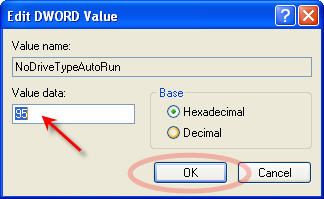
Now click the + Explorer directory just once so it is blue.  On the right side you will see “NoDriveTrypeAutoRun

Right click that and Select “Modify

turn off usb autoplay xp home

Here you most likely have b5 listed in the “Value data” field.  Simply replace that value with 95.

Click OK.

turn off autoplay usb

Close out of the Registry and reboot your machine.  Done!

Continue Reading No Comments

Copyright

Copyright © 2006 +

USB Powered Gadgets and more...

All Rights Reserved

Advertise with us

GetUSB Advertising

This is a high value website providing great exposure to your product and brand. Visit our advertising page to learn specifics.

For more information
Visit our advertising page.

Nexcopy Ad

Nexcopy Provides

USB copy protection with digital rights management for data loaded on USB flash drives.

Contact us learn more

Resources and References Page

Resources and References Page