
Bootable Windows 8 Off USB

Microsoft is looking to make their OS more portable. With Windows 8, one of the features the Redmond, Washington company is introducing is a bootable OS off USB. True, we’ve seen both Windows and Linux distributions bootable off a flash drive before, but what makes this different is 1) it’s legal and 2) officially supported. This is a smart move to keep Microsoft positioned as a strong option as virtual desktop and thin client systems continue to rise in popularity.
Many power users already run virtual laptops off USB flash drives, enabling them to work on a single consistent environment at both home and work without fussing with a laptop or briefcase. An official bootable Windows 8 USB version should cement this concept and help Microsoft move towards more secure OS options comparable to VPMs.
With an official version of bootable Windows OS on USB, IT managers could now use a Nexcopy USB Duplicator to mass-produce their installation and/or restore media in a much faster time frame than using an old-school optical duplicator.
An additional caveat of the portable Windows system is the speed of the environment. Granted, there is nothing like running off a hard disk, but running off NAND flash will be almost as smooth… and with memory performance getting better with USB 3.0 flash drives, it will soon become virtually the same experience.
Video of Bootable Windows 8 running on a MacBook Pro via USB after the jump:
Source: EverythingUSB
Bootable USB Drive Articles on GetUSB.info
GetUSB.info has published several articles and tutorials related to bootable USB drives, covering setup guides, troubleshooting tips, and reviews of popular utilities. Below is an overview of their most useful content.
Bootable USB Guides on GetUSB.info
- Ultimate Boot CD from a USB Pen Drive: A tutorial explaining how to make the Ultimate Boot CD boot from a USB flash drive by formatting, extracting, and using Syslinux to make it bootable.
- How To: Check if My USB Flash Drive is Bootable: A step?by?step walkthrough using Windows tools to verify whether a USB is configured with boot?code/MBR.
- Make USB Flash Drive Bootable in Anything: A review of using Ventoy, an open?source tool for making a USB drive bootable with ISO, IMG, VHD, and EFI files, supporting multi?boot and persistence options.
Other Related Articles
- Review of Rufus Utility: Explains how Rufus writes bootable ISO files to USB and clarifies common misunderstandings.
- USB Boot Troubleshooting: Tutorials about BIOS boot order issues, clearing boot code from USB drives, and proper formatting steps.
Summary Table of Bootable USB Articles
| Topic | Published On | Highlights |
|---|---|---|
| Boot Ultimate Boot CD from USB | 2006 | Hands-on guide using Syslinux and ISO extraction to create a bootable USB version of the Ultimate Boot CD. |
| Check if USB is Bootable | July 2020 | Methods using Windows Disk Management to verify MBR/boot code on a USB drive. |
| Make USB Bootable Using Ventoy | 2022 | Multi?boot support, handles ISO/IMG/VHD/EFI files, no need to reformat for new images. |
| Review of Rufus Utility | 2021 | Explains how Rufus writes bootable code and compares it with other tools for ISO installation. |
| USB Boot Troubleshooting | 2021–2022 | Guides for BIOS issues, clearing bootstrap code, and proper bootable USB formatting methods. |
For more tutorials, reviews, and troubleshooting guides on creating and using bootable USB drives, visit GetUSB.info.

 In addition to the cost of replacing software, areas of business that need this software cannot function until the replacement package is received and reinstalled on the computer.
Now there is a solution available to alleviate concerns and mitigate risks – the
In addition to the cost of replacing software, areas of business that need this software cannot function until the replacement package is received and reinstalled on the computer.
Now there is a solution available to alleviate concerns and mitigate risks – the 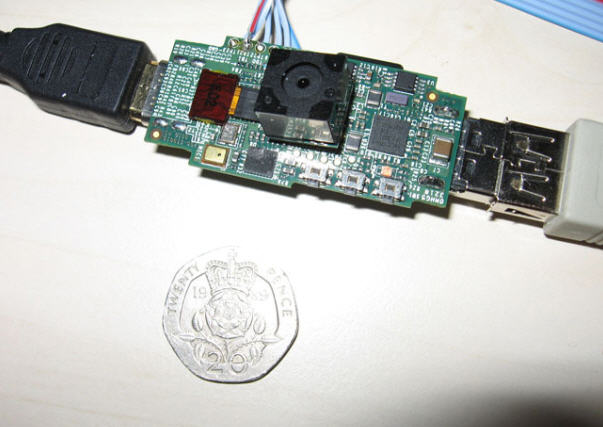 In the spirit of ultra portable operating systems – over the weekend – we learned of Raspberry Pi. The Raspberry is not only an operating system from a flash drive, but it includes the processor too! This means the Linux OS is not high jacking the hardware of the host computer, but rather using it’s own processing power to boot into Linux.
The developer, David Braben, are shooting for a target price of the Raspberry USB computer to be around $25. The above prototype isn’t pretty, but hey – what prototype is? David and his team started this project in the effort to bring ultra low cost computers to less fortunate kids who need and want computer access.
A long long time ago, the
In the spirit of ultra portable operating systems – over the weekend – we learned of Raspberry Pi. The Raspberry is not only an operating system from a flash drive, but it includes the processor too! This means the Linux OS is not high jacking the hardware of the host computer, but rather using it’s own processing power to boot into Linux.
The developer, David Braben, are shooting for a target price of the Raspberry USB computer to be around $25. The above prototype isn’t pretty, but hey – what prototype is? David and his team started this project in the effort to bring ultra low cost computers to less fortunate kids who need and want computer access.
A long long time ago, the  Unless you’ve been living under a rock the last 7 days, we all know Osama bin Laden was killed on May 1, 2011 by US Special Forces. Reading through many articles that week, it’s interesting to learn the al Qaeda leader kept quite and under the radar for nearly 5 years by living in a solid wall compound and without direct cable access, TV access, internet access. The only direct access bin Laden had was a radio.
That said, Osama bin Laden kept current with the outside world by use of flash drives. It was reported his trusted courier would shuffle USB flash drives between his compound and the outside world to communicate, send message and negotiate with the al Queda terrorist group.
During the attack on Monday May 2nd the Special Forces recovered nearly 1000 thumb drives which contained all sorts of information about bin Laden and his relationship with al Qaeda organization.
What is also interesting is the level of hypocrisy bin Laden had. Along with the report of flash drives – which you can only assume many of them where made by US companies – bin Laden also had Coca Cola brought to his compound as well. It seems extremely hypocritical for a terrorist who’s sworn his life to avenge all American’s, yet indulges in US products during his day-to-day existence.
With the hundreds of USB flash drives now in the hands of the Special Forces we should learn a lot more about the habits, plans and leaders of the al Qaeda network.
Glad bin Laden is gone from our world.
Unless you’ve been living under a rock the last 7 days, we all know Osama bin Laden was killed on May 1, 2011 by US Special Forces. Reading through many articles that week, it’s interesting to learn the al Qaeda leader kept quite and under the radar for nearly 5 years by living in a solid wall compound and without direct cable access, TV access, internet access. The only direct access bin Laden had was a radio.
That said, Osama bin Laden kept current with the outside world by use of flash drives. It was reported his trusted courier would shuffle USB flash drives between his compound and the outside world to communicate, send message and negotiate with the al Queda terrorist group.
During the attack on Monday May 2nd the Special Forces recovered nearly 1000 thumb drives which contained all sorts of information about bin Laden and his relationship with al Qaeda organization.
What is also interesting is the level of hypocrisy bin Laden had. Along with the report of flash drives – which you can only assume many of them where made by US companies – bin Laden also had Coca Cola brought to his compound as well. It seems extremely hypocritical for a terrorist who’s sworn his life to avenge all American’s, yet indulges in US products during his day-to-day existence.
With the hundreds of USB flash drives now in the hands of the Special Forces we should learn a lot more about the habits, plans and leaders of the al Qaeda network.
Glad bin Laden is gone from our world.
 Is it possible Microsoft figured out the best possible solution for longevity is letting users run their OS from a flash drive, then plug it into any PC they see fit to run their computer? Some storage problesm with that, but never-the-less, a good starting point.
Here are some other things we think might be bundled with Windows 8:
Is it possible Microsoft figured out the best possible solution for longevity is letting users run their OS from a flash drive, then plug it into any PC they see fit to run their computer? Some storage problesm with that, but never-the-less, a good starting point.
Here are some other things we think might be bundled with Windows 8:
 The Eggbot chassis is made of tough fiberglass, with integrated heat sinks for the included motors. The pen and egg motors are high-torque precision stepping motors, and the pen lift mechanism is a quiet and reliable servo motor.
The Eggbot kit is easy to assemble in a couple of hours, and only requires a couple of basic tools like miniature Phillips-head and flathead screwdrivers. You’ll also need a computer with an available USB port (Mac, Windows or Linux).
The EBB allows your computer to directly control the stepper and servo motors. The onboard 16X microstepping driver chips along with the 200 step/revolution stepper motors give a combined resolution of
The Eggbot chassis is made of tough fiberglass, with integrated heat sinks for the included motors. The pen and egg motors are high-torque precision stepping motors, and the pen lift mechanism is a quiet and reliable servo motor.
The Eggbot kit is easy to assemble in a couple of hours, and only requires a couple of basic tools like miniature Phillips-head and flathead screwdrivers. You’ll also need a computer with an available USB port (Mac, Windows or Linux).
The EBB allows your computer to directly control the stepper and servo motors. The onboard 16X microstepping driver chips along with the 200 step/revolution stepper motors give a combined resolution of

 Thunderbold, LightPeak and their magical 10Gpbs transfer rate have been the talk for some time. Well, at least the LightPeak version. Thunderbolt is just Apple’s spin on the technology. So will these new fangled technologies replace USB one day? Yes, I think so. Anytime soon? No way.
LightPeak and Thunderbolt are currently designed off copper wire and provide an estimated 10Gbps transfer rate in both directions. Of course that is spec, and we have yet to see a working product. But never-the-less, the LighPeak technology has the ability to cap at 100Gpbs if they ever switch to Fiber Optics as the transfer hardware.
But lets be clear, a lot must happen before the momentum of a market switches from one technology to another. Heck, just for Dell to make a change from USB 2.0 to USB 3.0 took them nearly 9 months…and that was just an upgrade.
Are we scared over here at GetUSB.info – no. I could see DisplayPort USB drives in the future, after all, it’s just another means of connection…and if it gets me more speed and more done in less time. I welcome it with open arms.
Thunderbold, LightPeak and their magical 10Gpbs transfer rate have been the talk for some time. Well, at least the LightPeak version. Thunderbolt is just Apple’s spin on the technology. So will these new fangled technologies replace USB one day? Yes, I think so. Anytime soon? No way.
LightPeak and Thunderbolt are currently designed off copper wire and provide an estimated 10Gbps transfer rate in both directions. Of course that is spec, and we have yet to see a working product. But never-the-less, the LighPeak technology has the ability to cap at 100Gpbs if they ever switch to Fiber Optics as the transfer hardware.
But lets be clear, a lot must happen before the momentum of a market switches from one technology to another. Heck, just for Dell to make a change from USB 2.0 to USB 3.0 took them nearly 9 months…and that was just an upgrade.
Are we scared over here at GetUSB.info – no. I could see DisplayPort USB drives in the future, after all, it’s just another means of connection…and if it gets me more speed and more done in less time. I welcome it with open arms.
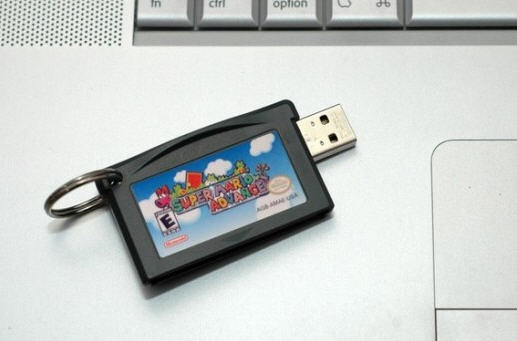
 Some live, eat and sleep SuperMario, or at least did when they where younger will enjoy this small USB flash drive cartridge:
 Or for the hard cord geek who needs a boat load of extra storage you can pull out all the stops for this 1TB hard drive,
