GetUSB.info Logo

Create your own Custom USB Flash Drive Logos

Create your own Custom USB Flash Drive Logos is a great method to build your brand, make a great impression and leave a lasting positive vibe with your clients.

Branding products isn’t a new concept in today’s marketing world, but Nexcopy has made it a lot more accessible to brand one of the most versatile pieces of technology in the industry. With the new USB7P full color inkjet printer, anyone can bring their designs or images to life on their flash drives. Below is a video illustrating the product with its features and benefits.

For more information about customizing this video for our reseller channel, please contact Nexcopy directly.

Source: Nexcopy Inc.

Create your own Custom USB Flash Drive Logos Twitter promotion
Create your own Custom USB Flash Drive Logos Facebook promotion

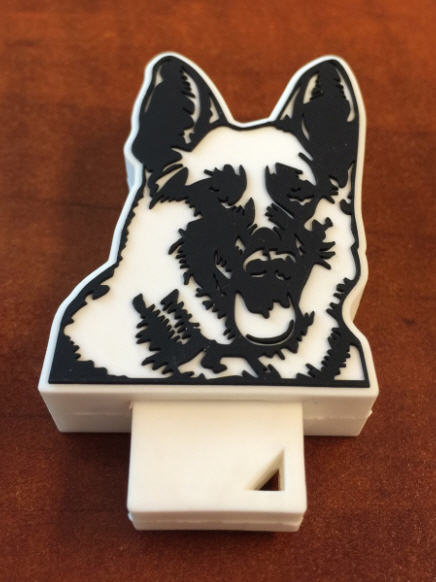
We recently published an article featuring 60 incredible custom USB flash drive designs that range from miniature cars to footballs and represent industries as diverse as material handling, construction, medical, and environmental services. A custom-shaped USB flash drive is more than just portable storage—it’s a unique, physical representation of your brand

By transforming a company logo or product into a functional USB drive, businesses create a marketing tool that not only stands out but also makes a lasting impression on their target audience. For example, a construction company once commissioned a USB drive molded in the exact shape of one of their heavy-duty excavators. This creative giveaway left potential clients with a practical device that doubled as a memorable conversation starter, reinforcing brand recognition long after the initial meeting

Marketing professionals continue to choose custom logo USB flash drives because they offer a tangible, engaging, and highly effective way to drive home their brand message.

Continue Reading No Comments

A Breath of Fresh…

Helium?

The gas most commonly associated with balloons and chipmunk voices has recently seen use in Western Digital’s hardware. The memory provider unveiled a new set of their helium-filled drives this week, aimed at personal and small business use. While some of their sizing options are above and beyond what many users would care for, bringing these kinds of options beyond just server use can be a step in an uplifting direction.

wd_red_nas_hdd_678_1_678x452

Just like their predecessors, the new hard drives come with SATA III interfaces. With a density one-seventh that of air, helium filled hardware reduces the drag force acting on the spinning stack and lowers fluid forces affecting the disks, enabling thinner platters in larger numbers. The family of WD’s hermetically-sealed hard drives will include 8TB options with 5400RPM or 7200RPM spindle speeds and looks to be optimized for mixed workloads. While the only helium platforms available are for NAS drives, the use of the gas leads to speculation that Western Digital is working on more inexpensive helium-filled platforms. Hopefully, this will lead to helium adaptations of their high-performance HDDs currently on the market for desktop use.

Continue Reading No Comments

AirBar – Make Any Laptop Touchscreen

The Airbar will turn any Windows laptop into a touch screen. Very cool. The technology is friendly with Windows 8 and 10 and this is because it uses Microsoft’s “Gestures” technology to turn your laptop into a touchscreen laptop.

The Airbar was designed in Sweden and made in Sweden. The bar is $50 US Dollars.

The Airbar works by invisible light beams. To get it working you connect is via USB and set the bar at the bottom of your laptop screen, just like you see in the picture.

The Airbar will project light upward. As your fingers break the barrier of the projected light, the bar will translate this into gestures. Through the Windows API for gestures your actions will translate to the programs running.

Continue Reading No Comments

Can I Connect a USB-C to a USB 2.0 Port?

USB Type C Connector

Question

Can I connect a USB Type C cable to an older USB 2.0 port?

Answer

No you cannot.

The USB type C socket is a backward compatible technology with respect to the protocol but it is not backward compatible in the physical connection. Meaning, the sockets wont fit, but with an adapter you will have no problem charge devices or trasnfering data.

Why

The USB-C connection was design for several reasons. Of course a new specification will always be developed to increase data transfer rates or introduce new features, such as increased power across the buss to charge or power connected devices. The main reason for USB-C connectors is size. With USB being the world’s most popular technology for peripheral devices, the Implementers Forum (with members such as Intel, Acer, AData, SanDisk, Lexar, Micron and many others) they wanted to insure the USB specification continued to be the #1 method for connecting the ever decreasing size of digital devices.

Continue Reading No Comments

Trained Dogs to Sniff Out SD Cards and USB Sticks

USB stick, dog

Police dogs have yet another smell they must detect. Tactical Detection K9 company now trains dogs to sniff out SD cards and USB sticks. The training is in response to better assisting law enforcement in child pornography investigations.

The percentage of a dog’s brain which is devoted to analyzing smells is 40 times greater than humans. For example, humans can detect about 5 million scents and a German Shepherd can detect around 225 million smells.

In a recent investigation a dog was used in the FBI raid of the home of the former Subway spokesman Jared Fogle in Hancock County, Indiana.

What could take investigators hours to find an SD card or USB stick in a house would take a trained dog considerably less time, probably no more than 30 minutes.

According to Tactical Detection K9 it took scientists over four years to isolate the odor associated with memory devices. Now that a specific odor has been identified it takes 8-9 months for a dog to be trained in picking up that scent.

A dog which can sniff out SD and USB sticks can cost upwards of $9,000.

Source: IB Times and Dummies.com .

Continue Reading No Comments

Lenovo USB Compu-Stick

Computers on a stick will begin to gain popularity over the next two years. Lenovo is the most recent to offer a compu-stick. The Ideacentre 300 Stick is a 2GB of RAM computer with an Intel Atom Z3735F processor (2M cache + 1.83 Ghz) and runs Windows 8.1.

The Compu-Stick can be plugged into any computer and when you reboot, the hardware now uses the OS of the compu-stick.

compu-stick, usb

Alternatively you may connect the device to a TV and sync a keyboard and mouse and now you have a fully functioning PC with your TV as the monitor.

This is a great step in the right direction as all technology will move towards solid state memory. The Lenovo product has 32GBs of memory which is fine for a first generation product. If they can house a microSD slot in there for expanded memory, it would be an inexpensive solution to a possible data storage problem.

The only caveat left is that unless true Grade A memory is used in these devices the data retention and stability is the week point. With Grade A NAND memory you have a re-write of about 100,000 cycles. SLC memory will help this issue and improve reliability.

Reports indicate the Compu-Stick will run about $150.

Continue Reading No Comments

Portable, Plugable USB Type C Dock Station

With the single USB-C port of the new MacBook laptop we knew a power station and/or dock station was right behind.  Here is a Kickstarter compaign to address the single port computer and connecting all your peripheral gadgets to your new computer.

The ultimate dock station will power and charge your system using USB’s new Power Delivery specification, while providing an additional alternate mode video output up to 4K resolution, gigabit Ethernet, audio input/output, and 4 USB ports.  The tall slender design of the dock station packs a number of sockets to support any type of peripheral you need to connect.

In addition, the USB 3.1 Type-C specification supports a feature called “VESA Alternate Mode” which works with the built-in graphics processor on supported systems to provide video output at resolutions up to 4K.  This is particularly important given the up-tick in TVs and monitors which are being released with a 4K specification.  The other two display outputs in the Ultimate Dock are enabled by the DisplayLink DL-3900 graphics processor, which can support two additional 1080P displays at 60Hz.  The DisplayLink driver is still in development, but the Kickstarter campaign claims the driver will have a final release by the time the dock station hits full production.

The Plugable Ultimate USB-C Universal Docking Station supports:

Continue Reading No Comments

How To Make a USB Read Only

There are two ways on “How to make a USB read only.” One method will make the USB read-only in anything it is connected to, so you could say this is a universal way of making a flash drive write protected.

The other way is a PC-specific solution where some registry edits are required to any computer the USB flash drive is connected to.

When we say 100% permanent, this means the USB stick is read only (write protected) on all devices, whether it be computers like a Mac, Windows PC, Linux box, or non-processor based products like a car stereo. This permanent solution also means the status of the drive cannot be changed. The other method flags a USB device to be read only in relationship to the PC it is connected to so that whenever that USB stick is connected to that computer, it makes the USB read only and blocks all write commands to the device.

Most times an IT manager or content owner wants the USB stick to be read only so the files cannot be deleted or formatted off the drive. Another reason for making a USB read only is for the original files to remain the same and block the ability for files to be changed or manipulated. Finally, it’s smart to have USBs read only so that viruses don’t jump onto the drive and possibly spread to other computers.

Let us start with the less permanent way because it’s easier to do and doesn’t require any specific hardware.

You will need a Windows7 machine or higher. The Windows7 machine will have DiskPart utility which allows us to perform all sorts of cool things to flash drives, like setting write protection.

  • Connect the USB to your Windows computer.
  • To begin, go to your Windows Start and in the Search Field type cmd
How To Make a USB Read Only command prompt example

This will run your Command Prompt.

  • Next, you will want to get to the C root of the Command Prompt and if you are signed in as a user you can simply type cd\ – this will get you back to the root of the C drive.
  • Type DISKPART
  • Type LIST DISK

Now you will need to find the USB stick connected to your PC. Most likely it’s DISK 1

Continue Reading No Comments

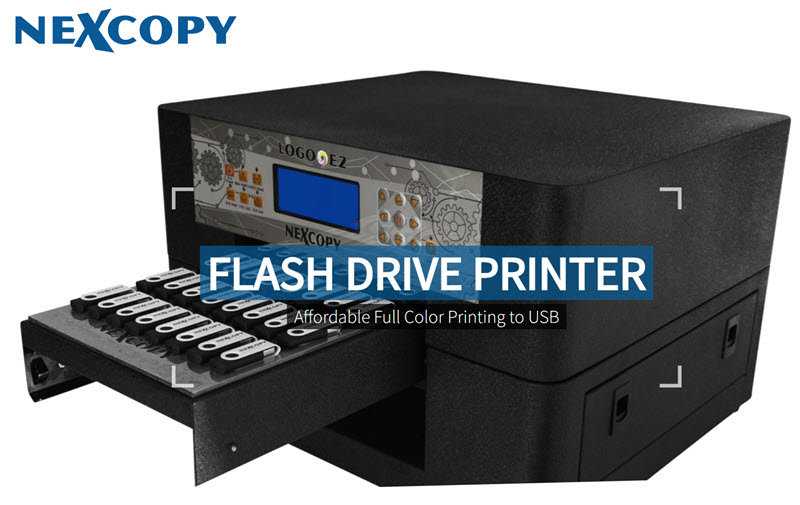
Nexcopy Introduces USB Flash Drive Printer

USB Flash Drive Printer

UPDATE: The Nexcopy USB flash drive printer has been upgraded to a 40-up full-color print unit. Nexcopy has replaced the USB7P printer with the new LOGO-EZ PRINTER. This updated model includes a custom-built tray designed to securely hold USB drives in place during high-speed printing. Pricing starts at approximately $3,500.

Press Release: Nexcopy Launches USB Flash Drive Printer

Lake Forest, CA – June 11, 2014Nexcopy Inc. has announced the release of its full-color USB flash drive printer. This new inkjet printer is designed to print vivid, high-resolution logos directly onto USB swivel clips. Targeted at small businesses, marketing firms, and promotional companies, the printer is ideal for fast, in-house branding and short production runs.

Fast and Efficient Printing with the USB7P

Using Nexcopy’s seven-slot USB flash drive printer and specially coated printable clips, users can easily print high-quality images in under 35 seconds.

  • Supports standard JPEG and BMP image formats
  • Prints 7 identical or 7 unique logos per batch
  • Dual-sided printable swivel USB clips
  • White matte finish ideal for color accuracy
  • Perfect for single samples or small-to-medium print jobs
  • Printed images are dry instantly, water-resistant, and scratch-resistant
  • Compatible with most standard swivel USB flash drive designs

Affordable In-House USB Printing

“The USB flash drive printer is a major innovation for Nexcopy,” said Greg Morris, President of Nexcopy Inc. “The USB7P provides a cost-effective way for marketing and promotional companies to produce vibrant, branded USB flash drives in-house, without the delays or expenses of outsourcing.”

USB flash drive printer

USB Flash Drive Printer, by Nexcopy

HP Inkjet Technology for Vibrant Results

The USB7P is powered by Hewlett Packard’s reliable inkjet technology, known for precise color reproduction and Pantone color matching. In testing, the printer produced seven full-color clips in 35 seconds. Black-only logo printing can be completed in as little as 15 seconds.

Lower Cost, Faster Turnaround

“With our USB flash drive printer, small businesses can save on shipping, screen setup fees, and costly print runs,” added Morris. “Some of our resellers simply grabbed logos from a customer’s website, printed them directly on USB clips, and landed bulk orders the next day. That’s the power of fast, on-demand branding.”

USB7P Specifications

The printer weighs 11 lbs (5 kg) and has dimensions of 18 x 11.5 x 10.5 inches (452 x 286 x 267 mm). It ships with universal power support (110V/220V), includes one CMY cartridge, one black cartridge, and 20 printable clips. The tray holds 7 clips per print cycle. MSRP: $1,799. “USB Flash Drive Printer” is a trademark of Nexcopy Inc.

Product Resources

Global Reseller Network

Nexcopy’s full line of duplication systems—including USB, CF, SD, and microSD duplicators—is available through a global network of authorized resellers.


About Nexcopy Incorporated

Nexcopy specializes in developing and manufacturing advanced flash memory duplication systems. As a pioneer in the solid-state memory sector, Nexcopy services markets in North America, Europe, India, Asia, and the Pacific Rim, with U.S. headquarters located at 13 Orchard Road, Suite 102, Lake Forest, CA 92630.

Nexcopy Incorporated
Mr. Greg Morris
+1 949 481 6478
contact@nexcopy.com
https://www.nexcopy.com

Continue Reading No Comments

Nexcopy Adds New Standalone SD Duplicators With SD Card Sanitization Features

Standalone SD duplicator system with sanitize feature by Nexcopy

Press Release: Nexcopy Introduces SD Duplicators with Sanitize Feature

Lake Forest, CA – November 5, 2013 – Nexcopy Inc., a leading manufacturer of flash memory duplicators, announces two new standalone SD duplicators with sanitize feature: the 1-15 and 1-31 target systems. These models offer high-speed Secure Digital (SD) duplication combined with advanced sanitization capabilities for enterprise, IT, and government data workflows.

Why Sanitization Matters in SD Duplicators

The new Nexcopy SD duplicators introduce a powerful full binary overwrite system, offering both single-pass and triple-pass random write sequencing. This proprietary triple-pass process ensures data is permanently deleted—making these SD duplicators with sanitize feature ideal for secure environments where data cannot be recovered by forensic tools.

Efficient In-House Duplication and Sanitization

These standalone duplicators are perfect for businesses needing in-house flash memory management. They allow duplication and sanitization of multiple SD cards simultaneously. Nexcopy’s core binary copy engine, used in its trusted USB duplicators, supports all major file systems: FAT, FAT32, NTFS, ext2, ext3, ext4, and custom formats. This makes the SD duplicators with sanitize feature highly flexible for IT teams and software developers.

“Pivoting from our core binary copy firmware, Nexcopy expands our technology to include sanitization features now being sought by IT professionals,” said Greg Morris, President of Nexcopy Inc. “We built these standalone SD duplicators specifically to meet enterprise demands.”

Standalone Operation with One-Touch Control

The Nexcopy SD duplicators operate independently of any host computer. Their simple one-button functionality allows fast deployment, making them ideal for deployment labs, software QA teams, government organizations, and educational institutions where speed and security matter most.

Available Models of Nexcopy SD Duplicators with Sanitize Feature

Product Image Resources

Global Availability

Nexcopy’s complete product line—including USB, SD, CF, and microSD duplicators with sanitize features—is available through a global network of authorized resellers.


About Nexcopy Incorporated

Nexcopy specializes in cutting-edge duplication technology for flash memory. As a pioneer in solid-state memory duplication, Nexcopy serves clients across North and South America, Europe, Asia, and beyond, from its headquarters in Lake Forest, California.

Nexcopy Incorporated
13 Orchard Road, Suite 102
Lake Forest, CA 92630
+1 949 481 6478
contact@nexcopy.com
https://www.nexcopy.com

Continue Reading No Comments

ECCN and HS Code for USB Flash Drives

When importing or exporting USB flash drives in the United States you will want to use these ECCN and HS Codes to help with customs paperwork. The ECCN Code for a USB flash drive is:  EAR99 The HS Code for a USB flash drive is:  8523.51.0000 In the event your freight forwarder or delivery service tells you that an ECCN is needed to ship USB flash drives and is required to complete the Automated Export System (AES) or other documentation then please give them the above information and it should all work out. ECCN stands for Export Control Classification Number.  An ECCN is an alpha-numeric classification used in the Commerce Control List to identify items for export control purposes. HS Code is the  “Harmonized System” which is a 6-digit standardized numerical method of classifying traded products developed and maintained by the World Customs Organization.  The Harmonized System system (HS) forms the basis of all countries’ tariff Schedule all over the world.  Or it helps countries asses value to a product in a standardized way and by definitions all countries can agree and interpret. Continue Reading No Comments

Copyright

Copyright © 2006 +

USB Powered Gadgets and more...

All Rights Reserved

Advertise with us

GetUSB Advertising

This is a high value website providing great exposure to your product and brand. Visit our advertising page to learn specifics.

For more information
Visit our advertising page.

Nexcopy Ad

Nexcopy Provides

USB copy protection with digital rights management for data loaded on USB flash drives.

Contact us learn more

Resources and References Page

Resources and References Page