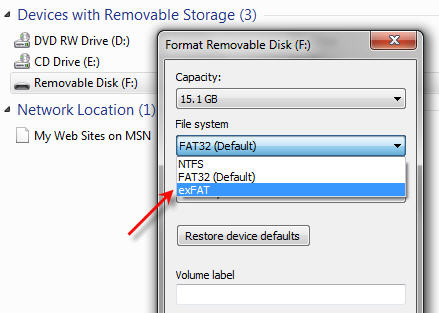
It’s a good question; format a USB flash drive as exFAT or NTFS? There are several reasons not to format as NTFS and we’ll explain.
Most of the Time you are Okay
Most of the time, formatting a flash drive is a very simple decision. There are only two situations where you should carefully consider what format to use. Here are the details:
Note: This article is focused on Windows and Mac operating systems.
The file formats available for a USB flash drive are:
FAT (also called FAT16)
FAT32
exFAT
NTFS
HFS (Mac only)
Flash drive manufacturers typically format a drive as either FAT or FAT32. Any device of 2GB or smaller will be formatted as FAT, and any USB over 2GB will be formatted as FAT32.
These two formats are the best file systems for removable drives like USB flash drives because they support quick disconnect functionality. Chances are very slim that you will destroy the device or files if you unplug the USB without using the Eject function (in Windows) or the Un-mount function (in Mac).
The one huge limitation with FAT and FAT32 is the single file size limit. If a single file is larger than 2GB, you need FAT32. If you have a single file bigger than 4GB, you must use NTFS or exFAT. Typically, these large files are video files or restore image files (for restoring a computer operating system from a single image file).
Can I connect a USB Type C cable to an older USB 2.0 port?
Answer
No you cannot.
The USB type C socket is a backward compatible technology with respect to the protocol but it is not backward compatible in the physical connection. Meaning, the sockets wont fit, but with an adapter you will have no problem charge devices or trasnfering data.
Why
The USB-C connection was design for several reasons. Of course a new specification will always be developed to increase data transfer rates or introduce new features, such as increased power across the buss to charge or power connected devices. The main reason for USB-C connectors is size. With USB being the world’s most popular technology for peripheral devices, the Implementers Forum (with members such as Intel, Acer, AData, SanDisk, Lexar, Micron and many others) they wanted to insure the USB specification continued to be the #1 method for connecting the ever decreasing size of digital devices.
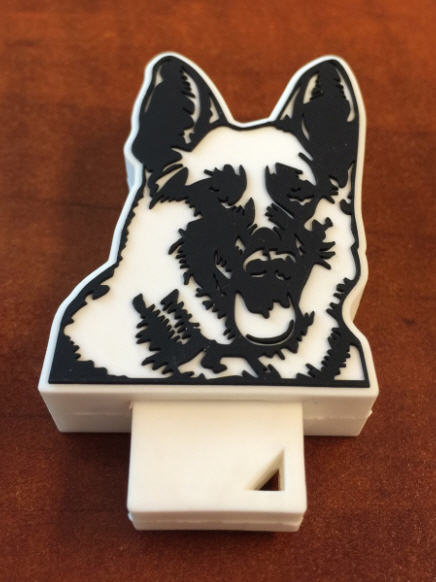
Police dogs have yet another smell they must detect. Tactical Detection K9 company now trains dogs to sniff out SD cards and USB sticks. The training is in response to better assisting law enforcement in child pornography investigations.
The percentage of a dog’s brain which is devoted to analyzing smells is 40 times greater than humans. For example, humans can detect about 5 million scents and a German Shepherd can detect around 225 million smells.
In a recent investigation a dog was used in the FBI raid of the home of the former Subway spokesman Jared Fogle in Hancock County, Indiana.
What could take investigators hours to find an SD card or USB stick in a house would take a trained dog considerably less time, probably no more than 30 minutes.
According to Tactical Detection K9 it took scientists over four years to isolate the odor associated with memory devices. Now that a specific odor has been identified it takes 8-9 months for a dog to be trained in picking up that scent.
A dog which can sniff out SD and USB sticks can cost upwards of $9,000.
With the single USB-C port of the new MacBook laptop we knew a power station and/or dock station was right behind. Here is a Kickstarter compaign to address the single port computer and connecting all your peripheral gadgets to your new computer.
The ultimate dock station will power and charge your system using USB’s new Power Delivery specification, while providing an additional alternate mode video output up to 4K resolution, gigabit Ethernet, audio input/output, and 4 USB ports. The tall slender design of the dock station packs a number of sockets to support any type of peripheral you need to connect.
In addition, the USB 3.1 Type-C specification supports a feature called “VESA Alternate Mode” which works with the built-in graphics processor on supported systems to provide video output at resolutions up to 4K. This is particularly important given the up-tick in TVs and monitors which are being released with a 4K specification. The other two display outputs in the Ultimate Dock are enabled by the DisplayLink DL-3900 graphics processor, which can support two additional 1080P displays at 60Hz. The DisplayLink driver is still in development, but the Kickstarter campaign claims the driver will have a final release by the time the dock station hits full production.
The Plugable Ultimate USB-C Universal Docking Station supports:
Yes, there are million flash drives in the market. This one is a bit clever don’t you think? Buy the 4GB drive off Urban Outfitters. Create your own multimedia message with audio, video or text and save it to this flash drive. Throw it into the ocean and see what happens.
Sometimes you will connect a USB to the PC and get an error message saying the drive has a GPT Protective Partition and you cannot format the drive. Here is the fix to resolve the issue:
First, what is a GPT USB stick? The GUID Partition Table (GPT) is the successor to the Master Boot Record. The MBR was created by IBM back in the early 90s. The problem with MBR is the limitation to partition table sizes which is 2 Terabytes.
Since there are no 2T USB flash drives (at the time of this post), there is no need to use GPT as your partition table.
Removing the GPT Protected Partition can be accomplished through the Windows Diskpart program.
Determine the Disk Number for the USB GPT-protected drive. To do this, perform the following:
Right-click on (My) Computer.
Choose Manage.
Select Disk Management (listed under Storage).
Look for the drive that is identified as GPT and note the Disk number (such as Disk 1).
Format USB GPT Protected Partition
Now, open a Command Window. From the command prompt, type diskpart and press Enter.
The diskpart prompt will open.
From the diskpart prompt, type list disk and press Enter. A list of disks will appear in a text format. You will return to the diskpart prompt.
From the diskpart prompt, type select disk disknumber (in this example from the screen shot above, you would type select disk 1)and press Enter. A message appears saying that the disk is selected. You will return to the diskpart prompt.
From the diskpart prompt, type clean and press Enter. At this point the drive’s partition and signature a removed. You will return to the diskpart prompt.
From the diskpart prompt, type exit and press Enter. Type exit once more to close the Command Window.
There are two ways to make a USB read only. One method will make the USB read-only on anything it is connected to, so you could say this is a universal way of making a flash drive write protected.
The other way is a PC-specific solution where some registry edits are required on any computer the USB flash drive is connected to.
When we say 100% permanent, this means the USB stick is read only (write protected) on all devices, whether it be computers like a Mac, Windows PC, Linux box, or non-processor based products like a car stereo. This permanent solution also means the status of the drive cannot be changed. The other method flags a USB device to be read only in relation to the PC it is connected to, so whenever that USB stick is connected to that computer, it makes the USB read only and blocks all write commands to the device.
Most times an IT manager or content owner wants the USB stick to be read only so the files cannot be deleted or formatted off the drive. Another reason for making a USB read only is for the original files to remain the same and block the ability for files to be changed or manipulated. Finally, it’s smart to have USB drives set to read only so that viruses don’t jump onto the drive and possibly spread to other computers.
Let us start with the less permanent way because it’s easier to do and doesn’t require any specific hardware.
You will need a Windows 7 machine or higher. Windows 7 includes the DiskPart utility, which allows us to perform useful tasks on flash drives, like setting write protection.
Connect the USB to your Windows computer.
To begin, go to your Windows Start menu and in the search field type cmd.
This will run your Command Prompt.
Next, you will want to get to the C root of the Command Prompt. If you are signed in as a user you can simply type cd\ – this will get you back to the root of the C drive.
Type DISKPART.
Type LIST DISK.
Now you will need to find the USB stick connected to your PC. Most likely it’s DISK 1.
This is a great video that explains how flash memory works. Granted, the video is very technical but does work through the concept of reading and writing data to flash. So if you have the 17 minutes to use, I suggest giving this a watch. The video does cover SLC, MLC and TLC memory and how each of these technologies read and write with the different layers of a floating gate device like NAND.
Source: YouTube.
Continue Reading
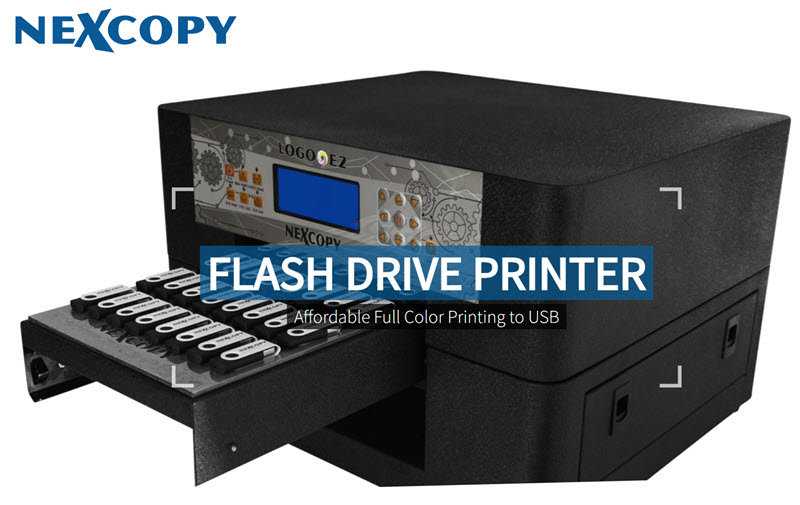
UPDATE: The Nexcopy USB flash drive inkjet printer has been upgraded to the new LOGO-EZ PRINTER, a 40-up full-color inkjet printer designed specifically for USB flash drive branding. The LOGO-EZ features a fully customized tray that securely holds USB drives in place during printing. Pricing starts around $3,500. For current product specs and availability, visit Nexcopy.com.
Legacy Overview: USB7P USB Flash Drive Inkjet Printer
Note: The following section refers to the discontinued USB7P model. Nexcopy now offers an improved USB flash drive inkjet printer under the LOGO-EZ name. See Nexcopy’s site for current models.
What Was the USB7P Inkjet Printer for USB Flash Drives?
Nexcopy introduced the USB7P USB flash drive inkjet printer as a compact desktop solution for professional, full-color branding of USB swivel drives. Unlike traditional third-party printing services that require bulk orders and long lead times, the USB7P allowed businesses to take control of their branding process directly from their office. With the ability to print custom logos, promotional graphics, or product-specific designs onto the metal swivel clips of USB drives, companies could create fully personalized flash drives on demand.
This inkjet printer for USB flash drives supported widely used file formats like JPEG and bitmap, making it easy for users to import their artwork and align it accurately to each clip. Designed for efficiency, the USB7P produced vivid, high-resolution prints in less than a minute. Whether for small-run marketing giveaways, corporate training tools, or private-label media distribution, the USB7P gave organizations a flexible and cost-effective way to customize USB drives in-house without sacrificing print quality or turnaround time.
How the USB Flash Drive Inkjet Printer Worked
The USB7P utilizes specially designed printable swivel clips provided by Nexcopy, which replace the standard metal clips commonly found on traditional USB flash drives. These printable clips are engineered to fit perfectly on most standard swivel-style flash drives, making it easy to transform a generic drive into a custom-branded product. One of the standout features of this system is the ability to swap out the clips at any time—a major advantage for businesses that frequently update their branding, change promotional campaigns, or require multilingual packaging.
For example, if your logo undergoes a redesign or seasonal artwork is required for a limited-time offer, you can simply print new clips and replace the old ones without needing to purchase entirely new drives. This modular approach to USB branding not only saves cost but also greatly enhances operational flexibility. Companies can even produce different color variations of the same logo or design to align with specific departments, product lines, or event themes—all from the same batch of flash drives.
Powered by HP’s advanced inkjet technology, the USB7P USB flash drive inkjet printer supports over 11 million colors with spot-on PMS color matching. Whether you’re printing a vibrant photo, a subtle watermark, or a two-tone logo, the output remains sharp, consistent, and high-resolution. The printer can produce a full-color set of seven USB clips in just 35 seconds, delivering fast, professional results with minimal effort and no drying time required.
Key Features of the USB7P USB Flash Drive Inkjet Printer
Full-color inkjet printing on both sides of USB clips
Accepts JPEG and bitmap file formats
Prints 7 clips per batch with unique or identical images
Onboard camera ensures perfect image alignment
Fast output with instant-dry, water-resistant results
Software Setup for the USB Flash Drive Inkjet Printer
Setup was simple: install drivers, load the 7-slot clip tray, and launch the included Nexcopy software. The printer’s onboard camera helped align your artwork with precision. To print the reverse side, just flip the clips and print again—no drying time needed.
A Proven Solution for USB Branding and Fulfillment
The USB7P USB flash drive inkjet printer was specifically engineered to meet the dynamic needs of modern corporations, where product labeling, software revisions, or branding updates can change rapidly and often with little notice. In industries where management frequently mandates last-minute design or version updates—such as software development, medical devices, education, or government—the ability to perform in-house USB flash drive customization becomes not just a convenience but a necessity.
Unlike outsourcing, which introduces lead times, minimum order quantities, and increased costs, the USB7P allowed organizations to react quickly to evolving requirements. Whether it was a rebranded product suite, a new software patch, or an internal initiative that needed fast deployment, the USB7P gave teams the ability to print full-color, professional-grade USB swivel clips in real time—on demand, and in small or large batches.
Its capability to print seven clips simultaneously with unique or identical artwork made it ideal for short-run branding jobs, quick-turn marketing promotions, sales samples, trade shows, beta program rollouts, or even internal asset labeling. This level of flexibility empowered departments to keep pace with marketing, compliance, or operational directives without relying on third-party suppliers or long production schedules.
Though the USB7P has since been replaced by the more powerful LOGO-EZ printer, the core concept remains the same: give corporate users the ability to control their USB branding pipeline from start to finish—affordably, efficiently, and on their own schedule.
Promotional items have been around for years. Coffee mugs, pens, etc are still the default item for marketing manager without an imagination. Back in 2000 the flash drive was the new kid on the block for swag. Flash forward five years and the USB stick was a bit like the coffee mug, old and boring. At about this same time manufacturing processes started improving for using silicon as a moldable material. This is where the custom flash drive started gaining popularity. As time move along, the process and technology got even better. Today we are seeing some fantastic promotional items in the shape of logo’s, parts, products and even airplanes.
Today we list five realistic looking USB airplane designs that would get any marketing manager excited about a promotional flash drive.
Let’s take a look large cabin cruiser
Here is the Pilatus airplane
Here is a Hawker airplane
Here is the F16 and F35 planes designed by Lockheed Martin
These are all very impressive designs and certainly a piece of swag any trade show junkie, or even executive, would love to have. Times have certainly changed. The source for these designs is through a company named www.USBCOPIER.com and these products or any customized design can be created, just contact them.
Continue Reading
One of the most classic and – yet still perversely prevalent – issues IT staff face is resetting Windows passwords for users who have forgotten them (again). While remote administration has reduced the need to physically reactivate and reset passwords in most scenarios, a copy of L0phtcrack still remains in every experienced admins ‘toolbox’. Of course, having to reboot the system and use a copy of Bart PE or other portable OS’ to run L0phtcrack has a PITA factor all its own.
Well, it seems that entrepreneur Jonty Lovell has done something about it as the all new – and fully funded – Password Reset Key has been designed to take the hassle out of this common issue. In fact, as long as you have physical access to the system even home owners can now reset their forgotten password within mere moments.
The secret to the Password Reset Key is the fact that it combines a key shaped 1GB flash drive – available in black, stainless steel, or ‘gold’ – with a simple OS that auto-loads his custom software upon startup. Just as with L0phtcrack, with a simple click or three, you can scan, reset and even test how secure a given systems login passwords are. Because of its ‘key’ form factor, it will be hard to lose as you can simply stick on your keychain and always have it close at hand. However, be warned that this $15 – $50 device (depending on which option to choose) may get you in trouble with your IT staff as resetting the ‘administrator’ password will greatly ‘annoy’ them if they find out.
Continue Reading






 Here is the Pilatus airplane
 Here is a Hawker airplane
 Here is the F16 and F35 planes designed by Lockheed Martin

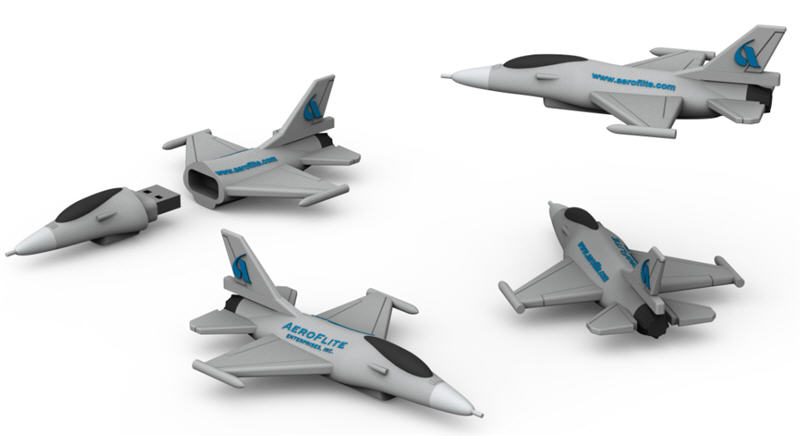 These are all very impressive designs and certainly a piece of swag any trade show junkie, or even executive, would love to have. Times have certainly changed. The source for these designs is through a company named www.USBCOPIER.com and these products or any customized design can be created, just contact them.
 Well, it seems that entrepreneur Jonty Lovell has done something about it as the all new – and fully funded – Password Reset Key has been designed to take the hassle out of this common issue. In fact, as long as you have physical access to the system even home owners can now reset their forgotten password within mere moments.
The secret to the Password Reset Key is the fact that it combines a key shaped 1GB flash drive – available in black, stainless steel, or ‘gold’ – with a simple OS that auto-loads his custom software upon startup. Just as with L0phtcrack, with a simple click or three, you can scan, reset and even test how secure a given systems login passwords are. Because of its ‘key’ form factor, it will be hard to lose as you can simply stick on your keychain and always have it close at hand. However, be warned that this $15 – $50 device (depending on which option to choose) may get you in trouble with your IT staff as resetting the ‘administrator’ password will greatly ‘annoy’ them if they find out.
Well, it seems that entrepreneur Jonty Lovell has done something about it as the all new – and fully funded – Password Reset Key has been designed to take the hassle out of this common issue. In fact, as long as you have physical access to the system even home owners can now reset their forgotten password within mere moments.
The secret to the Password Reset Key is the fact that it combines a key shaped 1GB flash drive – available in black, stainless steel, or ‘gold’ – with a simple OS that auto-loads his custom software upon startup. Just as with L0phtcrack, with a simple click or three, you can scan, reset and even test how secure a given systems login passwords are. Because of its ‘key’ form factor, it will be hard to lose as you can simply stick on your keychain and always have it close at hand. However, be warned that this $15 – $50 device (depending on which option to choose) may get you in trouble with your IT staff as resetting the ‘administrator’ password will greatly ‘annoy’ them if they find out.