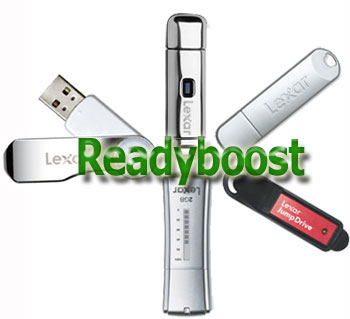
Yesterday Lexar announced their full line of USB flash drives are Windows Vista Readyboost compliant. I’m starting to believe that being Readyboost compliant should be a standard for any flash drive. Then again, the specification from Windows is very general that any additional flash memory can be flagged for use with Readyboost.
None the less, welcome Lexar; welcome. If you’re interested in seeing what kind of boost Readyboost gives, check out the video.
Continue Reading
Today SanDisk announced their largest Memory Stick Micro card the M2. At convenient 4GBs it’s the largest flash memory card for any mobile phone. The M2 was designed, in partnership, with Sony and their line of Ericcson mobile phones.
Norm Frentz, director of marketing believes, “this is the threshold at which mobile phones provide enough capacity to become the user’s all-in-one portable music player, camcorder, photo album and video player.â€
And I for one believe him. At 4GBs you can do just about anything and carry just about anything you could imagine.
Continue Reading
Another Update:Use external drive via USB for unlimited storage!
Update: The guys at AwkwardTV.org have been very busy. Here are some quick links to their wiki site with some great AppleTV hacks.
The full wiki is here. None of this could be done without the hard work of Ozy and his clan at AwkwardTV.org
—————
Ozy from AwkwardTV.org figured out how to write a bootstrap from USB so that he can now start to hack AppleTV without opening the box. Here is a showcase of the USB boot.
If you’re interested in more details on this hack and others, visit AwkwardTV.org for updates.
Continue Reading
CNET posted a fun little tutorial on how to convert a floppy disk into a USB flash drive. Not that it would matter, but the USB connection doesn’t read off the floppy disk, we’re just talking case modification.
You can get the thin USB flash drive from Amazon to do this mod yourself.
Continue Reading
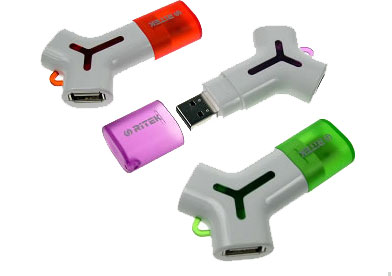
RiDATA introduces their Yego flash drive, the name is a twist on Lego as the Yego lets you connect multiple flash drives, creating a mini-hub environment. And if you haven’t done the math already the “Y” in Yego is derived from the fact that…well, just look at the picture.
What GetUSB.info is most interested about is what kind of transfer rates can you expect from the additional drives plugged into the “Y” connectors. We’ve put one on order and will report back. Available from 128MBs to 4GBs.
Revo put some sex drive into their USB flash. Turning the tables, Revo incorporates a collection of sexy pictures as your encryption technology. Simply place these erotic pictures in correct order and…your IN. Not only does this make security fun for the owner, but equally as fun for the hacker.
The Victorinox Swiss Army USB Knife is one of the most popular flash drives with a touch of novelty. This week at CeBIT, the famous pocket knife maker cleaned house of Asian exhibitors pushing knock-off look-a-likes. It’s reported that 7 booths got a visit from the German police, some where closed completely.
I reviewed a Victorinox Swiss USB Knife a while back and must say they are made of quality and nothing would be more frustrating then spending your hard earned cash on a knock-off.
Continue Reading
With spring just around the corner it’s a great time to get some digital gear for summer. Nothing would fit that ticket better then a USB SurfDrive. Obviously you couldn’t hang-ten with this board, unless you where a USB Star Wars Pez but a great Easter basket stuffer for your little one. USB SurfDrives are available in sizes from 256MB to 1GB with free shipping. Who said USB novelty items are worthless?
OCZ Technology ups the ante for UFDs with their Rally 2 with Firewire connectivity. Although USB is king for connectivity it never hurts to have options, especially when USB ports disappear so quickly with keyboards, speakers and now monitors.
The Rally 2 flash drive comes with two Firewire version, a small 4pin version and larger 6 pin version. As Dave White from Mobile Magazine admits, the Rally 2 could be the answer to what could be a common problem – lack of USB ports.
Continue Reading
Samsung announced a new 19-inch LCD monitor called, the SyncMaster 940UX, which can be connected to a PC using only a USB port. I’ve been saying this for years, but a move like this from Samsung once again proves my point…USB is king of plug-n-play solutions.
The SyncMaster approach of USB connectivity for monitors eliminates the need for a second graphics card and although it never took a masters degree in engineering
Continue Reading
I got an email from Apple this morning at 4 A.M.. Guess my Apple TV is on its way. And it looks like they gave me a discount. I only got charged $281. It’s listed for $299 on Apple.com. I pre-ordered my Apple TV the day it was announced. Maybe I got the discount because it got delayed a month?