NEC has long had the best performing USB PCI card with their USB host controller chip (uPD720170) and today they are expanding the portfolio to includes wireless USB. The new wireless USB host controller will allow high speed communication between PCs and peripherals with wireless USB technology such as USB hubs, printers and external storage devices.
The NEC wireless USB host controller received approval from the USB Implementors Forum and uses the WHCI protocol developed by Microsoft, NEC, Philips and Texas Intstruments. The Wireless Host Controller Interface specifications supports data transfer rates of up to 480 megabits per second (Mbps) of data, comparable to wired USB 2.0 connections at close range.
The NEC wireless USB host controller starts at $10 for sample and development use with prices dropping at higher quantities.
Source:Â NEC America.
Continue Reading
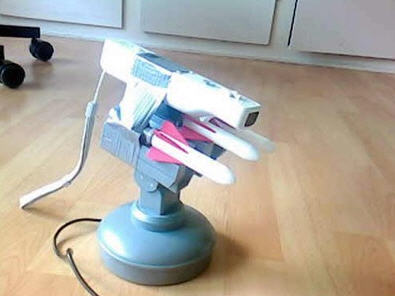
An Instructables member took an extra Wiimote and turned it into the eye-site gauge for the famous USB missile launcher. Now you can have all the fun with the added pin-point accuracy for a deadly shot with your missile launcher.
With a spare remote, USB cable, USB missile launcher and some code they guys at Instructables provided, you too can have this USB hack. The only concern you should have is the foam missiles really aren’t all that accurate, at least not the sample we tested. But hey, forget about the logistics of it all, it’s the cool factor we’re chasing after.
Source:Â Engadget.
Continue Reading
This USB design fits into the same category as the Sawed Off USB Key we reported about one month ago. The USB Nail generates this look of amazement at first glance, “How did a nail get jammed into your laptop?” Well the answer is quite easy!
It’s just a USB drive. A design company in Denmark, Plankton, came up with this off-the-wall look. Would this change the definition of a “rugged flash drive?” Probably not, but it’s definitely a fresh twist on USB storage.
Plankton is offering up the USB Nail for [about] $46 directly from their site.
Continue Reading
Have a mess? Need some help on that clean up job? If so, check out this DIY video on how to home brew a USB vacuum.
Can’t see the video – here’s the YouTube link.
Continue Reading
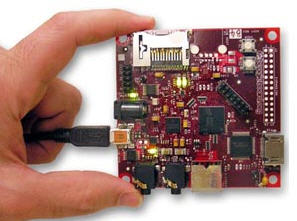
Digi-Key released their USB Beagle Board today which is a low cost, high performance development board for ground level design work. The USB Beagle Board is 3in x 3in in size, includes a powerful 600MHYz ARM Cortex A8 processor, high speed USB 2.0 port, SD port, C64x+ DSP & video acceleration and supports 1280×1024 DVI-D monitors.
The ARM processor will handle over 1,200 million instructions per second (MIPS) making it as powerful as most laptops these days.
The USB Beagle Board is only $149 making it the least expensive, most powerful development board on the market. Here is a list of other hardware components for the Beagle Board:
OMAP3530 applications processor featuring the ARM® Cortex™-A8
Have you seen this error message before from your Windows machine when a USB device is connected: “This USB Device can Perform Faster if Connected to Hi Speed USB 2.0 Port?” Well, I’ve seen it recently and went through a fairly long process to figure out how to correct it. Surprisingly it’s not difficult.
First, let me say I’ve found little information on WHY this error occurs and how to avoid getting this error message when a USB device is connected to your computer. From the research I’ve done, this USB error message of “device can perform faster when connected to hi-speed USB” stems from a corrupt setting for a device on your computer in relation to how it communicates with the hi-speed USB host controller.
So here is the quick and easy fix: Reinstall the drivers for your Enhanced USB controller. Sounds complicated, but it isn’t. In fact, it’s a simple right click and a reboot. That’s it. Here’s how you do it:
Step 1: Unplug any USB devices from your computer with the exception of your keyboard and mouse [if they are connected].
Step 2: Navigate to your Device Manager page by doing:
Start > Control Panel > System > go to Hardware tab > Device Manager
From this window scroll down until you see the + sign for “Universal Serial Bus controllers.” Click the PLUS sign and another list will expand out. Simply identify the item which references a “USB Enhanced” controller and right click. From the options provided from your right click select “uninstall.”
You will get a warning sign, but don’t worry. Click OK.
Your computer will go through the process of uninstalling the USB Enhanced USB controller. Your computer will then immediately go through the installation process as well. After the re-installation you computer might seem all-is-well; however, your error message will not go away until you reboot your machine. Do that now.
If you have any questions or comments hit the forum post for follow up.
Continue Reading
It’s probably fair to say most of use have damaged a USB drive while stuck inside a computer by bumping it, jamming it or stuffing it in via the wrong direction. To reduce the possibility of damage and increase the life of your USB stick, designer Damjan Stankovic has come up with a flexible USB device.
The “USBee” is a new prototype design which includes a flexible neck just after the USB connector but still keeps the flash memory usable for data storage. The USBee is shaped like a Bee and has thin wire between the USB connector and flash memory to provide flex under stress.
It does look like a manufacturing nightmare, but hey, if we can build automobiles with robots, I’m sure we can string out some wire between point A and point B to make a flex drive.
In addition, the tip has a rubber flap-back lid for quick access to the USB connector and quick protection for the USB connector. Stankovic calls it the “lid-snap system.” The USBee can also twist, turn and flex in any direction to save itself from your daily abuse.
Continue Reading
BootIt is a Lexar based utility to flip the Removable Media Bit setting of a USB drive. What this means, is you can take a Lexar drive (and many other brands) and make it appear as a Local Drive on your PC rather than Removable Storage.
This is absolutely necessary if you are looking to partition your USB drive or try some trick hack like run your iTunes from a USB stick.
The RMB or Removable Media Bit is present on all flash drives, but whether the Lexar utility can flip it is something of trial and error. Although it goes without saying…and I’ll say it anyway…the utility works with Lexar drives, everything else, use at your own risk.
Lets cut out the middle man (PC or laptop) and directly wire a Western Digital Passport to your USB DVD Player. This hack will give you the ultimate in A) storage size of movies and B) portability without lugging around a laptop.
If you can’t see the video click here.
Continue Reading
Back in July 2007 I made a USB tutorial post about putting WordPress on a stick. Shortly there after, several visitors emailed me indicating I had too much time on my hands and it really wasn’t worth the effort. But how do I disagree!
Even in the past year, WordPress has gain momentum in the blogisphere and becoming the #1 blogging platform. Even Alexa, a fairly decent gauge on web traffic ranks WP as #26 in most popular sites.
Given this information, I’ve seen more and more website – not blogs – use the WP platform to create their static website and webpages. So for those SEO and web designers out there, putting WordPress on a stick allows them to demo the site to clients, run SQL runtimes for testing and troubleshooting and isolating their web environment during development.
A good example is my RSS Filter website: FilterMyRSS. Take a look at the source code, you’ll see the script which runs the utility along with supporting pages and blog entries…all based off WordPress.
I do agree the masses wouldn’t care about putting WordPress on a stick, but if the web is your bread-n-butter it would probably be smarter for you to know how – than to not.
Today LifeHacker syndicated a short description on how to place a Wiki on a USB stick…and I thought…hmm interesting idea. So digging into things a little deeper it seems no more complicated than putting WordPress on a stick. But I think most of you would ask, why? The reason would be for off-line edits, organizing or remote access where there is no internet connectivity or you are in a facility which limits your access (schools & gov’t agencies).
Here is the web page from the MediaWiki website which gives you all the juicy details on placing a wiki on a stick.
Continue Reading
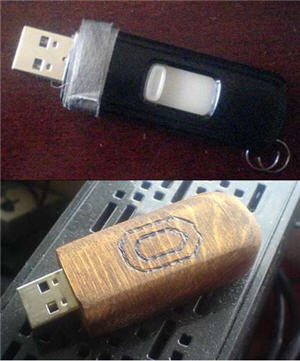
One of the most common problems with USB drives is the plastic casing getting cracked and breaking apart. It’s a shame that such a cheap piece of plastic might encourage some to drop another $20 or $30 on a new device. Of course fixing the plastic is never going to work as a long term solution – just a stop-gap.
Instructables has a nice USB tutorial on taking a UFD and turning it’s case into a nice, customized wood piece. Sure you could buy a fancy wood drive made from material carbon dated back 600 years or more, but sometimes making your own stuff is much more satisfying.
The USB tutorial displays 12 steps from start to finish with a list of equipment you’ll need, but after reading through the tutorial, I think a dremel would replace most of the tools required. And we all have one of those.
So get going and as Eric would say “go build something…”
Link to USB tutorial lesson.
Continue Reading

 NEC has long had the best performing USB PCI card with their USB host controller chip (uPD720170) and today they are expanding the portfolio to includes wireless USB. The new wireless USB host controller will allow high speed communication between PCs and peripherals with wireless USB technology such as USB hubs, printers and external storage devices.
The NEC wireless USB host controller received approval from the USB Implementors Forum and uses the WHCI protocol developed by Microsoft, NEC, Philips and Texas Intstruments. The Wireless Host Controller Interface specifications supports data transfer rates of up to 480 megabits per second (Mbps) of data, comparable to wired USB 2.0 connections at close range.
The NEC wireless USB host controller starts at $10 for sample and development use with prices dropping at higher quantities.
Source:Â NEC America.
Continue Reading
NEC has long had the best performing USB PCI card with their USB host controller chip (uPD720170) and today they are expanding the portfolio to includes wireless USB. The new wireless USB host controller will allow high speed communication between PCs and peripherals with wireless USB technology such as USB hubs, printers and external storage devices.
The NEC wireless USB host controller received approval from the USB Implementors Forum and uses the WHCI protocol developed by Microsoft, NEC, Philips and Texas Intstruments. The Wireless Host Controller Interface specifications supports data transfer rates of up to 480 megabits per second (Mbps) of data, comparable to wired USB 2.0 connections at close range.
The NEC wireless USB host controller starts at $10 for sample and development use with prices dropping at higher quantities.
Source:Â NEC America.
Continue Reading


 Digi-Key released their
  First, let me say I’ve found little information on WHY this error occurs and how to avoid getting this error message when a USB device is connected to your computer. From the research I’ve done, this USB error message of “device can perform faster when connected to hi-speed USB” stems from a corrupt setting for a device on your computer in relation to how it communicates with the hi-speed USB host controller.
So here is the quick and easy fix: Reinstall the drivers for your Enhanced USB controller. Sounds complicated, but it isn’t. In fact, it’s a simple right click and a reboot. That’s it. Here’s how you do it:
Step 1: Unplug any USB devices from your computer with the exception of your keyboard and mouse [if they are connected].
Step 2: Navigate to your Device Manager page by doing:
Start > Control Panel > System > go to Hardware tab > Device Manager
From this window scroll down until you see the + sign for “Universal Serial Bus controllers.” Click the PLUS sign and another list will expand out. Simply identify the item which references a “USB Enhanced” controller and right click. From the options provided from your right click select “uninstall.”
First, let me say I’ve found little information on WHY this error occurs and how to avoid getting this error message when a USB device is connected to your computer. From the research I’ve done, this USB error message of “device can perform faster when connected to hi-speed USB” stems from a corrupt setting for a device on your computer in relation to how it communicates with the hi-speed USB host controller.
So here is the quick and easy fix: Reinstall the drivers for your Enhanced USB controller. Sounds complicated, but it isn’t. In fact, it’s a simple right click and a reboot. That’s it. Here’s how you do it:
Step 1: Unplug any USB devices from your computer with the exception of your keyboard and mouse [if they are connected].
Step 2: Navigate to your Device Manager page by doing:
Start > Control Panel > System > go to Hardware tab > Device Manager
From this window scroll down until you see the + sign for “Universal Serial Bus controllers.” Click the PLUS sign and another list will expand out. Simply identify the item which references a “USB Enhanced” controller and right click. From the options provided from your right click select “uninstall.”


 Today
Today