With the iPhone in its 8th iteration of the product and most likely you have some older models laying around. Those older models can be put to use, but chances are, you don’t keep them charged up. So after a couple of days without connection, they are dead. I currently use an older iPhone to stream my music at work. I don’t stream from my phone, because I always seem to get disconnect to the Bluetooth speakers after I take a call.
This is why I like the 10 port charging station from USBFever. It’s got a logical design for holding ten devices. With the USB ports on the bottom, it keeps the plugs from hanging off the wall. Just above the USB ports are hollow channels you can bundle up the USB cable and stash it away. On top are vertical channels to hold your iPhone, iPad, Smartphone or tablet. The vertical channels are tall enough the devices will sit sturdy and proper.
Finally, the design includes a good balance of power output for the devices. There are a total of 10 USB ports. Eight of which push out a 2.5amp power supply and the remaining two are 1amp. This means the charging dock station will power the tablets as well as the larger iPhone and Samsung product while you can leave the smaller phones to the 1amp channels.
The default color is
Continue Reading
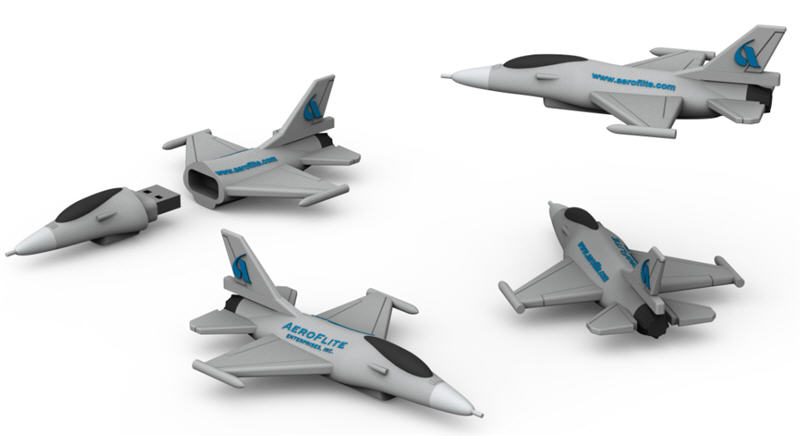
Promotional items have been around for years. Coffee mugs, pens, etc are still the default item for marketing manager without an imagination. Back in 2000 the flash drive was the new kid on the block for swag. Flash forward five years and the USB stick was a bit like the coffee mug, old and boring. At about this same time manufacturing processes started improving for using silicon as a moldable material. This is where the custom flash drive started gaining popularity. As time move along, the process and technology got even better. Today we are seeing some fantastic promotional items in the shape of logo’s, parts, products and even airplanes.
Today we list five realistic looking USB airplane designs that would get any marketing manager excited about a promotional flash drive.
Let’s take a look large cabin cruiser
Here is the Pilatus airplane
Here is a Hawker airplane
Here is the F16 and F35 planes designed by Lockheed Martin
These are all very impressive designs and certainly a piece of swag any trade show junkie, or even executive, would love to have. Times have certainly changed. The source for these designs is through a company named www.USBCOPIER.com and these products or any customized design can be created, just contact them.
Continue Reading
The Xpower 2 in 1 Zipper USB cable will support all micro USB and lightning devices.
With its unique zipper design, it allows the cable to become expandable enough to charge more than one device at any given moment. It also supports iOS 7 and android devices. It is conveniently 36cm in length.
The 2 in 1 Zipper USB cable will make multitasking much easier. The design and size make it very practical for transporting with you on the go. Its cable syncsupport is a 2.4A output at max and it has a 30/30 AWG high speed transmission and cable sync with micro UBSs only.
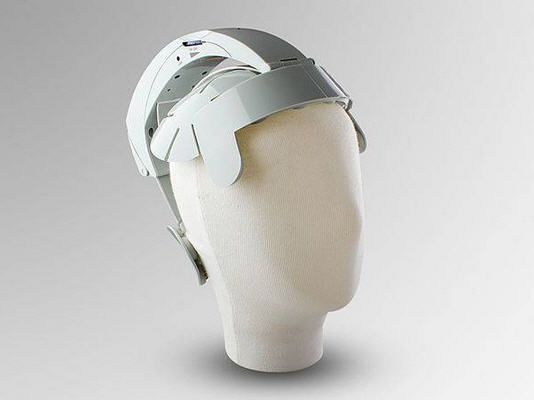
We have heard about the USB hand warmer or the USB foot warmer or even the USB eye warmer, but it appears we’ve gone one step further. I guess if there were ever a line to draw in the sand as to much, is too much, this would be it. Brando, a distributor of USB gadgets, now has on sale a USB head massager.
For $52 US dollars you can have this goofy looking head bracket which will vibrate at your heads key acupuncture points.
If anyone ends up buying this USB head massager, please post a picture of you wearing it on our facebook page.
Continue Reading
The Universal Serial Buss Implementers Forum or USB-IF has released their new specification, USB 3.1. The full spec will be available for download off the USB-IF website on Friday Aug 2, 2013. The new specification allows for 10Gb/s transfer rate. Of course this is optimal transfer speed without the incurrence of operating system resources trying to regulate bandwidth for multi device transfers, but none-the-less it’s a huge jump in speed for USB.
USB 3.1 cable
USB is the most versatile connector type in the computer market. Universal Serial Bus (USB) is an industry standard developed in the mid-1990s that defines the cables, connectors and communications protocols used in a bus for connection, communication, and power supply between computers and electronic devices.
Originally USB was specific to connect computer peripherals such as keyboards, pointing devices, digital cameras, printers and network adapters. With the increased need for bandwidth with digital content and the faster speeds of portable storage devices and smartphones the need to increase the speed of USB has been significant.
In addition the USB specification incorporated a Power Delivery or PD protocol which can deliver up to 100watts of power over a USB cable. The PD technology must use a certified cable with the Power Delivery wiring so not all USB cables will have the PD ability. The intent is to permit uniformly charging laptops, tablets, USB-powered disks and similarly higher power consumer electronics, as a natural extension of existing European and Chinese mobile telephone charging standards.
With the increased 3.1 speeds and the power ability of 100watts per cable it appears USB has made a substantial gain in the cable of choice for manufacturers and consumers a like for connecting their peripherals to their host computers.
The USB 3.1 specification is just now in development and products should come to market in the next 8-10 months.
Continue Reading
You can’t help to think Apple’s push for Thunderbolt has something to do with the latest announcement from the USB-IF…in that transfer speeds via USB will double what the USB 3.0 specification currently is. If development can stay on target, this increased speed should be seeing implementation by end of 2014.
The new specification will run with USB 3.0 sockets and connectors; however, will require new wire setup for the cables.
It is expected to see the faster USB spec in PCs, adapter cards and hard drives, but will take significantly longer to reach mobile devices and tablets. As it stands now, USB 3.0 is just gaining momentum as a standard socket in PCs and mobile devices should start seeing 3.0 connectors in late 2013. Â
Continue Reading
In recent weeks the cost of flash memory has increased substantially. The commodity product, is for the most part, a stable consumable with pricing that fluctuations in single digit percentages. However, lately the prices have increased between 10-30%. As with any product there are variables which contribute to price and the following information might help explain why flash memory is getting more expensive.
The two largest manufacturers of flash memory (NAND memory) are Samsung and Toshiba. Together they account for about 70% of the world’s flash. These companies produce a wide variety of flash memory models and the factories have various levels of quality for the output of their product.
Typically the high performance memory that gets the best test ratings is sold to large consumers like Apple, Nokia and Sony. As the ratings for the speed of the memory drop, these variants get pushed into the low-end market segments, such as USB drives and inexpensive MP3 players and other promotional gadgets.
In Q3 2012 Toshiba made an announcement they will reduce world wide production by 30%. Since this time, flash pricing has remained stable and has not decreased in cost.
With the on-going patent battles between Apple and Samsung the Cupertino based company made a decision
Continue Reading
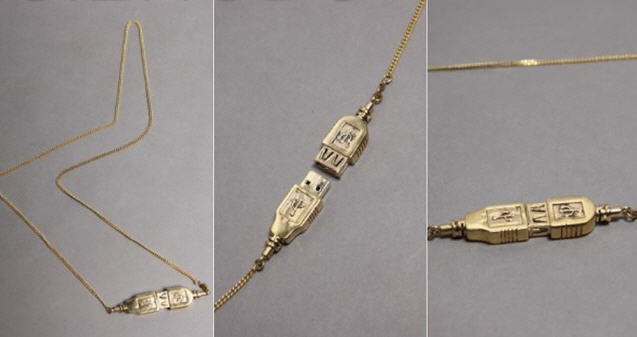
Gizmodo posted about a USB necklace in early February and all the comments ripped them a new one for the non-tech product. I kinda agree, but the funny thing, the “Upload” necklace is sold out. And sold out with a price tag of $48.
I think we should push the jeweler (if we can call her that) to make some more.
Order Page: Here!
Continue Reading
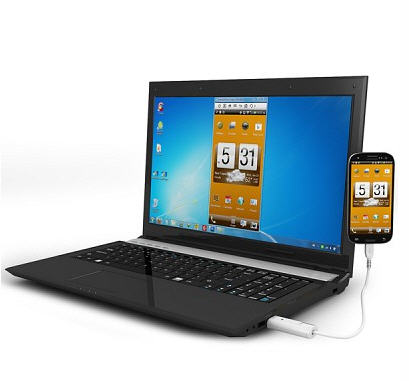
The DN-84254 is a microUSB cable which mirrors your smartphone screen on your PC. The sync software allows you to click around on the PC screen and control your phone.
So what’s it good for, imagine this:Â Â If an app would require you to input letters or characters, you can simply do so by using the PC’s keyboard. Several key shortcut buttons on top of the program also allow you to conveniently make the device do specific commands, or access certain areas instantly. So, aside from being able to record screen activity directly on your PC (for gaming and reviews and the likes), you can also intuitively control the smartphone within the PC’s environment as if it was just a simple Android emulating program or similar.
For me, this cable is worth
Continue Reading
The Alesis IO Dock is a great product for iPad musicians – this small hack makes it even greater. It overcomes one limitation of the IO Dock: You can’t simply hook it to a USB hub. So I decided to build in an additional hub – which allows me to hook up additional class-compliant interfaces like my M-Audio Axiom master keyboard, and power them via the hub.
Yes, it works. No, it hasn’t been thoroughly tested yet. So try at your own risk.
Full Tutorial (nice)
Continue Reading
Gamestick is creating a set-top gaming console for the Android space. The GameStick is true to it’s name where the data sits on a USB flash drive and the flash drive fits inside the hand held console.
The GameStick is targeted at $79 and plays the same games as other Android platforms. Of the 700,000 Android games about 200 have been targeted by GameStick to be developed and fully supported for the GameStick environment.
The console sports an Amlogic 8726-MX processor, with 8GB of flash memory and 1GB of DDR3 RAM. It supports Bluetooth 4.0, and also comes with the standard 802.11 b/g/n WiFi. The console ships with Jelly Bean.
PlayJam, the developers, state they have a working prototype, and is 90% of the way toward getting the final pre-production sample. If you
Continue Reading

 This is why I like the 10 port charging station from USBFever. It’s got a logical design for holding ten devices. With the USB ports on the bottom, it keeps the plugs from hanging off the wall. Just above the USB ports are hollow channels you can bundle up the USB cable and stash it away. On top are vertical channels to hold your iPhone, iPad, Smartphone or tablet. The vertical channels are tall enough the devices will sit sturdy and proper.
Finally, the design includes a good balance of power output for the devices. There are a total of 10 USB ports. Eight of which push out a 2.5amp power supply and the remaining two are 1amp. This means the charging dock station will power the tablets as well as the larger iPhone and Samsung product while you can leave the smaller phones to the 1amp channels.
The default color is
Continue Reading
This is why I like the 10 port charging station from USBFever. It’s got a logical design for holding ten devices. With the USB ports on the bottom, it keeps the plugs from hanging off the wall. Just above the USB ports are hollow channels you can bundle up the USB cable and stash it away. On top are vertical channels to hold your iPhone, iPad, Smartphone or tablet. The vertical channels are tall enough the devices will sit sturdy and proper.
Finally, the design includes a good balance of power output for the devices. There are a total of 10 USB ports. Eight of which push out a 2.5amp power supply and the remaining two are 1amp. This means the charging dock station will power the tablets as well as the larger iPhone and Samsung product while you can leave the smaller phones to the 1amp channels.
The default color is
Continue Reading
 Here is the Pilatus airplane
 Here is a Hawker airplane
 Here is the F16 and F35 planes designed by Lockheed Martin

 These are all very impressive designs and certainly a piece of swag any trade show junkie, or even executive, would love to have. Times have certainly changed. The source for these designs is through a company named www.USBCOPIER.com and these products or any customized design can be created, just contact them.

 If anyone ends up buying this USB head massager, please post a picture of you wearing it on our
 The two largest manufacturers of flash memory (NAND memory) are Samsung and Toshiba. Together they account for about 70% of the world’s flash. These companies produce a wide variety of flash memory models and the factories have various levels of quality for the output of their product.
Typically the high performance memory that gets the best test ratings is sold to large consumers like Apple, Nokia and Sony. As the ratings for the speed of the memory drop, these variants get pushed into the low-end market segments, such as
The two largest manufacturers of flash memory (NAND memory) are Samsung and Toshiba. Together they account for about 70% of the world’s flash. These companies produce a wide variety of flash memory models and the factories have various levels of quality for the output of their product.
Typically the high performance memory that gets the best test ratings is sold to large consumers like Apple, Nokia and Sony. As the ratings for the speed of the memory drop, these variants get pushed into the low-end market segments, such as 
 So what’s it good for, imagine this:Â Â If an app would require you to input letters or characters, you can simply do so by using the PC’s keyboard. Several key shortcut buttons on top of the program also allow you to conveniently make the device do specific commands, or access certain areas instantly. So, aside from being able to record screen activity directly on your PC (for gaming and reviews and the likes), you can also intuitively control the smartphone within the PC’s environment as if it was just a simple Android emulating program or similar.
For me, this cable is worth
So what’s it good for, imagine this:Â Â If an app would require you to input letters or characters, you can simply do so by using the PC’s keyboard. Several key shortcut buttons on top of the program also allow you to conveniently make the device do specific commands, or access certain areas instantly. So, aside from being able to record screen activity directly on your PC (for gaming and reviews and the likes), you can also intuitively control the smartphone within the PC’s environment as if it was just a simple Android emulating program or similar.
For me, this cable is worth

 The console sports an Amlogic 8726-MX processor, with 8GB of flash memory and 1GB of DDR3 RAM. It supports Bluetooth 4.0, and also comes with the standard 802.11 b/g/n WiFi. The console ships with Jelly Bean.
PlayJam, the developers, state they have a working prototype, and is 90% of the way toward getting the final pre-production sample. If you
The console sports an Amlogic 8726-MX processor, with 8GB of flash memory and 1GB of DDR3 RAM. It supports Bluetooth 4.0, and also comes with the standard 802.11 b/g/n WiFi. The console ships with Jelly Bean.
PlayJam, the developers, state they have a working prototype, and is 90% of the way toward getting the final pre-production sample. If you