USBFever has a 5 port USB wall charger for those a bit light on USB ports, yet need something to charge those iPhones, iPods and PDAs.
The USB SuperTravel has 4 standard USB ports and one miniUSB port. It’s no longer required to haul around your laptop just to power up your gadgets while on the go.
The kit includes world voltage acceptance with plugs that cover you in US, UK, AU and EU. The charger will auto detect the voltage and adjust accordingly so no mess with figuring out which fuse or setting is needed in different countries.
USBFever is offering the USB wall charger for $26.
Continue Reading
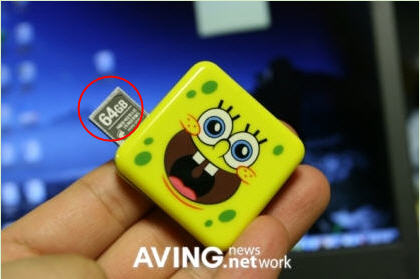
Yes we do…or at least the 64GBs of memory…and yes, I said gigabits, not megabits. No word or price for the Spongebob drive, but it’s expected to display at CeBiT 2009, so we’ll find out soon enough.
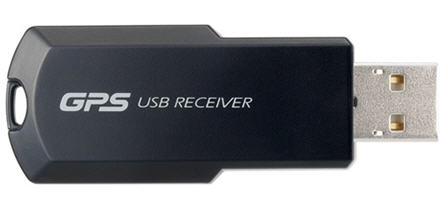
The individual user wouldn’t need this, but a GPS dongle for the corporate world would have it’s benefits. For this reason, I-O Data released their first USB GPS key.
Now team this device up with Google Maps and any control freaked boss could track your where-a-bouts 24/7 [or is the new term 31]. Anyway, the USB GPS unit will cost you about $175 USD. That seems a bit steep as you could furnish your employee with a Blackberry or iPhone for $199, and have the same benefits with loads more features.
But, for those on-site job descriptions this would also fit the bill.
Continue Reading
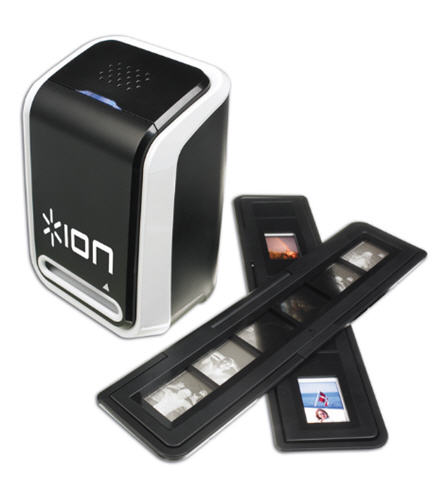
Ion Audio, the guys known for their vinyl record ripper, expands their analog conversion product line, with the Ion 35mm Photo Negative and Slide Converter.
Quickly and easily transfer slide film or 35mm film into beautiful, high resolution, digital images with the Ion unit. USB 2.0 connection and USB 2.0 port. There is fixed focus range and auto exposure/color balance with high-quality 4 glass optical element to bring you the best quailty of digital copies.
Although you wont get the very best image quality the Ion 35mm converter is definitely an economical solution for small jobs or home transfer projects.
The product is available at Amazon for well under
Continue Reading
TinkerNut ran a great video on how to turn a typical phone line into an extended USB cable. Excellent DIY project for a security camera at the front door. Home brew a video baby monitor system or just extended some USB devices past the range of that 15 foot $30 USB cable you got at BestBuy.
Source: YouTube.
Continue Reading
Here is a guy with a bit too much time on his hands and clearly in the need for a healthy meal. Check out this USB tutorial on making a USB popcorn maker:
Source: YouTube.
Continue Reading
Engadget reported on this just a few minutes ago, “USB cake design worst birthday surprise in history” but I beg to differ…at least for a guy like me.
True this USB birthday cake is ridiculous looking, but for a guy like me who spends most of his days working with, or thinking about USB, I would LMAO if this was presented to me.
So good on you, Mr. Birthday Cake Designer.
Although Engadget did have some good comedy with their post:
Continue Reading
GetUSB.info has a category called “Useless Novelty” and it’s used for those gadgets that really don’t make sense, or just ridiculous. Scrolling through just the first two pages we have items like: USB Breast Warmers, USB Volcano or USB Cabbage.
Today I add to the list with the USB construction set. Sure the photo looks cool and sure it seems like fun if you’re an 8 year old, but is it really worth it?
I guess if you have a train set with a laptop that sits in the middle of the track you could make up “a scene” but that’s far and few between.
On the slight chance you are excited about this useless novelty item, you’ll need to source it from an on-line vendor since the USB construction site is only available in Japan. Cost is about $20.
Continue Reading
Gizmodo did an interesting post today, it’s as though they knew I purchased an iPhone over the weekend. Yes, I’m part of the “cool kid crowd.” Giz did a post on a new iPhonecustom flash drive. It’s a cute little thang, with two eyes, a red dot mouth where the home button is and two munchkin feet.
By pulling the top rubber lid, you expose the USB for connection. No word on the price, but you can visit the site if you really need one.
Continue Reading
I found this USB powered gadget at Boingboing, and I must admit the author, Joel Johnson does such a great job with the post, I’ve got to publish the whole entry:
Ladies, a question: For years I have offered my services as a breast warmer out of what I must now admit was a desire not for the comfort of your more prominent glands, but instead an attempt to put my mittens on your kittens. But unlike my campaign to make sure your bosom is extraordinarily clean by barging into your shower with gallons of frothy soap — motivated purely by Christian hygienic charity — I was not entirely positive that your mams got, you know, chilly.
Do they?
That Thanko has created a USB-powered breast warming system has turned my world upside down. In fact, I’m getting a bit dizzy. If only there were some warm, soft place to lay my head.
Oh, give me a home where the buffalo roam. Where the deer and the antelope play. Where seldom is heard a discouraging word And the skies are not cloudy all day.
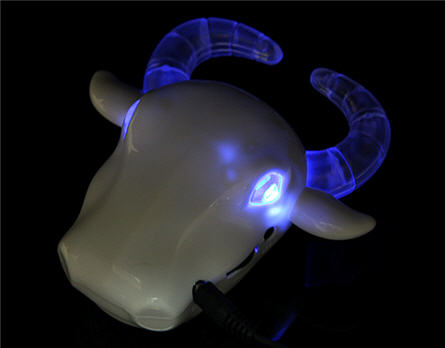
Might be the perfect song for this USB buffalo speaker system by Gadget4all. With freaky looking blue LED lights to illuminate the eyes and horns, you’ll be impressed with these speakers even in the dark. Not the strangest USB powered gadget, but it’s up there.
~~~
The USB buffalo speakers include a small Li-ion battery for portable use. Because you need to take this out on the range. Back at the ranch you can charge her back up via USB.
You can get all this buffalo madness for only $14.
Continue Reading
These are trying times. Everyone I talk with seems to be going through a rough time. Whether it be work related stress, finances or personal challenges – life these days is tough.
No better time could the USB stress ball be introduced. It’s not your typical stress ball, as those don’t have USB connectivity. But this does. The stress ball includes software where you can load up a picture [your boss or ex] and as you bang away at the stress ball or squeeze the day-lights out of it, the picture will reflect the stress.
The USB stress ball includes some options as well. You’ve got a strength game and a squeeze game.
It’s amazing how technology can make it’s way into any product, even a dumb little squeeze stress ball.
Continue Reading