GetUSB.info Logo

Author Archive

Matt LeBoff

Kicking around in technology since 2002. I like to write about technology products and ideas, but at the consumer level understanding. Some tech, but not too techie.

Top 5 NAND Flash Memory Manufacturers in the World as of 2025

Top 5 NAND Flash Memory Manufacturers in the World  as of 2025

Who Are: The Top 5 NAND Flash Memory Manufacturers in the World as of 2025

First off, it’s important to know that NAND flash memory powers everything from smartphones and laptops to massive data centers and cloud storage systems. In 2025, just five companies control over 90% of the global NAND market which is a testament to the complexity, capital, and innovation needed to produce these essential chips.

In the order of global market share, let us take a closer look at the top five NAND manufacturers and with a quick dive into their company history.

At #1 we have Samsung Electronics (South Korea) with a 31% Market Share

Samsung has been the undisputed king of NAND flash for over a decade and the set the standard for quality. With cutting-edge V-NAND (Vertical NAND) architecture and some of the most advanced semiconductor fabs in the world, Samsung is still the leader of performance and capacity.

Samsung at a glance

Founded in 1938 as a trading company, Samsung entered the electronics industry in the late 1960s. By the 1980s, it was investing heavily in semiconductors, laying the groundwork for its current dominance.

At #2 we have SK hynix (also South Korea ) with a 18% Market Share

SK hynix is a newer name in the industry but rapidly grew in the NAND space, especially after acquiring Intel’s NAND business in 2021. SK hynix created the “Solidigm” business division to represent the enterprise and data center SSD business sector.

SK hynix at a glance

Originally part of Hyundai Group, SK hynix started in 1983 and grew into a major DRAM producer. Its NAND growth was supercharged by Intel’s exit, and their purchase of it, making Hynix a global heavyweight almost overnight. Money does talk!

Coming in at #3 Kioxia (Japan) which has a 17% Market Share

Kioxia is better known as Toshiba Memory from before the change in 2019. Kioxia is credited with inventing NAND flash in the 1980s but unfortunately has not been able to capture the “high quality” component which Samsung has achieved. Toshiba…we mean, Kioxia continues to lead innovation with joint manufacturing ventures alongside Western Digital in Japan.

About Kioxia

Toshiba, founded in 1875, spun off its memory division in 2017, which was renamed Kioxia in 2019. Despite the name change, it maintains deep roots in flash memory innovation.

In a solid #4 spot Western Digital (USA) captures 15% of Market Share

Western Digital may be best known for its hard drives, but its SanDisk acquisition in 2016 catapulted it into the NAND flash big leagues. In partnership with Kioxia, WD continues to produce high-quality NAND for consumer and enterprise use.

About Western Digital

Founded in 1970, Western Digital began as a calculator chip maker before pivoting to storage. It evolved with the market, transitioning from hard drives to solid state drives (SSDs) with strategic acquisitions like SanDisk. Western Digital is based out of San Jose California

Rounding things out, #5 Micron Technology (USA)with an 11% Market Share

Micron is the only U.S. based memory manufacturer with strong capabilities in both DRAM and NAND. Micron has made big strides in 3D NAND technology and offering competitive solutions for PCs, smartphones, and data centers. Micron has earned a strong reputation for high quality memory equal to the “leader” of Samsung.

About Micron

Micron was founded in 1978 in Boise, Idaho. It began as a DRAM producer and expanded into NAND flash in the early 2000s, later forming (and eventually dissolving) a joint venture with Intel.

In 2025, the global NAND flash memory market is highly consolidated, with just five companies controlling roughly 92% of total output. Whether you’re saving selfies on your phone or storing enterprise data in the cloud, chances are your information is riding on memory made by one of these giants.

The estimates for this market will reach $117 billion by 2030. This is a signal that NAND flash memory will continue to be a key roll in technology products and mostly driven by increased demand for smartphones, solid-state drives (SSDs), and data center storage solutions.

Continue Reading

What Is GPMI? Or General Purpose Media Interface?

What Is GPMI? Or General Purpose Media Interface?

If you’ve been hearing about a new technology standard called GPMI and wondering what it is, you’re not alone. So what is GPMI? To the best or our knowledge this is what GPMI is:

A group of over 50 Chinese companies also known as the “Shenzhen 8K UHD Video Industry Cooperation Alliance,” announced this new technology called GPMI, which stands for General Purpose Media Interface.

We thought at first this was like HDMI or DisplayPort but it isn’t; although GPMI is designed to be the next generation alternative. The goal is to deliver faster speeds and more features through a single cable with a socket type everyone already has.

Right now, when you connect a laptop to a monitor, you typically need two cables: one for the video signal (like HDMI) and another one for power (like your charging cable). GPMI changes that. It combines super high data speeds with power delivery into one cable, making setups much simpler and cleaner.

There are two types of GPMI cables:

  1. GPMI Type-B uses a new, proprietary connector and can deliver up to 192 gigabits per second of data and 480 watts of power — that’s way more than today’s HDMI or DisplayPort cables.
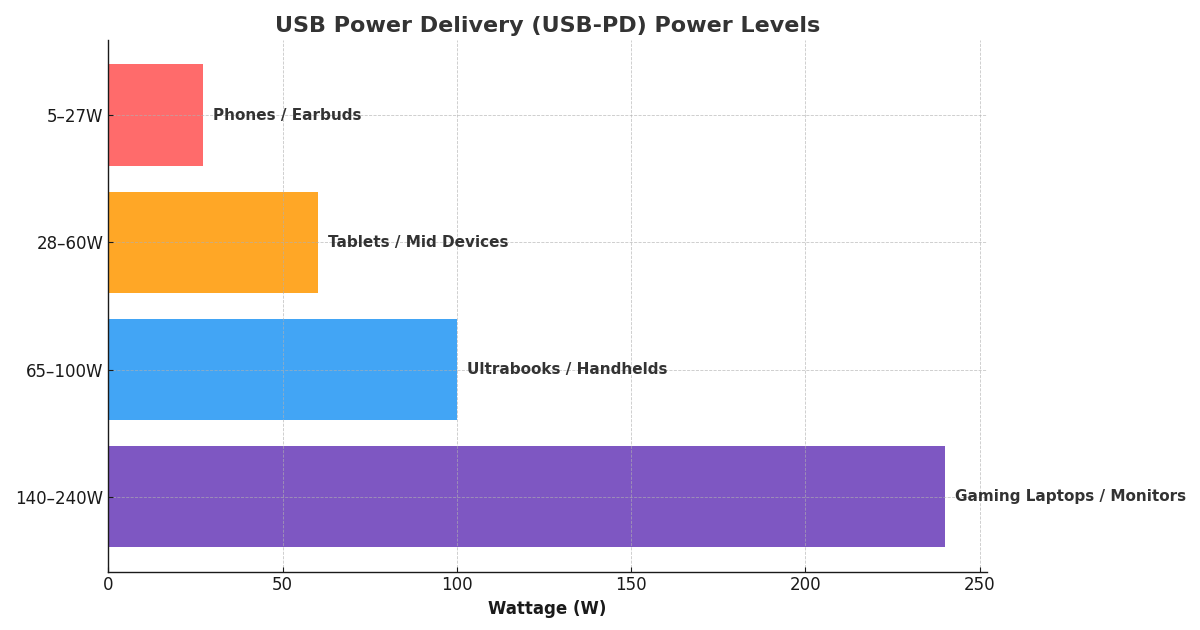
  2. GPMI Type-C uses the familiar USB-C connector and still offers impressive performance, with 96 gigabits per second of data and 240 watts of power.

What does this mean for tech?

It means GPMI could easily become the default protocol for anything audio and video. With support for 8K displays, high-end gaming setups, streaming devices, andpower-hungry devices, all while letting you control multiple devices with a single remote (similar to how HDMI-CEC works today).

Compared to today’s popular standards like HDMI 2.1, DisplayPort 2.1, and USB4, GPMI Type-B stands out by offering much higher bandwidth and significantly more power. If GPMI catches on, it could completely change how we connect and power our devices — at least in China to start, and possibly around the world later.

Just to clear up any confusion: you might have seen people mention GDMI (General Digital Media Interface), but that’s actually a mistake. The correct term is GPMI – General Purpose Media Interface.

This is exciting news for tech lovers because it promises faster speeds, cleaner setups, and future-proof devices.

Here’s a comparison table between GPMI, HDMI 2.1, and DisplayPort 2.1:

Feature GPMI Type-B HDMI 2.1 DisplayPort 2.1
Max Bandwidth 192 Gbps 48 Gbps 80 Gbps (UHBR 20 mode)
Max Resolution 8K and beyond (future-ready) 10K @ 120Hz (compressed) 16K @ 60Hz (compressed)
Power Delivery 480W ~1–5V at 50mA (very low) No power delivery (video only)
Connector Type Proprietary (Type-B), USB-C (Type-C) HDMI (Type-A/B/C/D) DisplayPort, USB-C (Alt Mode)
Control Functions Yes (CEC-like features) Yes (HDMI-CEC) Yes (Aux channel, MST)
Compression Standard Unknown (likely proprietary or TBD) DSC (Display Stream Compression) DSC (Display Stream Compression)
Backward Compatibility No (brand new tech) Yes (with older HDMI) Yes (with older DP)
Market Maturity New (early 2025) Very mature Mature
Main Backers 50+ Chinese companies HDMI Forum (Sony, Intel, etc.) VESA (Intel, AMD, NVIDIA)
Continue Reading

Hologram PC Fan by COOLIFY

Hologram PC Fan by COOLIFY

Hologram technology is difficult to develop and manufacture. We list the reasons below, but in the mean time, COOLIFY has a hologram PC fan people can take advantage in very short order (available soon). The Holo Fan by COOLIFY is the world’s first holographic PC case fan. By placing a small LED bar across the diameter of their cooling fan COOLIFY has created a customizable 3D visual display on their fans – a brilliant idea we should have thought of years ago!

Users can upload images and videos via the COOLIFY app to personalize their PC setups, creating personalized holograms on their PC rig. The fan offers two speed options: 2600 RPM for maximum cooling efficiency and 1500 RPM for quieter operation with sharper visuals. Its transparent blades and base ensure crystal-clear resolution, while the 4.1-inch display, equipped with 96 high-quality LEDs, delivers vibrant, dynamic holographic effects. Applications include video displays, custom slideshows, logos, GIFs, 3D visuals, and background effects, allowing for a unique and personalized gaming experience.

Hologram technology is difficult to develop and implement because it requires extremely precise control over light to create realistic 3D images. At the core of holography is the use of interference patterns between laser light waves, which must be recorded and reconstructed with great accuracy. Even the slightest vibration or environmental disturbance can disrupt this process. However, a less expensive and less sensitive solution is placing mini LED lights on a spinning object to create the affect of something floating.

Another challenge is the resolution requirement. To create a sharp and convincing hologram, displays need to have pixel densities far beyond what standard LCD or OLED screens can offer, which current technology struggles to support in a practical, affordable way. True holograms also require dynamic changes in perspective based on viewer movement, known as parallax, which is extremely difficult to achieve accurately.

Hardware limitations further complicate the process. Traditional display technologies aren’t suitable for real holography, so specialized optics, lasers, or spinning LED arrays are often required. These components tend to be expensive, bulky, and fragile. On top of that, integrating hologram tech into real-world consumer devices—like phones, monitors, or even PC fans—raises additional concerns around size, power consumption, heat, and cost. All of these factors make hologram technology complex and challenging to bring into everyday use.

The halo fan will be available for about $50 and should be shipping by end of Q2 2025. Reference: COOLIFY product page.

Continue Reading

Freeware for Running a Server from a USB Stick

Freeware for Running a Server from a USB Stick

Freeware for Running a Server from a USB Stick

There are several free software options which allow people to set up a portable server on a USB stick. Probably the biggest sector looking for freeware to run a server on a USB stick would be students looking to learn more about server functionality or developers who need a quick and easy way to setup a sandbox for testing of web applications, websites, or for security testing.

We have four categories listed on this post:
  1. Web Servers
  2. FTP & File Servers
  3. Windows-Based Local Server
  4. Linux-Based Live Server on USB

Web Servers

XAMPP Portable is a lightweight, portable version of the XAMPP stack (Apache, MySQL, PHP, Perl) that runs directly from a USB drive. You can download it from Apache Friends.

XAMPP Portable is a lightweight and portable version of XAMPP, a widely used open-source software stack that provides an easy way to set up a local web server. The name XAMPP is derived from the core components it includes:

  • X – Cross-platform (works on Windows, Linux, and macOS)
  • A – Apache (the web server)
  • M – MySQL/MariaDB (the database)
  • P – PHP (server-side scripting language)
  • P – Perl (another server-side scripting language)

Origins and Development

XAMPP was initially developed by Kai ‘Oswald’ Seidler and Kay Vogelgesang as an easy-to-install web development environment. The project was launched by Apache Friends, a non-profit organization, to provide developers with a simple way to test websites locally without configuring complex server settings manually.

The first versions of XAMPP appeared in the early 2000s, around 2002, and quickly gained popularity due to its ease of use. The stack bundled all essential components needed to run dynamic websites and applications, making it a popular choice for developers, students, and educators.

Introduction of XAMPP Portable

As XAMPP’s popularity grew, many users wanted a portable version that could run from a USB flash drive without requiring installation on a host computer. This led to the creation of XAMPP Portable, which offers the same functionality as the regular XAMPP package but is designed for mobility.

The portable version allows developers to carry a pre-configured web server environment on a USB stick and use it on different computers without modifying the system settings.

USBWebserver is a minimal and lightweight server that includes Apache, PHP, MySQL, and phpMyAdmin. It is available at USBWebserver.

USBWebserver was first developed in the early 2000s by Dutch developers to provide a portable web development solution. The primary goal was to create a small, efficient web server that could run without requiring installation on a local system. Unlike XAMPP Portable, which is a larger stack, USBWebserver was designed to be minimalist and lightweight.

The software includes:.

  • Apache – The core web server component
  • MySQL – The database management system
  • PHP – A popular server-side scripting language
  • phpMyAdmin – A web-based GUI for managing databases

Because of its portability and simplicity, USBWebserver quickly gained popularity among students, developers, and IT professionals who needed a quick way to test PHP applications and MySQL databases without setting up a full server environment.

Server2Go is a self-configuring, portable web server with Apache, PHP, MySQL, and Perl. Although it has been discontinued, it can still be found on archive sites. Visit Server2Go for more details.

While Server2Go is no longer updated, its concept of a truly portable, self-contained web server has influenced other software solutions. Today, developers looking for alternatives often turn to:

  • XAMPP Portable – A more actively maintained portable web server.
  • Uniform Server – Another lightweight WAMP solution.
  • Laragon – A modern, portable development environment for Windows.

Server2Go remains a notable part of portable web server history, especially for its offline web application distribution capabilities.

Here are some other solutions for server type applications which can be installed and ran from a USB flash drive.

FTP & File Servers

HFS (Http File Server) is a portable HTTP file server that allows easy file sharing over a network. Get it at HFS.

BabyFTP Server is a simple, lightweight, and portable FTP server. Download it from BabyFTP.

Windows-Based Local Server

Uniform Server is a small and lightweight WAMP (Windows, Apache, MySQL, PHP) server that fits on a USB drive. You can download it at Uniform Server.

Linux-Based Live Server on USB

TurnKey Linux is a collection of lightweight, ready-to-run servers (LAMP, WordPress, etc.) that can be installed on a USB. Check it out at TurnKey Linux.

Puppy Linux with a Web Server is a lightweight Linux distro that can run a web server directly from a USB stick. Download it from Puppy Linux.

Continue Reading

Apple Releases Urgent Software Patch for USB Vulnerability

Apple Releases Urgent Software Patch for USB Vulnerability

Trouble in paradise? Apple released a security update to fix an issue which may expose a security risk. The security risk stems from the USB protocol.

Apple isn’t sharing details about who is being targeted, no surprise there.

The vulnerability, known as CVE-2025-24200, could allow someone with physical access to an iPhone to turn off USB Restricted Mode, even if the device is locked.

USB Restricted Mode is the highest probability of having your device exposed to the security risk. The “restricted mode” is a security feature that stops unauthorized people from accessing an iPhone’s data through the lightning port. When this feature is on, the port only allows charging if the phone has been locked for more than an hour. This makes it harder for hackers to break into a locked phone without the correct login information.

The update is available for iPhone XS and newer models, as well as several iPad models, including iPad Pro 13-inch, iPad Pro 12.9-inch (third generation and later), iPad Pro 11-inch (first generation and later), iPad Air (third generation and later), iPad (seventh generation and later), and iPad mini (fifth generation and later).

If you have one of these devices, please update your software as soon as possible. You can check for updates in your device settings.

These types of security flaws are often used by spyware companies, like Pegasus, to spy on specific people. The average user isn’t at risk right now since the details of the attack haven’t been shared publicly. However, if they do get published, criminals could copy the method, making updates even more important.

A cyberattack on a mobile device happens when hackers try to gain access to a smartphone or tablet to steal information, take control, or cause harm. These attacks can occur in different ways, including malicious apps, phishing scams, security flaws, or even physical access to the device.

Malware is one of the most common threats, where harmful software is installed to steal data, track activity, or take over the device. Phishing attacks trick users into providing personal information or login credentials through fake emails, messages, or websites.

Continue Reading

What is ChromeOS Flex?

What is ChromeOS Flex

We focus so much on USB here at GetUSB.info that we often overlook other technologies such as portable browsers or new browsers. Today, and I’m sure we are much behind the 8Ball, we talked about What is ChromeOS Flex.

ChromeOS Flex is a lightweight, cloud-based operating system developed by Google, designed to be efficient and compatible with older Windows and Mac computers. ChromeOS Flex is free for everyone. It is different than a Chromebook operating system because the Chromebook OS is designed to work on Android. However; ChromeOS Flex is specifically designed to work with Windows and Mac computers only.

This free alternative is web based and provides a streamlined, secure, and manageable experience. Based on the cloud infrastructure of Google this makes it inviting for personal or corporate users to make the most of their older PCs without having to do hardware upgrades or updates. Web-based applications and cloud computing is very common these days, if not more common than standalone operating systems. ChromeOS Flex offers a modern solution tailored for users who primarily work within an internet-based environment.

One of the key advantages of ChromeOS Flex is its efficiency. Unlike traditional operating systems that can slow down over time due to software bloat, background processes, and frequent updates requiring manual intervention, ChromeOS Flex is designed to run smoothly on older hardware. It boots up quickly, typically within seconds, and operates with minimal system requirements, making it particularly useful for devices that have become sluggish over the years. Google is saying the computer OS can boot as quickly as six seconds. We like the sound of that. Because the OS is cloud-based, much of the processing is offloaded to the internet rather than being handled by the device itself and this is why ChromeOS Flex seems to be a great fit for older hardware.

Google is saying security is another big reason to use ChromeOS Flex. Google has built the operating system with a focus on protection against malware, ransomware, and other cyber threats. We still think Google is looking to glean information off your user habits and browsing habits, so although secure, we are sure there is some ancillary benefit Google is getting from offering up this free OS.

Unlike Windows and macOS, which often require third-party antivirus software to maintain security, ChromeOS Flex includes built-in security features such as sandboxing, verified boot, and automatic background updates that ensure the system is always running the latest, most secure version. Sandboxing isolates applications and processes so that even if a vulnerability is exploited, it does not affect the entire system. Verified boot further enhances security by checking for system integrity at startup, preventing any tampered or malicious software from loading. These features make ChromeOS Flex particularly appealing for businesses and educational institutions where data security is a top priority.

Continue Reading

Pros and Cons of the Raspberry Pi USB 3 Hub

It is common to hear Raspberry Pi owners want more USB ports. GetUSB.info just read about them introducing an official 4 port USB hub. Sweet. To note, most Raspberry Pi single-board computers, except for the Raspberry Pi Zero and A+ models, include a built-in USB hub that splits one USB connection into several USB Type-A ports. Just recently they launched the official Raspberry Pi USB 3 Hub, a high-quality USB 3.0 hub that offers four additional USB ports.

This hub includes a single upstream USB 3.0 Type-A connector with an 3 inches (8 cm) built-in cable. The “upstream” port is the socket used to communicate with the host device, which in this case is the Raspberry Pi. It also has four downstream USB 3.0 Type-A ports and can reach data transfer speeds up to 5 Gbps. There’s a USB-C socket for an optional external 3A power supply but that isn’t included with the $12 purchase. Quick note, the downstream port is are the sockets used to communicate with the devices, like a USB flash drive, hard drive, mouse, keyboard, printer, etc.

One driving force on why Raspberry Pi wanted to sponsor their own USB hub is the fact most ‘other’ hubs are just too expensive. One fundamental goal of Raspberry Pi is to provide an unparalleled offering for computer code development and the lowest possible price. Usually, you either pay a high price for a reliable, well-designed product, or you buy a cheaper option that’s unreliable, doesn’t work with various devices, or simply looks bad.

With this hub, there is no “race to the bottom,” where cheap, poor-quality products pushed out better options, and online marketplaces like Amazon became filled with low-quality hubs. To offer a better solution the Raspberry team got together with with Infineon to source a quality hub chip called the CYUSB3304.

Based on user beta testers and user comments here are the pros and cons of the Raspberry Pi USB 3 Hub:

Pros and Cons of the Raspberry Pi USB 3 Hub

Continue Reading

USB Mass Storage Device Protocol – What Is It

The USB Mass Storage Device Protocol defines how USB devices which are attached to a host computer should interact (such as flash drives, external hard drives, and memory cards) and this protocol is critical for allowing stuff to talk with each other in the computer world. Here’s a breakdown of its core components:

In order for a USB flash drives to work interchangeably with other devices a universal standard must be created, defined and implemented for both device manufactures (the flash drives) and the host manufacturers (what flash drives are plugged into). The “Mass Storage Device” is the more technical term for what a USB flash drive is ( or USB hard drive or other memory storage device ) classified as. The classification spells out how communication works between the host computer and USB device.

The following information is a general outline and meant for non-technical readers to better understand the USB Mass Storage Device is. A link at the bottom will direct readers to a more technical resource, say someone reading up from a computer science class.

Let us start with the “Device Class and Protocol”

USB Mass Storage Device Protocol - What Is It

As mentioned the Mass Storage Class (also known as MSC) is a set of specifications which define a standardized way the USB device will present itself and communicate with the host (what it is plugged into); for example a computer, smartphone a car stereo or even the USB socket you find on a passenger plane. All of these “hosts” must conform to a specific way to communicate with the device.

Although we mention the USB socket of a plane, that particular situation doesn’t require “data transfer” and it’s only meant for power; although a specification is still required even when only dealing with power and/or charging. With that said, the most common protocol used for MSC devices is the “Bulk Only Transport” or BOT. The BOT is a method defining how data is either read or written from one device to the other. The BOT is designed to be fast and optimize data transfer while at the same time providing a reliable and stable code base for transferring data.

As a side note, the BOT was improved with UASP. The newer UASP (USB Attached SCSI Protocol) was introduced for the USB 3.0+ speed of devices. The UASP improves the older BOT by allowing faster data transfer rates and better performance to the devices which support the newer UASP.

So whether the host and attached device, say a USB flash drive, use BOT or UASP the commands used come from the SCSI (Small Computer System Interface) protocol. This protocol was developed in the late 1970s and ultimately introduced to the public for use in 1986. So the SCSI protocol has been around for a very long time.

One pillar of the SCSI protocol is the “block device” appearance of a device connected to a computer. This block device approach helps organize data and allows the two to communicate in blocks. Remember the most basic, 1024? the block device approach allows data transfer to work more efficiently and organized than other approaches.

The Mass Storage Device specification will classify data transfer speeds. This type of classification will setup the host computer and device on the best method to communicate. This is important because you want to define a Mass Storage Device’s ability to transmit data, during either the read or write operation, to an optimal speed for best performance. So for example, you don’t want a USB 3.0 hard drive communicating with the host computer at USB 2.0 speeds. The classification for data transfer will sync up the proper protocol.

Continue Reading

USB-C Cable Tester Sets the Bar High

Review: USB-C cable tester by BLE caberQU

USB-C cable tester by BLE caberQU

USB-C has firmly established itself as the universal connector standard, integrating data transfer, power delivery, and video output into a single interface. With so many cables on the market, knowing which ones truly deliver on their promises can be challenging. That’s where the BLE caberQU comes in, a great USB-C cable tester that provide all the details one would need.

We can break down the need to test USB-C cables into five categories; and it’s worth noting if you are going to spend good money on a device, monitor or other peripheral, isn’t it worth a bit effort to make sure the cable connecting it all works at the highest level?

Of course the block buster category is USB-C Data Transfer Speed. Different USB-C cables support different data transfer rates. For example, some cables are USB 2.0 (480 Mbps), while others may support USB 3.1 or USB 3.2 (up to 10 or 20 Gbps). Testing ensures you’re getting the expected performance, especially when transferring large files or using external storage devices.

The BLE caberQU excels in its core functions. It provides a reliable way to test USB-C cables for data speed, charging power, and overall health. The LED indicators offer a clear and immediate visual representation of pin connectivity, which simplifies the testing process. The LCD screen takes things further, delivering detailed metrics on data speed of the cable being tested.

The second most important category is Compatibility. Not all USB-C cables are created equally. Some might not be compatible with high-speed protocols like Thunderbolt 3 or 4, which can impact both data transfer rates and compatibility with devices like monitors or docks. The BLE caberQU provides a systematic way to determine the true connectivity protocol of the cable. Although some cables may give false positive results, it is recommended to test the cable multiple times for Compatibility to insure the BLE caberQU reports the correct value.

Continue Reading

SMI “Displays” Their SoC Technology with SM770 Chipset

SMI Displays Their SoC Technology with SM770 Chipset

SMI ( Silicon Motion Inc. ) has introduced a new chip which allows for multiple 4K displays to be connected to a single host computer. The SM770 chip is, what SMI calls, a high performance USB Display interface or “SoC”.

Get three concurrent 4K UHD displays running without latency issues from a single host computer source. The new SMI chip features a user-friendly InstantView software application to configure the multi collection of displays. The free software tool effortlessly configures host content for any display without the need for a display driver which is really nice to avoid future driver update issues we are all so keen on trying to avoid.

The SM770’s features include:

  • Support Triple 4K (3840 x 2160) @60Hz, support up to 144Hz display
  • The 2nd generation CAT technology delivers codec with reduced latency
  • USB 3.2 Gen2 (10Gbps)
  • Support displays over USB, Ethernet or Wireless
  • OS compatibility: Windows, Linux, macOS, Android, and ChromeOS

USB docking stations are now a must-have for many professionals who need to use more than one screen. The new SM770 is made to make using multiple screens much better by reducing delay and improving system efficiency. This new technology helps create high-quality USB docking stations and display adapters which meet the high demands of today’s work environment.

Current the chips are available for samples, but we have yet to see the chip integrated into an end-user product. SMI… if you know of a product ready to buy, do send us an email.

Continue Reading

10 Reasons for Dracal’s Environmental USB Monitoring System

The PTH200 from Dracal Tech has lots of benefits for tracking the environment and more. Here are 10 great things about using it:

1- Very Accurate The sensors are precise, calibrated, and compensate for temperature. This is important for monitoring exact environmental conditions.

2- Easy to Use The small size makes it simple to add to different systems, even in limited space. This is useful for many different uses.

3- Simple Software Dracal includes an easy-to-use interface and tools for managing the device without needing lots of technical knowledge.

Continue Reading

USB Duplication Service Company, Name Says it all “USBCOPIER.com”

USB Duplication Service

A “USB copy service” means copying data from one USB drive to many other USB drives at the same time. A USB duplication service company is a good resource when the content owner doesn’t have the gear to make many USB copies. Some duplication systems can be more than several thousand dollars, so it would be more economical to higher a service rather than invest in the equipment. Another reason would be a company not having the human resources to run the USB duplication department.

Picking the right USB duplication service is important because the job must be done right, and must be accurate. In addition, the USB copy service should know what to look for with USB flash media; not all USB sticks are made the same and there is a wide range of NAND memory quality which defines how reliable the USB stick will be in holding data and working properly with the end-user. USBCOPIER.com is a service which has been around since 2004 and seen the USB technology develop from USB 1.0 all the way to (currently) USB 3.2.

Great USB Copy Service

USBCOPIER.com is easy to work with, and always available during business hours. 8am to 4pm Pacific Time Zone. They use the best USB duplication technology equipment (Nexcopy) to create and verify the data on USB. This is key if you need to copy very important data.

Fast USB Copying

Being fast is key to hitting time goals. USBCOPIER.com copies USB drives fast, while still being good quality. If you need things done fast, they can help without any worry.

Customizable USB Duplication Solutions

USBCOPIER.com allows for extensive customization in their USB duplication service. They provide a range of

Continue Reading

Copyright

Copyright © 2006 +

USB Powered Gadgets and more...

All Rights Reserved

Advertise with us

GetUSB Advertising

This is a high value website providing great exposure to your product and brand. Visit our advertising page to learn specifics.

For more information
Visit our advertising page.

Nexcopy Ad

Nexcopy Provides

USB copy protection with digital rights management for data loaded on USB flash drives.

Contact us learn more

Resources and References Page

Resources and References Page