GetUSB.info Logo

Author Archive

Matt LeBoff

Kicking around in technology since 2002. I like to write about technology products and ideas, but at the consumer level understanding. Some tech, but not too techie.

Solar Power Clothing Collection Charges Your USB Gear

Just last week, we reported on a solar panel which rotates with the sun to optimize charging time and power.  Today we bring you another method to recharge your life, but this time wearing clothes.  Silvr Lining is a start up clothing company which integrates solar panels into your every-day cloths. The style Silvr Lining embraces is that of a casual fit – as it would be difficult to integrate solar panels into a bikini or fitted top. The company integrates several 6 x 8 panels into the outside of pocket panels so the lock blends with the style. The solar panels are the right size to charge most any small USB gadget like MP3 player, phone or PDA device.  It also appears the pockets are big enough you might just fit that iPad which is so awkward to carry around. The solar power pants from Silvr Lining run just under $300.  The company is based in Los Angeles and all cloths are made in the USA.  Not sure how fashion conscience you are, but if you are Continue Reading

Tilting Solar Panel for Your USB Gadgets

In a concept design only, Eric Strebel and Jim Nogarian prototyped a solar panel which can rotate with the sun.  The case has three angles on the bottom, a flat surface for sunlight directly above around noon time, and two 45 degree angle for morning and afternoon sun.  It’s a good idea…I think.

USB solar power

After a little bit of research it appears the direct sunlight approach to solar is a thing of the past.  New technology allows diffused light to generate electricity through the solar panels and thus maximizes any solar panel even slightly exposed to sunlight. Putting this information aside, The Solcar Vox does look like a fresh idea on charging your USB gadgets or other devices which charge via USB like the iPhone. If you like the idea you can pre-order the prototype which is Continue Reading

Digital Camera is USB Hub by Samsung No Less

Samsung is looking to put a new twist to the classic digital camera with multiple USB ports.  The idea is simple, once a picture is taken, the folks in the picture can turn over their thumb drives for a quick download of the picture just taken.

camera USB port

Not a bad idea considering most of us now have USB sticks in our pocket, car or computer bag.  I think the wifi SD card is a bit better of an idea, but this too will work. The concept camera from Samsung has three female USB ports to accept mass storage devices [tech term for USB stick] and a male USB for connecting to a computer for downloading. Continue Reading

How To: Fix MacBook Air and USB Ethernet Adapter

How To: Fix MacBook Air and USB Ethernet Adapter

If you are one of the few who rushed out to purchase the MacBook Air, you might have found yourself in a bit of a pinch.  How to get the USB Ethernet Adapter working?  If this is you, or a friend you know, here is a quick fix until a new Apple update is published.

MacBook Air USB Ethernet Adapater

First, it appears that some have luck plugging the adapter into different ports on the MacBook Air, but it’s not a universal solution. After a bit of investigative work sifting through the Apple forums, you can do the following for a sure thing fix: Continue Reading

How To: Turn Off USB Auto Run in Windows 7

How to turn off autoplay Windows 7 for USB flash drives.

Some may want to turn off the USB auto play so that when a USB device is connected the auto pop-up window doesn’t appear.  I don’t mind the pop-up window as it usually defaults to the area or program I’m trying to get into anyway, but for some, I could see the frustration.  So on that note, here is a quick USB tutorial on how to turn off the USB auto run function. First, click START > RUN and type in gpedit.msc  then click RUN.

USB autorun Win7 - 1

Next you’ll want to navigate to the location shown below.  That would be: Computer Configuration > Admin Templates > Windows Components  Once there you would double click Windows Components

USB autorun Win7 - 2

That will take you to the following area where we can select the menu to edit the USB autorun functions.  Double click the AutoPlay Policies

USB autorun Win7 - 3

Next select the Turn Off Autoplay by double clicking it. Continue Reading

US Military Bans USB Sticks As Result of Wikileaks

Bradley Manning was able to download over a quarter million documents from the US government via USB slurping…where by, he downloaded the sensitive data directly to his flash drive, then sent the docs to Wikileaks. Not a cool move Private Manning. So as a result, the US Military is banning all USB flash drives with systems connected to, or have access to, the SIPRNET network.  The Secret Internet Protocol Router Network, in simple terms, the internet used bye the DOD.  Of course it’s much more sophisticated then your office network with internet access. The US Government has taken this breach of information so seriously that any military who do not comply with the data transfer ban “may be punished under Article 92 of the Uniformed Code of Military Justice.” The article covers failure to obey orders and dereliction of duty and makes clear that any persons in violation of such rules “shall be punished as a court-martial may direct.”

US military bans USB

Like I said, not a cool move Manning. Continue Reading

USB Movie Kiosk – Flix On Stix

If you haven’t noticed, Redbox movie rental kiosks used to be everywhere, especially at grocery stores and convenience locations. The idea made sense at the time: you were already there, so grabbing a movie on the way out was easy. Today, many of those kiosks have disappeared, replaced by on-demand streaming and app-based rentals that deliver instantly to your phone, TV, or tablet.

Movies on USB

Flix-on-Stix was trying to solve a similar problem, but with a twist: instead of renting a disc, the idea was to rent your movie on a USB drive. Conceptually, it still sounds appealing today, especially for situations where internet access is limited, unreliable, or restricted. Think hotels with poor Wi-Fi, long flights, remote job sites, classrooms, or enterprise environments where streaming services are blocked.

But the technical and practical challenges remain. Transfer times are less of an issue today thanks to widespread USB 3.2 support and faster flash media, but file size has gone the opposite direction. A modern 4K movie can easily exceed 40–80GB. That raises new questions: who supplies the media, who pays for wear on the flash drive, and how does the kiosk handle compatibility across devices? Then there is the DRM problem. There is still no universal USB copy protection method that works cleanly across Windows, macOS, smart TVs, game consoles, and set-top boxes. Studios continue to require strict, certified protection systems, and most rely on streaming ecosystems precisely because access control is easier to enforce there. All of this makes the original Flix-on-Stix idea interesting, but still commercially difficult. What do you think?

Source: EverythingUSB

Continue Reading

Playboy Cataloged on USB Hard Drive

Playboy USB hard driveIn a day when typing “cougar” into Google yields more pornography then the animal you would expect, it’s almost a shock to hear about Playboy content being available on USB hard drive.  Wouldn’t you think it had already been done? It hasn’t, and that is why I’m here to tell you about the 250GB USB hard drive full of all Playboy magazine content.  All of it – back from 1953 when the first issue was published. The USB Hard drive from Playboy holds 650 magazines and over 100,000 pages of fascinating articles, photographs and interviews. The hard drive works on any computer, just like you’d expect a USB hard drive to work, but you do need to install Continue Reading

USB Key Safe – The SplashID

How many times have you registered for a service or product on the web, only to be required to enter a user name and password?  How many times has that website required some 6 or 8 character password which includes numbers, capital letter and lower case letters – basically some abstract combination of characters?  Or you enter a user name only to find it’s already been used or you’re required to enter your email address as your user name.  With most people having mulitple email address its difficult to remember which one, the password or combination there of.  You need a system. That system could very well be the SplashID from SplashData.

SplashID, USB password

Consider some of the following – would they help you?
  • Never forget a username or password again – ever
  • Secure and backup your passwords, credit card numbers, registration codes, PINs, and more
  • Generate truly random passwords hackers cannot guess
  • Protect yourself from identity theft, keyloggers, and phishing
The SplashID uses a autorun function which automatically opens up the SplashID user interface upon connection to a PC or Mac computer.  Pull the key out, and not a trace of SplashID stays on the system or any of your sensitive data you just gone done using.  So clearly a big value add for passwords, data base of private content and  password generator. Currently you get the SplashID for $30 with free shipping…although the free shipping is for a limited time.  Here is the link for more info. Continue Reading

USB Mass Storage Mode For Windows Phone 7

It’s standard for mobile phones to sync and connect with your computer with limited or no access to the memory for storage.  As with our Zune hack for making a Mass Storage Device, here is a tip for the Windows Phone 7 as well…

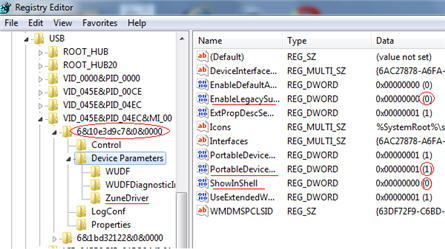
Windows Phon 7 USB hack

The caviet to this tutorial, is that you can only perform the tweak to your computer which you sync the Windows Phone 7 device with. To get started, do the follwoing:
  • Open the registry editor on your PC by typing regedit in your Start menu
  • Go to HKEY_LOCAL_MACHINE\SYSTEM\CurrentControlSet\Enum\USB; search for ZuneDriver
Now you will modify three entries (note, if you have multiple WP7 phones, you have to do it for each one)
  • Change ShowInShell from 0 to 1
  • Change PortableDeviceNameSpaceExcludeFromShell from 1 to 0
  • Change EnableLegacySupport from 0 to 1
Note:  Perform registry entries at your own risk.  It’s best if you back up the Reg before starting. Continue Reading

LaCie SuperSpeed USB Stick Lives Up To USB 3.0 Spec

If the benchmark claim rings true, LaCie has a new USB 3.0 flash drive which is living up to the USB 3.0 SuperSpeed promise.  Things might be coming to fruition with the most recent product from LaCie, the FastKey.

SuperSpeed LaCie

The FastKey has print on the box claiming a whopping 260MB/s transfer speed.  If it true, this puts a single flash drive at a faster transfer rate than your best hard drive.  As EveryThingUSB points out:
“To put that in its proper perspective a typical 3.5″ hard drive has a peak read speed of about HALF of that and has an average speed about one THIRD of this little bad boy’s performance numbers”
So dumping your buddies MP3 collection of a 1,000s songs will be much easier with this USB 3.0 flash drive, then your portable USB hard drive.  But don’t think this convenience, and some would say luxury, come without a price.  The LaCie FastKey comes in a variety of sizes, starting at Continue Reading

Copyright

Copyright © 2006 +

USB Powered Gadgets and more...

All Rights Reserved

Advertise with us

GetUSB Advertising

This is a high value website providing great exposure to your product and brand. Visit our advertising page to learn specifics.

For more information
Visit our advertising page.

Nexcopy Ad

Nexcopy Provides

USB copy protection with digital rights management for data loaded on USB flash drives.

Contact us learn more

Resources and References Page

Resources and References Page