
USB Mass Storage Mode For Windows Phone 7
It’s standard for mobile phones to sync and connect with your computer with limited or no access to the memory for storage. As with our Zune hack for making a Mass Storage Device, here is a tip for the Windows Phone 7 as well…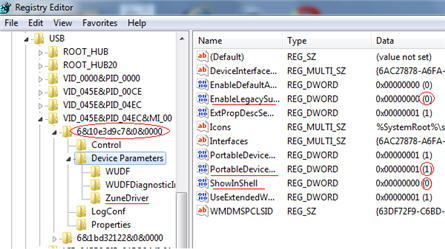
- Open the registry editor on your PC by typing regedit in your Start menu
- Go to HKEY_LOCAL_MACHINE\SYSTEM\CurrentControlSet\Enum\USB; search for ZuneDriver
- Change ShowInShell from 0 to 1
- Change PortableDeviceNameSpaceExcludeFromShell from 1 to 0
- Change EnableLegacySupport from 0 to 1
Tags: Mass Storage, usb, Windows Phone 7

Matt LeBoff
Kicking around in technology since 2002. I like to write about technology products and ideas, but at the consumer level understanding. Some tech, but not too techie.