
Inexpensive iPhone Charging Cable – and Smart
Are you looking for an inexpensive iPhone cable? This is a common search on Google because those cables go missing, get taken by your kids or co-workers, or simply break. It’s as though we need an endless supply of them. I don’t recall the last cable I had that lasted more than four months. There is an article out there somewhere that claims for each iPhone made, the user will need at least three cables for charging it. The link to that article escapes me, but from personal experience, it feels accurate.
Typically, one cable lives in the car for charging while driving. One stays at work to charge while you’re at your desk (and yes, for a little TV-background noise {wink}). And one stays at home for overnight charging. That’s the baseline.
iPhone cables, or Lightning cables, are expensive. Go to Amazon and you’ll find a decent six-foot cable costing close to $20. Multiply that by three and you’re looking at a $60 expense just to keep your phone alive. No thanks. We want an inexpensive iPhone charging cable solution.
This cable problem actually gets worse, not better, and here’s why.
You also need microUSB cables to charge your portable battery packs. So now we’ve got three Lightning cables for the iPhone (work, car, home) and at least one microUSB cable to charge the power bank that keeps your phone alive when you’re away from all three. Portable batteries are non-negotiable these days. Kids’ baseball games can stretch to three hours. Softball tournaments stack games back-to-back. A round of golf runs 4.5 hours. The point is, we’re often away from power outlets longer than our phones can handle.
If this feels familiar, you’re not alone. We’ve been writing about USB charging standards and cable sprawl for years, including how USB slowly became the? standardized connection for charging phones and mobile devices in general (related article here).
So how do we solve the problem of finding an inexpensive iPhone charging cable? The answer is a combination of products. This setup charges your iPhone and your portable battery packs without buying multiple expensive Lightning cables.
On Amazon, you can find a pack of five microUSB cables for under $10. Be sure to check the length you want. It’s easy to save a dollar and accidentally buy cables that are too short to be useful.

The other item you need is a microUSB to Lightning adapter. These small adapters sit on the end of your microUSB connector and convert it into a Lightning connection for your iPhone. A four-pack can usually be found for under $10.

It’s important to note these adapters only supply power to your iPhone. They do not support data transfer. For most people, that’s a non-issue. When was the last time you plugged your iPhone into a computer to sync? Everything happens wirelessly now.
For about $20 total, you now have multiple Lightning charging options for your iPhone and multiple microUSB cables to charge your portable power packs. It’s a simple, flexible, and very inexpensive iPhone charging cable solution. Honestly, it’s hard to justify doing it any other way.

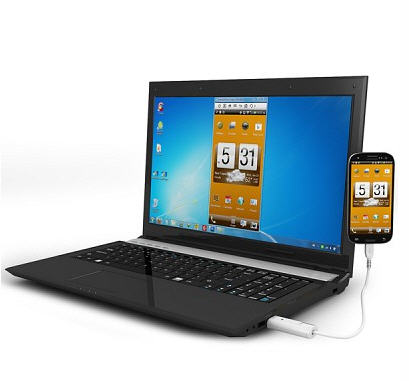 So what’s it good for, imagine this:Â Â If an app would require you to input letters or characters, you can simply do so by using the PC’s keyboard. Several key shortcut buttons on top of the program also allow you to conveniently make the device do specific commands, or access certain areas instantly. So, aside from being able to record screen activity directly on your PC (for gaming and reviews and the likes), you can also intuitively control the smartphone within the PC’s environment as if it was just a simple Android emulating program or similar.
For me, this cable is worth
So what’s it good for, imagine this:Â Â If an app would require you to input letters or characters, you can simply do so by using the PC’s keyboard. Several key shortcut buttons on top of the program also allow you to conveniently make the device do specific commands, or access certain areas instantly. So, aside from being able to record screen activity directly on your PC (for gaming and reviews and the likes), you can also intuitively control the smartphone within the PC’s environment as if it was just a simple Android emulating program or similar.
For me, this cable is worth
 Other adapters already offered by Apple include options for SD card readers, VGA connectors, Lightning to HDMI, Firewire, and eSATA.
The new micro USB adapter comes at a cost of $19.
Other adapters already offered by Apple include options for SD card readers, VGA connectors, Lightning to HDMI, Firewire, and eSATA.
The new micro USB adapter comes at a cost of $19.
