
Play Copy Protected Video on Smart TV – Why It Doesn’t Work

Why You Can’t Play Copy Protected Video on a Smart TV — The Locked Suitcase Analogy To Make Things Crystal Clear
Let’s talk suitcases to kick things off. Not the boring suitcase we take on business trips with socks and toothpaste, but digital suitcases. When you buy a secure USB that protects movies, training videos, or audio files, what you’re really getting is a locked suitcase full of content. The whole point of the suitcase lock is to stop other people from grabbing what’s inside and copying it all over creation. Security is the job. Protecting is the job. Just working in a TV or car stereo is definitely not the job.
Here’s the key idea most people miss: a locked suitcase does not magically unlock itself. It does not unpack itself. And it definitely doesn’t turn into a tiny little butler who pushes the Play button for your TV show. Someone must hold the key, open the suitcase, take out what’s inside, and press Play. In the world of technology, that “someone” is a computer — a Windows PC or a Mac.
A Smart TV doesn’t have hands. It doesn’t have the security software required to use the key. It can’t unpack the suitcase. It can’t pick up the MP4 or MP3 file. And even if the SmartTV could somehow levitate the file, it still wouldn’t have the ability to press Play for the secure file. Smart TVs can recognize that a USB drive is plugged in — that part is easy. They just can’t perform the work of secure decryption or controlled playback.
And here’s a critical fact that almost nobody realizes: the USB ports on Smart TVs are completely locked down from the manufacturer as a security standpoint. Yes, your TV can “see” a USB stick, but only through its own approved and restricted apps — like its built-in photo viewer or its built-in video player. Smart TVs do not allow third-party security software to run through the USB port. They do not let outside programs handle file access. They only allow their pre-installed TV apps to touch the files. So even if the TV “wanted” to unlock the suitcase, it physically has no way to run the key.
This is the major reason why you can’t play USB copy protected video on Smart TV devices. Their internal video player doesn’t know how to decrypt protected media. It can play wide-open files — absolutely. But encrypted files? Not a chance. The TV isn’t built for security work, just simple playback, and only within a sandbox it controls.
Now here’s where the confusion usually starts. People say, “But my TV plays movies from my other USB just fine.” And that’s true, because those USBs are more like open grocery bags. Nothing is locked. Everything is sitting right on top, free to grab. The TV just reaches right in, takes what it wants, and plays it. No security. No protection. Just a bag full of loose apples ready to roll out onto the floor.
But when we upgrade from a grocery bag to a locked suitcase, the whole situation changes. The TV still sees the suitcase sitting there. It still recognizes that something important is inside. But it has absolutely no ability to unlock it or operate the contents. The TV just stares at the suitcase like, “Cool luggage… what do you want me to do with it?” Without hands and without the key, nothing happens. No movie. No music. No play button ever gets pressed.
Your computer, on the other hand, has both the key and the hands. It can unlock the suitcase, take out the protected content in a secure, controlled way, and then manage playback so the files never escape from the suitcase into the wild. That’s the entire purpose of a protected USB — to make copying impossible while still allowing playback through an approved device that knows how to handle security properly.
So the next time someone tries to play copy protected video on a Smart TV and gives you that look — you know the one — remind them that security is work. Decryption is work. Pressing Play is work. And TVs simply were not hired for that job. They can carry a suitcase, sure, but they’re never opening it.
Summary Chart For Where USB Copy Protection Can Play
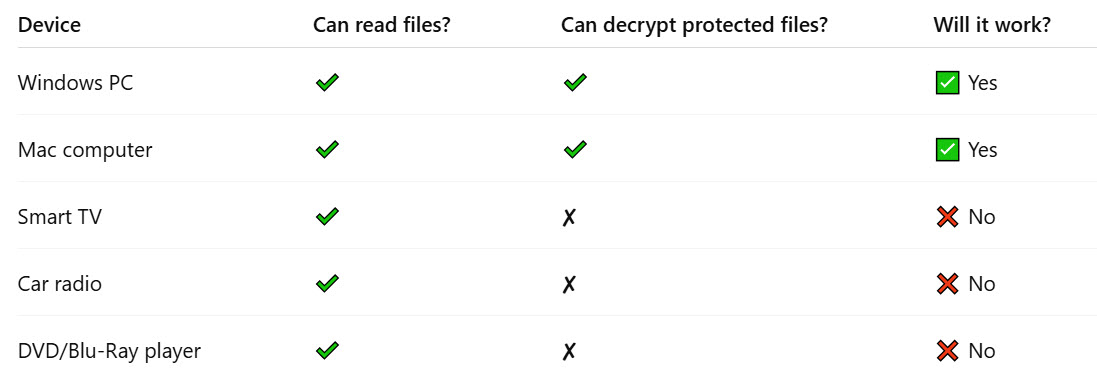
Bottom line: If the content must remain protected, a computer must unlock and play what’s inside. If you want a USB that plays anywhere without security, that’s the grocery bag option — wide open, no lock, no protection. But you can’t have the locked suitcase and expect a TV to suddenly grow hands. It’s secure for a reason.
To play copy protected video on Smart TV devices, the TV would need security software and full USB access — and Smart TVs intentionally block both, which is why protected USB media will only work on computers.
