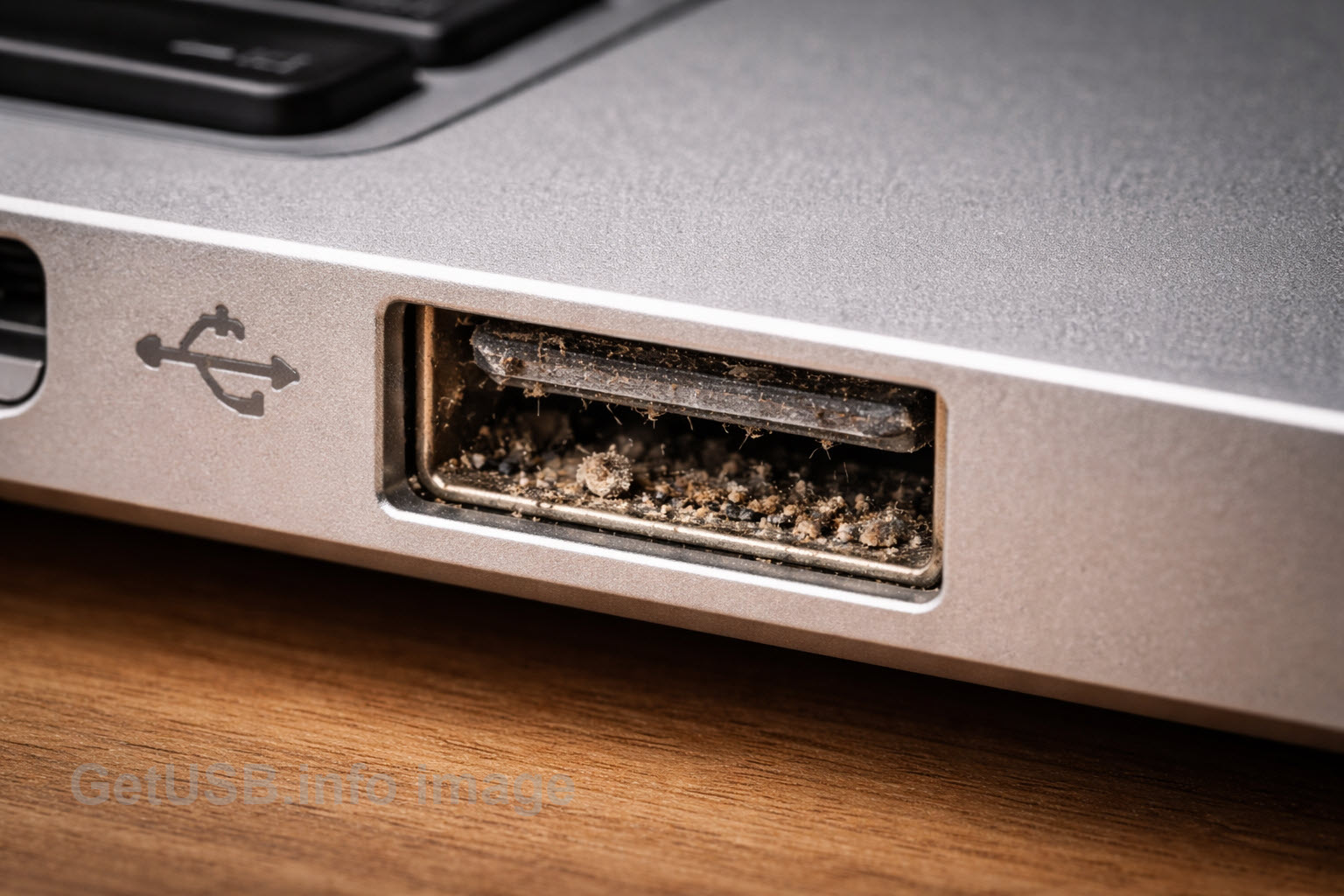
At first glance, this USB port looks normal. But a closer look reveals compacted dust, fibers, and residue sitting directly on the contact surface. This kind of contamination doesn’t usually cause immediate failure. Instead, it creates unstable electrical contact that leads to intermittent disconnects, unreliable charging, slower transfer speeds, and unexplained device behavior. Ports don’t need to look “packed with dirt” to cause problems — a thin layer of debris is often enough.
USB Hygiene: How Dirty Ports Cause Disconnects, Data Errors, and Premature Wear
USB is one of those everyday technologies that “just works” right up until it doesn’t. A flash drive disconnects mid-copy. A phone charges only if the cable sits at a certain angle. A USB 3.0 device suddenly behaves like USB 2.0. In many cases, the root cause isn’t a bad device at all — it’s contamination in the port, on the cable plug, or on the flash drive connector.
This article covers the practical side of USB hygiene: what dirt and residue actually do, where contamination comes from, how often ports should be inspected, and how to clean safely without damaging the connector. If you work in high-volume environments (like USB duplication stations), we’ll also cover why hygiene becomes part of the workflow instead of a troubleshooting step.
What a Dirty USB Port Really Causes
USB connectors rely on tiny contact surfaces and tight tolerances. When dust, lint, oils, oxidation, or residue get in the way, you don’t always see a total failure. You get unstable behavior: a device disconnects and reconnects, a transfer slows down, charging becomes inconsistent, or a USB 3.0 device negotiates down to USB 2.0 speeds.
The data risk is simple. Unstable connections cause retries and errors during transfers. Over time, that increases the chances of incomplete writes and file system damage — especially on removable media like FAT32 or exFAT flash drives. This is why dirty ports often get misdiagnosed as “bad drives” or “flaky cables” when the real issue is the connector.
How USB Ports, Plugs, and Cable Ends Get Dirty
Most USB contamination is normal life. Ports are open cavities. Cable ends get handled. Flash drives travel between computers. Dirt accumulates quietly and then shows up as “random USB problems.”
- Pocket lint and fabric fibers: Common for phones, laptops, and flash drives that ride in pockets or bags.
- Airborne dust: Open ports collect dust over time, especially on desktops, hubs, kiosks, and front panels.
- Skin oils: Oils transfer during handling, trap dust, and encourage oxidation on metal contacts.
- Food crumbs and drink splashes: Office desks and vehicles are frequent sources of sticky residue.
- Humidity and moisture exposure: Moist environments promote corrosion even when the port looks clean.
- Dirty cables spreading contamination: A single dirty plug can contaminate every port it touches (and vice versa).
How Often Should You Inspect or Clean?
There isn’t a single perfect schedule because cleaning frequency is driven by two things: movement and volume. The more a connector travels between machines, and the more insertions it sees per day, the less you can rely on “it looks fine.”
USB cables (usually lower risk)
Cables that stay connected to the same setup typically need the least attention. In normal home or office use, inspection every few months is usually enough. If a cable travels between systems or gets handled constantly, treat it like a mobile connector and check it more often.
Host ports (PCs, hubs, front panels)
Host ports are open to the environment and often handle multiple devices. A monthly glance is reasonable in typical office conditions, and more frequent checks make sense in dusty, shared, or industrial environments. Visual inspection catches obvious lint and debris, but it won’t always reveal oils, residue, or early oxidation.
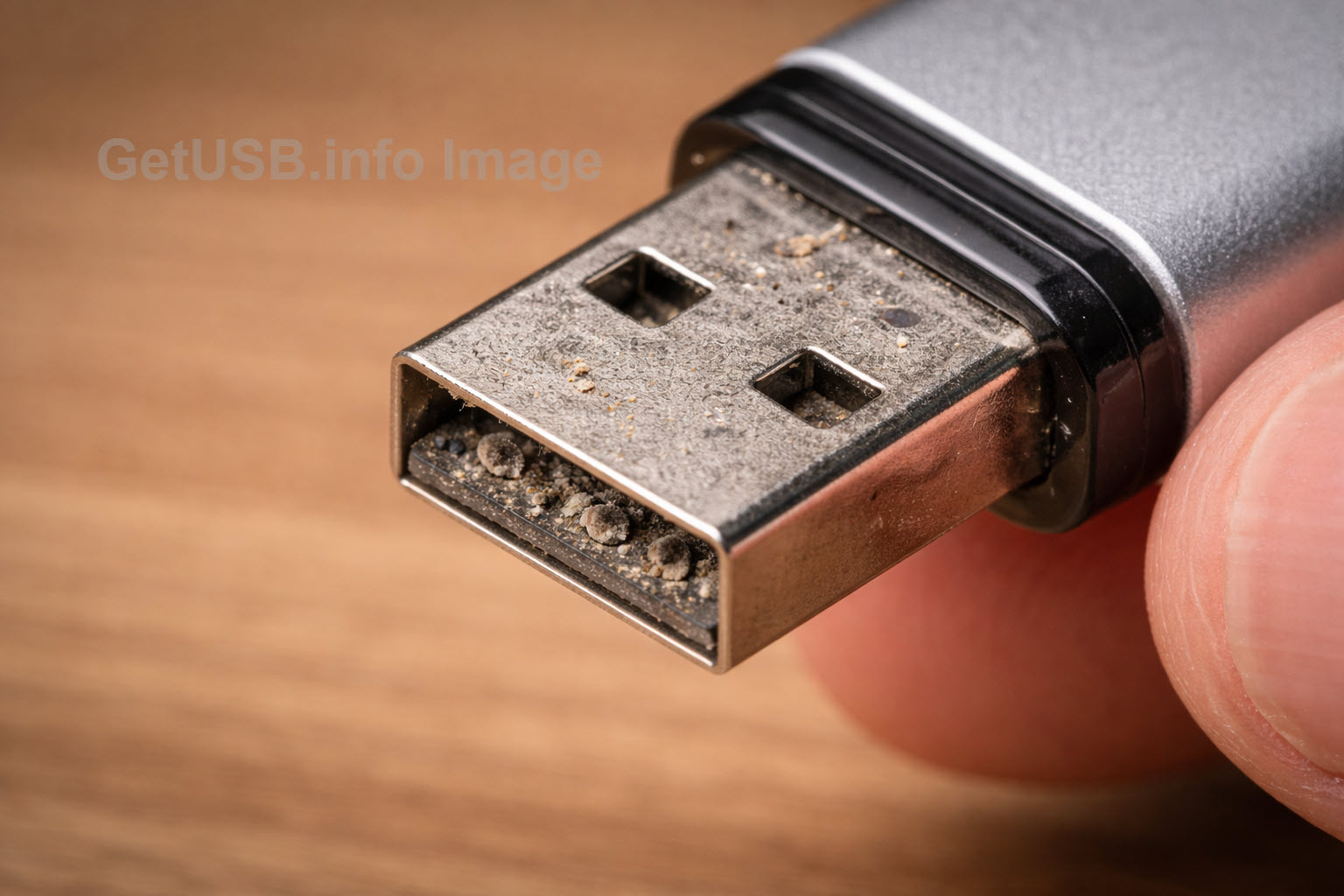
USB flash drives quietly collect grime as they move between pockets, desks, vehicles, and computers. Even moderate buildup on the connector can interfere with signal quality and power delivery, especially during long data transfers. Because flash drives travel from host to host, they also act as carriers, spreading contamination into otherwise clean ports. This is why mobile USB devices benefit from routine inspection and light cleaning, even when they appear mostly clean.
Flash drives (highest risk because they travel)
Flash drives deserve the most attention because they move from host to host and can spread contamination between systems. If a drive is used for anything important — imaging, software installs, field updates, compliance distribution, or even just moving large files — it’s smart to treat the connector as something that should be inspected regularly and cleaned lightly when needed.
High-volume environments (where hygiene becomes process)
In high-throughput workflows, USB connectors stop being an occasional touchpoint and become part of the production surface. A single station may see hundreds of insertions in a day, often across multiple devices and operators. In that context, waiting for a port to fail isn’t just inefficient — it introduces inconsistency into an otherwise repeatable process. Connector hygiene naturally shifts from a reactive fix to routine maintenance, helping extend port life, reduce intermittent errors, and keep throughput predictable.
This is especially true in environments built around tools like a
USB flash drive duplicator,
where repeated insert–verify–remove cycles are part of normal operation. At that scale, small variables add up quickly. Keeping connectors clean becomes one of those quiet practices that supports reliable duplication, minimizes unexplained failures, and helps equipment behave the same way at the end of the day as it did at the start.
Visual Inspection vs. Default Cleaning
Visual inspection is helpful, but incomplete. If you see lint or debris, remove it. But oils, thin films, oxidation, and residue can create problems long before they become obvious. That’s why a “clean by default” mindset makes sense for mobile flash drives and shared ports, while “inspect first” is fine for low-use equipment that stays in one place.
A simple rule you can follow: fixed, low-use gear can be inspected first; mobile or high-volume gear should be cleaned on a schedule.
How to Clean USB Ports Safely
Whenever possible, unplug the device from power (or shut it down) before cleaning. The goal is to avoid applying power while moisture is present and to keep cleaning controlled and gentle.
Do not use abrasives
Avoid sandpaper, nail files, or anything abrasive. USB contacts are thinly plated. Scraping removes plating, accelerates corrosion, and permanently shortens connector life. Abrasives may appear to “work” briefly, but they often create worse problems later.
Avoid household cleaners like Windex
Household glass cleaners are water-based and contain additives that leave residue. Residue traps moisture, promotes corrosion, and can create conductive paths. Even if you blow a port out after spraying, residue can remain deep inside the connector.
Liquids themselves are not automatically dangerous in a USB socket. The real risk is using the wrong liquid, using too much, and applying power before everything is fully dry. Low voltage doesn’t mean “safe to flood.”
Safe Cleaning Methods That Actually Work
The safest approach is to start dry, remove loose debris, then use a fast-evaporating cleaner only if you need it. Keep ports lightly damp, never flooded. When in doubt, clean the plug end of the cable or flash drive rather than saturating the socket.
-
Air first (best first step): Short bursts of air remove loose dust and lint. Disposable compressed-air cans work, but they’re expensive over time and they generate waste. A rechargeable electric air duster is a smarter long-term buy for both your wallet and the environment. Here is a reusable option:
rechargeable compressed air duster. - Isopropyl alcohol (best household option): Use 90%+ if available. Lightly dampen a lint-free swab or microfiber corner, gently wipe accessible surfaces, and allow full evaporation before reconnecting.
-
Electrical contact cleaner (best professional option): Contact cleaner is designed for electrical surfaces and typically evaporates cleanly when used correctly. If you want a spray option, here is an example:
electrical contact cleaner spray.
Use sparingly and allow full drying time before applying power.
Avoid the “Push-Pull While Wet” Habit
It’s tempting to spray a liquid into the port and repeatedly insert and remove a connector to “scrub” the contacts. The risk is that you can drive debris deeper into the port and spread contamination between surfaces. If you use a cleaner, apply it sparingly and focus on cleaning the plug end first. A clean plug reduces contamination transfer with every insertion.
USB Hygiene Rules You Can Remember
- No abrasives: never scrape or sand contacts.
- No household cleaners in ports: avoid products that leave residue.
- Air first: remove loose debris before using any liquid.
- Use fast-evaporating cleaners: alcohol or proper contact cleaner only.
- Minimal liquid, full drying: damp, not flooded; reconnect only when dry.
- Mobile and high-volume gear needs routine hygiene: flash drives and duplication ports benefit from scheduled cleaning.
Bottom Line
USB hygiene is simple, but it matters. Dirt and residue cause unstable connections, slow charging, performance drop-offs, and data errors that often get misdiagnosed as bad hardware. Regular inspection and careful cleaning eliminate many of these issues before they interrupt your work.
In high-volume duplication workflows, cleanliness equals consistency. Treat connector hygiene as part of the process, not an afterthought, and your USB hardware will be more reliable for far longer.
A Clean Chart for a Messy Situation
The impact of connector contamination isn’t always obvious, but it can materially affect speed, power delivery, and reliability. The table below shows typical real-world outcomes when USB connections are clean versus contaminated.
| Condition | USB Speed / Behavior | Power Delivery | Connection Stability | Real-World Symptoms |
|---|---|---|---|---|
| Perfectly clean connector |
Full negotiated speed (USB 3.x operates as USB 3.x) |
Normal current delivery Stable voltage |
Stable, consistent connection | Reliable transfers, expected performance, no disconnects |
| Light contamination (dust, skin oil film) |
Slight speed reduction Occasional retries |
Minor voltage drop | Mostly stable | Slower copies, warm connectors, inconsistent charging |
| Moderate contamination (lint, residue buildup) |
USB 3 device may fall back to USB 2 speeds | Reduced current delivery | Intermittent | Random disconnects, slow transfers, devices re-enumerating |
| Heavy contamination (packed debris, oxidation) |
Unstable or severely reduced speed Transfer failures common |
Unreliable power | Highly unstable | Failed copies, corrupted files, devices not recognized |
| Worst-case scenario (corrosion or worn plating) |
Near-zero usable throughput | Power delivery may fail entirely | Unusable | Port appears “dead” or works only when wiggled |