The GetUSBDealz for today is a 4 port USB charging station for your PlayStation3 controllers. At just $8 there is just now way you can turn this down…well, unless you don’t have a PlayStation.
So we start a $49 – Buy.com knocks off just about all that and drops the price to $8…then throws in free shipping. Clearly we have some inventory dumping going on, and YOU should take advantage.
Here is the company sales pitch:
You’re in the middle of an awesome game, tension high, adrenaline pumping, and then…Warning: Low Battery!
Don’t let the fun stop due to lack of battery power! With the PlayStation3 Quadruple Port Drop-in USB Charging Dock, you’ll have everything you need to keep the games going. Containing four-space cradles that allows you to charge and rest a total of four remotes at one time, the dock also includes built-in LED indicator lights. Need to know where charging is holding? The unit’s multicolored LED lights notify you of each controller’s charge status: Red for battery empty, yellow for charging, and green for fully charged.
This charging dock is powered by a USB cable that can be connected to a USB port on the PS3 Console or on a computer. Simply drop one or all of your Playstation3 controllers into this 4-port charging dock and leave them alone as they power up!Grab this GetUSBDealz now!
Continue Reading
About three weeks ago I started the process to design a USB power strip where the device would be a dumb down version of a USB hub…it only gives power. The reason why I wanted to design something like this was for the infinite number of USB items I have. Just in my house alone, we have 3 iPhones, one Flip Video camera and two blue-tooth headsets…all powered and recharged by USB.
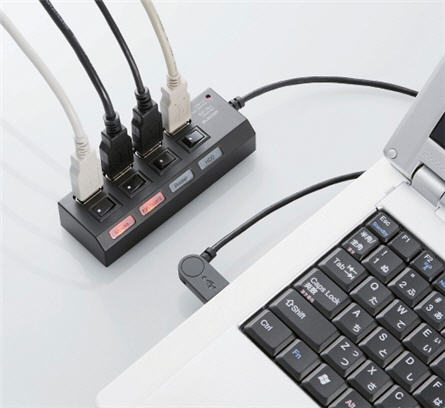
So enter, stage left, my thought of a USB power strip. Well, Elcom was thinking the same thing, but only months earlier! They have officially released the USB for port power strip and the 7 port USB power strip. Clearly I think the idea is simply brilliant.
Elcom includes LED lights for each port to show if a device is active or not. They include a switch to flip On or Off that particular port and last, Elcom gives you some clear labels [in English] to label what cable is going to which device.
The 4 port USB power strip is $40. The 7 port USB power strip is $110. Both are available at Geek Stuff 4 You. Page.
Continue Reading
Marantz, a premium set-top audio manufacturer, introduces a new Network solution for home audio. The M-CR603 is a combination of all good things. Featuring a built-in amplifier, a receiver, a CD player, an AM/FM radio and the ability to stream music from Rhapsody, Pandora or Napster.
In addition, the Marantz unit includes a USB port for iPod / MP3 docking, but what we really like about the unit is the ability to stuff a 64GB flash drive in there loading with MP3 files and you’ve now got one hot audio box!
No pricing yet, so I’m assuming the executives and sales guys are hammering out those details. Check Marantz for more info on pricing / availability.
Continue Reading
There is a new kid on the block when it comes to USB connectors, it is “The Flipper.” The concept is so incredibly simply you will laugh when you see it. The Flipper is a USB connector that will make correct contact with the host USB port regardless of how you insert it.
Granted it is not that hard to figure out which side is up and down…and I will admit [openly] that if you have trouble with that – then you are an idiot.
So if you are having trouble here is a tip:Â Seam is the down side, seamless is the up side.
So The Flipper will help the idiots who can’t figure heads from tails.
I do say, there was a design flaw in the first place with having an up and down position, it should have been universal and hopefully The Flipper will catch on and thus change USB forever…or at least until USB 3.0 takes over.
Continue Reading
They say the best product to invent is taking an existing product and make it better. Today is a case in point. The paper clip has been around forever [1870] and just recently have we seen a true improvement. The USB paper clip is very creative and a fresh twist on an old product. In fact, TechCrunch quoted, “why didn’t I think of that” type design.
So here it is, the USB memory clip.
Biking is great exercise, but don’t let a healthy body be the only reward for this activity, power up your gadgets. Here is a USB tutorial which incorporates a two port USB hub and switching regulator to generate a 5v charge to any USB device.
There are so many small electronics that can be powered or charged from a USB connection it only makes since that people might want to do this while riding a bike.
The hack isn’t too complicated, but it is a weekend project and will require some soldering skills. The two fundamental components are a Rectifier which changes AC current into DC current and a Voltage Regulator which is a switching regulator to control the amount of volts going to the charged devices.
To get all the details visit the DIY project here.
Continue Reading
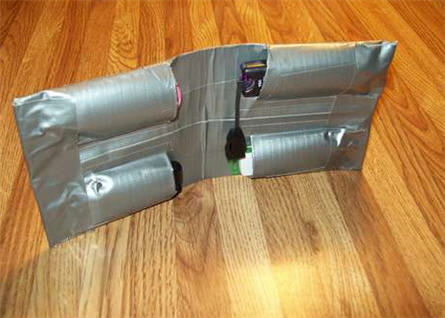
I’ve seen some USB holders at Staples and Office Max for over $20 dollars and that’s just for a fancy pouch to place your USB sticks while on-the-go. What about a DIY duct tape USB holder? You get the satisfaction of making it yourself, save yourself some cash and a hint of coolness to your storage devices.
Granted the duct tape approach is more in tune with kids, but lets give this a quick review.
In four simple steps you can do this exact project.
Step 1 – Grab some materials, that being a ruler, knife, duct tape, thumb drives and creativity.
Step 2 – Make the back plane duct tape which is very similar to making a duct tape wallet.
Step 3 – Add the pockets. In the picture you can see the USBs are parallel with each other, I would recommend staggering them so the thickness is reduced when folding.
Step 4 – Put the finishing touches on there with some clean lines of duct tape, patterns and custom designs.
For the full tutorial and loads more pictures visit Instructables.
Continue Reading
Happy 4th of July for 2010 from GetUSB.info. Here is a great image of a USB drive branded with the US flag. Did you know why we celebrate the 4th of July? I’m sure you do, but for a friendly reminder, read this:
Most people in the US celebrate the 4th of July, but do you know why the holiday is so important to our country? Imagine how you would feel if someone older than you kept telling you what to do all of the time and kept taking more and more of your allowance. That is how the colonists felt in the years leading up to 1776. Great Britain kept trying to make the colonists follow more rules and pay higher taxes. People started getting mad and began making plans to be able to make their own rules. They no longer wanted Great Britain to be able to tell them what to do, so they decided to tell Great Britain that they were becoming an independent country. (To be independent means to take care of yourself, making your own rules and providing for your own needs.)
Continue Reading
Adobe Photoshop is a great product, expensive, but great. You can do amazing things and take any picture and make it look like a million bucks. The trick, layers.
The deal about Photoshop is the average user only takes advantage of 10% of the features. Meaning you are paying gobs of money for features you probably don’t use.
If this is the case, another great product to try is the Corel Paint Pro photo editing software. Here you’ve got many of the elements an average use will try. Such as red-eye, color balance, filter effects and helpful makeover tools to remove blemishes on skin or whiten teeth, etc.
To get you past the tipping point, Corel is offering a free 2GB USB flash drive with your order. So this gives you a total price of $20 for Corel Paint Pro and 2GB flash drive.
Head over to Buy.com to grab this USB Dealz!
Continue Reading
During the month of July Instructables is running a USB contest for who can make the best mod while incorporating USB technology. For this reason, we’ve been keeping a close eye on what you creative folks are up to.
Today we bring you the 100% natural, all wood, USB marble machine.
I will admit the name is more impressive then the look, but the cool factor outweighs the look.
The wood USB marble machine is an excellent DIY project and will open up your eyes to all sorts of different ways you can make an automated, electric motor powered marble machine.
Check out the video, it’s well worth it!
Learn how at Instructables.
Continue Reading
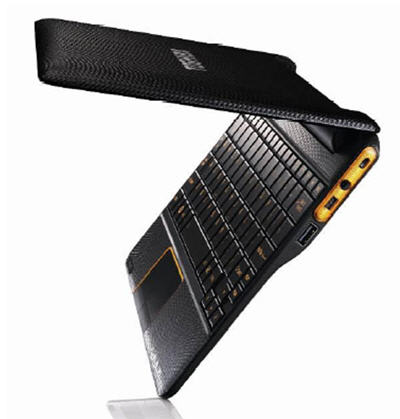
Toshiba announces a slick new Netbook running Android OS and NVIDIA processor. It boots in about 1 second, yes, that’s right, 1 second…and is it just me, or does that case look like leather?
The AC100 has a full sized keyboard, 10.1 LED backlite screen and 512RAM [upgradeable to 1GB] with 8GB of storage. With the USB port and mini USB port storage should not be a problem as it’s virtually unlimited with USB hard drives and USB flash drives.
Toshiba claims that the machine is good for up to seven days on standby with mixed use and the machine weighs in at 870g and is 14mm thick at the thinnest point.
The AC100 will be released in the UK first with an undiscolsed price point, but can’t be more than $350. To find a bit more here is the Toshiba PDF.
Continue Reading
There is nothing more satisfying for a finger work-out then using a laboriously slow old school typewriter. Or on those cloudy days where you feel a bit melancholy and in the mood to write the start of a novel you’ll never finish, you may need to punch down on those exhausting keys of a manual typewriter to get the creative juices flowing.
Today I present you that possibility and better yet, with a touch of technology to make your craving a bit more current.
A well known steampunk modder [Jack Zylkin] has taken the traditional typewriter and transformed it’s key punching into a digital conversion of letters and numbers. Using some customized PCBA, a USB connection and a bit of code it’s now possible to sync your great grandmother’s typewriter with your computer, or in this video, your iPad.
Your craving wont go without some minor cash flow issues, as you can purchase a pre-made [or pre-mod I should say] USB typewriter or you can buy a kit and down grade your very own typewriter and keep the family air loom alive and kicking.
To get more details visit the Etsy Shop to make your purchase or gather more information.
Continue Reading




 Biking is great exercise, but don’t let a healthy body be the only reward for this activity, power up your gadgets. Here is aÂ
Biking is great exercise, but don’t let a healthy body be the only reward for this activity, power up your gadgets. Here is a