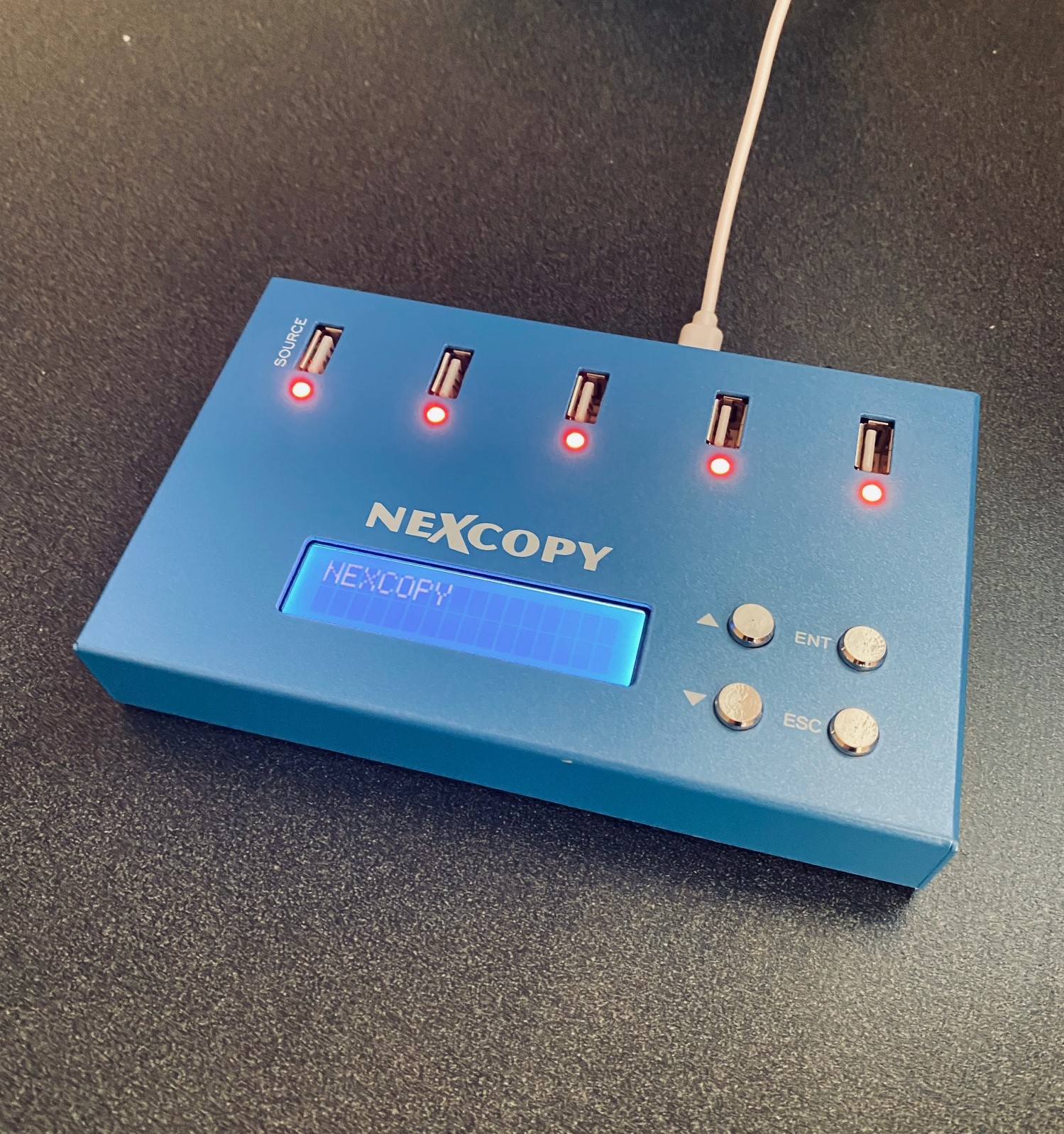
LAKE FOREST, CA, USA, November 20, 2019 /EINPresswire.com/ — Lake Forest, CA – November 20, 2019 –
Nexcopy Inc., introduces all new mini size USB duplicator, the USB104SA, a 4 target standalone USB flash memory Duplicator specifically design to be light weight and portable.
The USB104SA USB Duplicator has a list of features which pivot from the larger, award winning, Nexcopy standalone duplicators. Features include:
Asynchronous copy mode, all the time
Binary copier will copy any format; FAT, FAT32, exFAT, NTFS, HFS, Ext2,3,4, Proprietary
Binary CRC verification algorithm
Quick Erase and Ful Erase for disk sanitization
Four language modes in LCD menu
USB speed benchmark utility
Firmware upgradeable
“With the lack of optical drives in computers and laptop, the USB stick continues to grow in popularity,” reports Greg Morris, President of Nexcopy. “What we have seen is a demand for both small configuration systems for those transitioning from optical media to USB media and large production systems which we’ve serviced for years. The USB104SA is a great stepping stone for those coming from the optical duplication industry.”
Stan McCrosky, head of Sales, comments, “What we have seen, are small organizations and business requesting something low cost and low volume for data duplication. Our main focus is still business-to-business, but the growing demand for low volume duplication equipment justified the development of a product like the USB104SA.”
The USB104SA is a portable solution and ideal for trade shows or spoken word events. The unit weighs less than one pound and with a foot print of about six inches by one inch tall. The unit can easily fit into your computer bag, which is ideal for carry-on luggage at the airport.
The USB duplicator is powered by a microUSB cable which can be connected to your computer laptop USB port. A USB block is also provided for powering from an outlet.
Nexcopy firmware is a code technology which has evolved since 2008. This system is backward compatible with USB 1.0, 2.0 and 3.0 flash memory. The system will accept SD card reader adapters, microSD and CF card reader adapters. The firmware may be used to speed test flash memory which is a great tool for understanding the quality of flash memory a supplier has provided.
USB-C is a great technology, offering ultra-fast data transfer rates close to 10Gbps and increased power delivery for charging laptops, monitors, and TVs. However, the power advantage of USB-C diminishes over longer cable lengths. According to the USB-C (USB 3) specification, optimal power and transfer rates are maintained only when the cable length is under two meters (about six feet).
Power over Ethernet (PoE) is a proven way to deliver both data and power over long distances via cable. PoE Texas has introduced a product that extends USB-C connections using this technology.
“As a standard, USB-C offers amazing speed and power delivery. Unfortunately, USB-C can only transmit power less than ten feet (three meters), and the cable infrastructure comes at a cost premium. Ethernet cable, nearly ubiquitous in modern construction, can transmit power and data up to 328 feet (100 meters). USB-C power and data transmitted over Power over Ethernet significantly lowers the cost of adopting USB-C by eliminating the need for new electrical infrastructure.”
Extending USB-C Connections with Power over Ethernet
Real-World Example of PoE USB-C in Use
A user has a workstation located about 30 feet away from the production unit it needs to communicate with. The production unit is a USB-C duplicator by Nexcopy. The workstation manager controls the data to be loaded onto USB-C flash drives, while the production manager physically connects and disconnects the USB sticks during the duplication process.
Because a standard USB-C cable cannot cover the required distance, the user can employ the USB-C Power over Ethernet solution to deliver both power and data effectively to the remote device.
Conference Room Setup: A USB-C monitor is mounted 40 feet away from the docking station. Using PoE to USB-C allows both video data and charging power to reach the display over a single Ethernet cable.
Security Camera Installation: A USB-C powered 4K security camera is installed 80 feet from the control room, receiving both power and data via PoE without additional electrical wiring.
Point-of-Sale Terminal: Retail stores can power USB-C tablets located 50–75 feet from the main server rack using PoE, avoiding the need for extra outlets and USB hubs.
Industrial Automation: A USB-C duplicator or machine placed 60 feet from the workstation uses PoE adapters to maintain stable power and high-speed data transfer without costly long USB cables.
Last year, Google released the Titan security key. It can be used as ultra secure methods for two-factor authentication for some online services over USB-A, NFC, or Bluetooth. Today, Google announced an updated USB-C key to the lineup, which will be available tomorrow from the Google Store for $40.
The new USB-C key appears to have similar functionality to their previous model, all of which are built to the FIDO standard. The USB-C model lacks the NFC capabilities that its other two keys have, but this shouldn’t matter as the USB-C design is meant for you to plug it directly into your portable device, such as phone or ultra-thin laptop. That said, NFC is a bit moot.
Google’s new USB-C key is compatible with Android, Chrome OS, macOS, and Windows devices (Only the Bluetooth key works with iOS, and it requires the installation of Google’s Smart Lock app.) Like its previous keys, Google says the USB-C key’s firmware is permanently sealed into a secure element hardware chip, making the key more resistant to physical attacks.
Google partnered with security key-maker Yubico to manufacture its new USB-C key. Google’s key looks a lot like Yubico’s YubiKey 5C. Both keys are pretty similar, but Yubico’s keys support a few more protocols than Google’s Titan keys do, such as WebAuthn, so they might be the better option for some, depending on what you need.
Google’s other two Titan security keys were previously only available as a $50 bundle, but Google says you’ll be able to buy them individually starting tomorrow. The USB-A / NFC key will cost $25, while the Bluetooth key,
USB 3.2, the most recent, shipping, standard sees a maximum transfer speed of 40Gb per second. USB4 will double that. Said another way, 80Gbps is equal to moving 10,000MB in one second. Said another way, that’s about 10GBs in one second.
Keep in mind, this is all theoretical, maxium speed. Real world applications will not get to this point. Never has, never will.
USB4 is built on Intel’s Thunderbolt technology. You know, the technology Apple tried to force everone to use back in 2012. The big change for USB is the interface. The Thunderbolt licensing setup is expensive and thus, we never saw low priced accessories to accommodate the technology. This is why Intel was always so interested in getting Thunderbolt to be the backbone for USB. It would gain in both speed and reduced price.
USB4 is also backwards compatible with USB 3.2, USB 2.0 and Thunderbolt 3. Since the new standard merges both USB-C and Thunderbolt, we should start to see decreasing accessory price points that utilize faster speeds as USB4 gains popularity.
USB4 device manufacturers must also include USB Power Delivery technology, which regulates device charging. PD can quickly charge your phone or gaming laptop, sending the optimal amount of wattage for each device to charge quickly without damage.
Expect to see the first USB4 products hit the market as early as mid-2020.
With USB gadgets like this, it’s hare to imagine companies like ADT stay in business for residential customers. This working USB charger includes a miniature camera which acts like a surveillance camera. You can plug any USB gadget into it for charging, all the while record or stream video for what is going on within it’s view.
Use your Android or iPhone you may stream directly to your connected app or stream to a group of people you’ve authorized within the app. The spy camera records 1080p HD footage and will also record that video to the 32GB microSD card (included). Bonus: You can set the surveillance camera to record only when it detects motion.
The camera view is anything directly in front of the plug, so no ability to turn the camera itself, but that is a simple enough problem to solve, just use an outlet that is in-line with the viewing area you want to record.
Here are some noteworthy bullet points about what you will get for the low price of $29USD:
Motion Detection – Can be set to initiate recording only when motion is detected and then send a notification directly to your phone.
Loop Recording – Can be set to automatically record over old footage, allowing for uninterrupted video recording.
Night Mode – Can be set for recording in dim and low light environments.
Multi-Use – Allows for multiple users to connect to the same device (Supports up to 8 users)
Multi-View – Allows for multiple cameras to be connected to the same APP / Software. (Supports up to 8 cameras)
Came across an article today, which I thought was a very good read. It’s a niche article, but for anyone who deals with flash drives, I would suggest checking it out.
From the article:
The optical drive is nearly dead – they are no longer found in laptops and rarely found in tower PCs. With that said, the trend for giving out data is shifting to USB flash, not CD or DVD media. Because of this shift, many companies are taking a closer look at buying a USB duplicator.
There are several factors one must consider before spending thousands of dollars on a USB duplicator. We have broken down the most important considerations into four categories. After reviewing these four categories, you should have an excellent idea of which type of duplicator is best for your organization.
USB Duplication Speed
Speed is the first area you should analyze to figure out which direction you should go. When considering speed, we are not simply talking about the copy speed of the USB duplicator, but other factors as well, such as number of USB sockets and the user interface required for feedback during operation. Questions you should ask, include:
# How many USB drives will you need to copy in a day or week?
# How large is the data load in MBs or GBs?
# What kind of turn-around time do you have between a duplication request and when that request should be completed?
# Is there printing, or branding required, on the outside of the USB?
# Do you need proof of performance via a log file?
Answering the above questions will give you an idea of what type of USB duplicator to consider. The type of duplicator will be size, how many USB sockets, copy speed of the duplicator and what type of software, if any, your organization will need.
Your Production Crew
Your next step is to consider the production crew who will be running the equipment. Will there be non-technical people running the equipment, or will a more hands-on approach be required? Is the IT department looking to restrict user access to the equipment or restrict access to the data content during the duplication process?
Much of the above depends on how the data is received before copied to the USB flash drive. For example, a duplication company might receive a physical master from a client; where-as a fulfillment house may get content delivered from a server from an on-line order submission process.
Will the organization require multiple USB duplicators located in different parts of the world? Said another way, many global companies standardize on one manufacturer so the user experience is the same across multiple locations. This also makes production easier as both support and experience can be shared between divisions to streamline processes on a global scale.
Knowing the production crew, their capabilities and responsibilities will help narrow the search for the right piece of equipment.
Read-Only or Read-Write
The third category worth investigating is asking the state of what the USB should be once sent delivered. Is the organization looking to ship out a read-only flash drive? By default all flash drives are read-write. Because of this, many organizations fear a virus could jump onto the drive and spreading to other computers. With that fear in mind, most companies are looking for a USB duplicator which creates a read-only drive product. This means the USB drive is locked, or write protected. The files cannot be deleted or formatted off the drive, and more importantly, files cannot jump onto the drive.
Nexcopy is world leader in read-only flash drive duplicators and therefore used as an example of a duplicator system worth considering.
The most common reason why only one USB drive can be used in Windows is due to multiple USBs connected with the same USB device signature, or disk signature collision.
If you are dealing with bootable devices and seeing this problem, we are confident a collision is the issue. If you are not dealing with a bootable device, then our information below will probably not help.
What is a USB signature collision?
A signature collision can happen on any bootable device, such as Compact Flash cards, SD cards, microSD cards, and USB flash drives. A disk signature is a unique identifier number (UID). It is a unique identifier stored as part of the MBR (Master Boot Record) for an operating system loaded on the device. The operating system uses the UID to identify and distinguish between storage devices. It is commonly made up of eight alphanumeric characters. A disk collision occurs when your operating system (Windows) detects that there are two disks with identical signatures.
For Windows 7, 8, 8.1, and 10, these versions of Windows will disable the second drive and will not allow that second volume to mount until the disk collision has been rectified. If you are reading this article, chances are, this is exactly what is happening to you.
The first thing to do is navigate to the Disk Management tool within Windows. To do this, use the search tool and type in Disk Management. This will take you to the utility that Windows offers. Here you can see your multiple devices connected. If you click or hover over the device not working you will see one of two messages:
“The boot selection failed because a required device is inaccessible” or “This disk is offline because it has a signature collision.”
What created the USB disk signature collision?
Making a bit-by-bit copy of one device to another, like using a USB duplicator, would create a disk signature collision. Because these binary duplicators copy the MBR information, that UID is also copied to the target device. Stepping forward, once those two devices are connected to the same computer, “boom” you get the collision.
Chances are, the situation you are in right now is due to a cloning process you have just completed. But don’t worry, we have the fix!
Fixing a USB disk signature collision
There are two methods for fixing the collision issue. The first solution is using DiskPart, which is a free command line tool provided by Microsoft and is found on all Windows 10 computers. This is a one-by-one process. If you have multiple devices with this problem and need to fix all of them, best to use option number two.
DiskPart Method
To launch DiskPart, simply go to the search function and type DiskPart
You now see the command prompt for DiskPart and type list disk
DiskPart will list all the storage devices connected to your computer. From this list, identify which USB is your problem device. The easiest way to determine this is to check the capacity for the drive listed by DiskPart.
Select the disk you want to change the signature ID for, for example Disk 1, which is the second disk listed (typically disk 0 is your C drive). Type select disk 1
Now that disk one is selected, type uniqueid disk and the utility will spit out the disk signature for disk 1.
Our final step is to change this value. Knowing a hexadecimal value we can use, such as A53AEBE9, type the following in DiskPart: unique disk ID=A53AEBE9 and click Enter.
With this change, you can now go into Disk Management and put the device Online. When the device is online, Windows Explorer will see the device and you can use it. There is no longer a USB disk signature collision.
If your hexadecimal value will not take, it means your MBR file doesn’t have a signature you can change. You will need to flash the device with your bootstrap code. More details on that from a previous article found here.
Another reason why option number two, below, is better is that the hexadecimal number assigned to the partition is automatic and works. There is no guessing on what hexadecimal to assign to the partition, a step you must do in DiskPart.
The second solution is downloading the freePartition Wizard and opening the software. The Partition Wizard software will automatically identify the USB disk signature collision and update the necessary MBR. Super simple!
There is more technical information about disk collision issues from Wikipedia. You can brush up on the details there if so inclined.
Japan has been a long time supplier for three key elements used in the manufacturing of NAND memory and semiconductors. Because of recent trade war issues between Japan and South Korea, these elements are getting very hard to obtain.
Japan produces about 90% of the world’s supply of flurinated polyimide and resists, and about 70% of the world’s supply for hydrogen fluoride. This puts everyone at risk if Japan will not supply those demanding it.
Those chemicals are used by Korean manufacturers to produce semiconductors, and are crucial for making components — including memory chips, microprocessors and integrated circuits.
We have seen the direct impact already. For the first time in over eight months, the price of NAND memory for flash drives have gone up. For each GB capacity the percentage increase is different, but most notably are the 32GB and 64GB wafers. They have jumped nearly 25% from the previous week ( this article was posted on July 25th).
Japan has sited inadequate management of those chemicals by purchasing countries. Said another way, these chemicals can also be used to manufacturer military weapons and Japan is claiming those supplies have been diverted to do just that. Japan’s response; restrictions on the chemicals.
Who will lose from this trade war? None other than any person who uses technology. Cell phones, processors, flash memory, circuit boards, the list goes on.
For a more dry version of this report, and our source visit: here
From this article, the Raspberry Pi 4’s USB-C power port was designed outside of official USB-IF specifications, making it incompatible with many USB-C chargers and/or power supplies. You can read more about from the link above and the information gathered to come to such a conclusion was done by a well known Google engineer, Benson Leung.
The raspberry Pi is a collection of small computer boards put together in a simplistic way to create the foundation of a computer system. The Raspberry Pi (also known as RPi) was released back in Feb of 2012 in the United Kingdom. The original intent of the RPi was to develop a low cost and simplistic computer which students could learn and develop.
The original model became far more popular than anticipated, and started selling outside its target market for uses such as robotics. It does not include peripherals (such as keyboards and mice) or even come inside a case. Literally a bare-bones product.
To give you an idea of the popularity, the RPi products have sold over 19 million units between its release in 2012 to the end of fiscal year 2018. This makes the RPi one of the best-selling computers in the world, although a computer with limited resources. Until now.
This week the Raspberry Pi Foundation has released the Pi 4. This is one hell of a great product. Check out these specifications:
A 1.5GHz quad-core 64-bit ARM Cortex-A72 CPU (~3× performance)
1GB, 2GB, or 4GB of LPDDR4 SDRAM
Full-throughput Gigabit Ethernet
Dual-band 802.11ac wireless networking
Bluetooth 5.0
Two USB 3.0 and two USB 2.0 ports
Dual monitor support, at resolutions up to 4K
VideoCore VI graphics, supporting OpenGL ES 3.x
4Kp60 hardware decode of HEVC video
Complete compatibility with earlier Raspberry Pi products
In addition to the hardware improvements, the Raspberry Pi Foundation says
Today Apple announced the new iPadOS will support USB thumb drives. The iPad has long been toughted a workers tablet from Apple, but the relaity is their iPad didn’t provide much functionality. In addition, the devices have limited storage.
With today’s announcement the above argument could get a little muted.
Update: We learned the iPad will allow other storage devices such as external hard drives and SD or microSD cards (with USB adapters). The USB port will also allow for HID devices, such as a USB mouse and keyboard. We are not sure if the iPad will support Bluetooth mouse and keyboard, but we’ve got to assume, right!
There is no word about the connection. The connection could be one of three; an adapter, USB-C socket size or the classic USB type A socket size.
The Gatling gun is one of the earliest known rapid-fire, hand cranked weapons. The Gatling design is a forerunner of the modern machine gun and rotary cannon. Invented by Richard Gatling, it saw occasional use by the Union forces during the American Civil War in the 1860s.
Megan Kening at Etsy has taken this concept and made a steampunk USB flash drive. The Gatling gun USB has incredible detail, impressive color LED during operation and a rotating cannon when power up.
Megan’s collection includes the Gatling gun and a ball-point pen in a nice wooden case. Both devices are 100% hand made from a collection of materials that include copper, brass, glass tubing, USB and motorized engine with gears.
Mr. Kening has been mentioned before on GetUSB and his work continues to impress. With a near perfect, five star rating, we are confident to say any purchase from Megan is worth the money. Additional pictures after the break…
In a battle that is so ancient most no longer consider it an issue, Microsoft has gone away with the safe removal for USB flash drives. The original suggestion by Microsoft was to eliminate data lose if a user removed the drive before properly ejecting it.
Nine out of ten times you wouldn’t lose data, unless a large file was being transferred, but it’s nice to see Microsoft adjust to user habits.
The update which includes this change is Windows 10 v v1809. If you are not sure the Windows version you have, simply right click the Windows icon in the bottom left of your screen and select “System“
From the resultant page, you can view the version of your OS.