Kicking around in technology since 2002. I like to write about technology products and ideas, but at the consumer level understanding. Some tech, but not too techie.
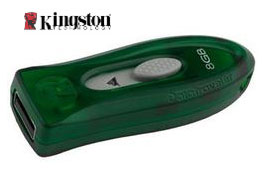
Not that fee shipping on a USB drive should put anyone over the edge, but consider an 8GB Kingston drive for only $32 – now that’s a deal worth jumping on board [for].
This GetUSB Dealz has no rebates or coupons, just raw savings. The Kingston DataTraveler was originaly $54 but is reduced to $32 and change.
This particular model has the flip-out USB connector which I’ve always been a fan. The mechanism reduces the device size and helps protect the product for a longer lasting unit.
So here is the company line:DataTraveler 110 contains room for high-definition photos, graphics-intensive documents, videos, spreadsheets, presentations, term papers, and music that can be stored and retrieved in a flash. Sleek, practical, and attractively designed, the affordable DataTraveler 110 serves the needs of the budget-conscious user as well as those looking for significant storage capacity in a lightweight, compact design. DataTraveler 110 features a retractable USB connector for ease of use and safe housing.
So what could they think of next? A USB pregnancy test kit? – you have got to be kidding me! Nope.
Pteq is taking the process totally digital with their new USB pregnancy test kit. I’m not sure why, as any test kit is a simple pee on the stick, and wait for one strip or two. So what does the USB bring to the table?
Well, to answer that question lets visit ThinkGeek and see what they had to say…and I must say, the did a great job describing the product. Take a read:
Quote:One line or two. Yes or no. Pregnancy tests are binary by their very nature. So when we found p-Teq’s USB Pregnancy Test Kit that’s chock full of extra scientific information, we knew we had to get this geeky goodness to our potentially spawning fans.
The process starts off like most pregnancy tests. You pee on a stick, specifically the absorbent test strip at one end. But everything’s different after that first step. Remove the cap from the other end of the stick (cleverly provided to keep you from accidentally contaminating the wrong end) to reveal the USB connector. Pop it in your computer. The power from your USB port starts the electrospray ionization process, creating a spectrograph of the various masses for your analysis. Get it? Your analysis? Urinalysis? *rimshot* Moving on.
Continue Reading
MSN has this exclusive i-Buddy design for their instant message customers. The idea is providing a visual message when a new instant message arrives. Akihabara reports the i-Buddy will perform various motions when an new instant message arrives which corresponds to the emotion of the sender. Not sure how that works, but…
The i-Buddy connects via USB port and cable and stands about 3″ tall. I’m not clear about the details, but it seems you must be apart of the i-Buddy community to use the i-Buddy USB figure. All features provided by the i-Buddy Community are free of charge, exclusively to those members. i-Buddy customers can login to express themselves through the innovative functions designed it.
Don’t get too excited for this IM buddy, as Japan will be the first to try it, before the i-Buddy community rolls out to other countries.
All major browsers are supported by i-Buddy.com, including Microsoft Internet Explorer 6/7, Mozilla Firefox 2, Safari 3 and Opera 9. However, to ensure maximum compatibility, we recommend users to use either Microsoft Internet Explorer 7.0+ or Mozilla Firefox 2.0+. Flash player is required to browse certain parts of i-Buddy.com
Source:Â Akihabara News.
Continue Reading
Irvine CA based Toshiba American (Digital Products Division) announced a newly designed Satellite laptop line with sleep and charge USB power concept…and we think it’s a winner.
The sleep-and-charge USB concepts makes it possible to charge and power electronic devices connected to the laptop without the laptop being powered-on or in sleep mode.
This is a simple yet revolutionary way USB power bus technology will begin working it’s way into our life. With USB connectivity as the #1 method for peripheral connection to laptops and computers, the sleep-and-charge USB concept is brilliant.
 “Toshiba has long been a leader of innovation, and prides itself on creating solutions that make the digital lifestyle even better,†said Jeff Barney, vice president of marketing, Digital Products Division, Toshiba America Information Systems, Inc. “With the development of the Sleep-and-Charge USB ports, Toshiba has developed an innovative technology that helps ensure that our digital products are ready for use at the moment we need them.â€
As you know, the major shortcoming with today’s USB ports from either computers or laptops is the lack of power support while the host device is turned off.
I have reported on USB surge protectors which do basically the same thing, but that requires more gear for a traveling business person, the sleep-and-charge is built into the host system.
Continue Reading
Luigi had some of his clan review the BFG 9800 GTX Video Card over at i4u gadgets and I wanted to pass along their findings:
The BFG 9800 GTX runs on the NVIDIA 9800 GTX GPU. The core clock of the card runs at 675 MHz, the shader clock is 1688 MHz and the memory clock is 2200 MHz. the card has a 256-bit memory interface and a memory bandwidth of 70.4GB/sec. the BFG 9800 GTX has 128 stream processors. The card features 512MB of GDDR3 RAM and the card is PCI Express 2.0 compliant. Other features include HDMI capable with adapter and HDCP capable for protected HD content. Read the entire review:
Continue Reading
AVerTV Hybrid Volar MAX is a long name to describe the multitude of functions the USB TV tuner does. The USB based TV tuner stick has the ability to receive HDTV, Analog TV and FM radio on any Windows XP or Vista computer or laptop.
Unless you need specific subscription channels, you no longer have to put up with cable or satellite costs to get the High Definition TV everyone is craving for. The AverTV Hybrid Volar MAX does it all. For video quality, playback and speed consider this:
“The AVer MeidaCenter provides users more joy from Clear QAM digital cable TV. Advanced real-time H.264 recording compression significantly reduces CPU loading and the amount of hard disk space needed for recording. The optional 320×240 resolution enables users to save and playback video on an iPod.”
Don’t hold doubt either, the AVerTV Hybrid Volar MAX can truly present the details of HDTV in 720p/1080i resolution. With an exclusive Vista MCE Video Gaming Plug-in, the AverTV Hybrid Volar MAX resolves the
Continue Reading
Here is a nice quick and easy USB tutorial.
Swapping storage can become a headache in Windows as you never know or can remember which drive letter Windows assigns your drive. At Lifehacker, they posted a nice tip on assign USB drives to folders. This method not only keeps things organized, but adds one additional benefit most wouldn’t think of.
First, the tip.
Create a main USB folder where we will mount all the USB drives once connected. Then assign all your USB devices to sub-folders within that main folder. After creating the folder structure, do the following for assignment.
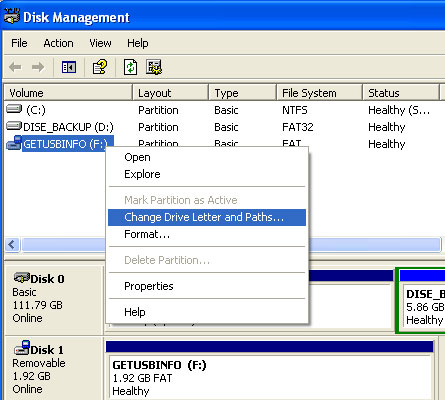
Click > Start > Run then enter diskmgmt.msc and hit enter. This opens the Disk Management configuration that should display all drives and devices currently connected to your computer.
Pick an USB device from the list and right-click that entry. Select Change Drive Letter and Paths from the menu.
This should open a new window that is displaying the current drive letter of the device and three buttons at the bottom which are named Add, Change and Remove.
Click on the Add button, select Mount into the following empty NTFS folder and click on browse. Now navigate to the subfolder that you want to assign the usb drive to and confirm the assignment. The USB drive will from now on be accessible from that folder as well if it is connected to the computer.
The Sharper Image does seem to come out with some cool stuff. Example, they announced a laser beam music system powered by USB. The music system is shaped like a big “W” with laser beams spanning each post. Using your fingers or hands, breaking the laser beams produces pre-authored sounds.
Although it appears simplistic with only 6 laser strings, the pre-authored pulses allow you to play pulses, streams, riffs and loops from a variety of instrument selections. Configure the laser beam music system to play strings, keyboards, winds and percussion instruments.
The laser beam music system from Sharper Image includes 30 original songs in 19 different music genres. Genres include Jazz, bluegrass, classical, hip-hop, reggae, heavy metal and more.
Continue Reading
Press Release: Philips Launches New USB Smart Key for Dictation Product Line.
Philips is the first company to offer such a tool, which replaces current dongles and older security codes that had to be manually typed in. The USB Smart Key is now packaged with Philips SpeechExec Pro Dictate and Philips SpeechExec Pro Transcribe, as well as Transcribe software packages.
The USB Smart Key can simply be inserted into a USB port and the software will automatically access the license stored on the key. The license can then be easily transferred to a computer with the touch of a download button and, after download is complete, the key is no longer needed for licensing and users can work on that computer without having to keep and carry a dongle. If a user wishes to work with the dictation software on an office computer as well as a computer at home, the USB Smart Key allows him or her to switch from one computer to another without having to purchase a second license.
Continue Reading
It’s been said for a while now that WiiWare was expecting Karaoke ability under a software program called Joysound. It appears this is finally coming to fruition. The Joysound Karaoke program has some ambitious plans with over 20,000 title by it’s release in mid summer with an additional 1,000 songs added each month.
“Although it’s being referred to as a WiiWare title, Joysound is a bit different from the rest of the WiiWare lineup. Users download the Joysound program from a server that’s being exclusively set up for it. This server will also house the songs for downloading.
Hudson is currently considering a billing system based not on a per song rate, but on a subscription rate. Users will presumably be able to download as much as they want over a set period of time.”
As previously mentioned the Karaoke Joysound will be available in two packages. You can either download the software to run Karaoke but you’ll need to have your own USB microphone. Or a bundled package will be available which includes the software along with USB microphone. There are even talks about including
Continue Reading
This “everything you need” HDTV connection kit is one Pretty Hot And Tempting deal from Buy.com for only $22.49. I’ve seen just a single HDMI cable at BestBuy for more than $50 so this deal is off the hook.
What you get for just over $20 bones:
6ft RCA Type Audio/Video Combination Interconnect
6ft Component Video Cable
6ft RCA Type Audio Interconnect
2m HDMI High-Definition Multimedia Interconnect 2m TOSLINK Optical Digital Cable
6ft S-Video Interconnect
HDMI to Male DVI Inline Adapter
All the cables have 24-karat gold plated connectors for optimal performance and quality. The gold plated connectors also ensure long lasting quality without degradation for connect and disconnect sequences. The cable ends are molded for ease of use, handling and comfort during installation AND these cables come with a lifetime warranty. You can’t go wrong.
However, BUY.com did say the quantities are limited and this GetUSB Dealz will only be around for a short while. $32.49 with $10 rebate. Free shipping so total is $22.49.
Today I’m able to report about the Casio LK300 with USB and TV connectivity. I didn’t perform the review, rather my brother did. So lets see what Ned had to say:
I have to say the Casio LK300 is bigger than I expected and definitely more solid and quality built than anyone would expect for the price (about $200). The LK300 keys provide just enough friction to make them feel almost real, but obviously not exactly like a real, piano hammer like feel.
Although I’m not a piano enthusiast, I did pick up the LK300 to learn. After all part of the enticing thing about the Casio is the ability to connect it to a TV and learn along with instructional lessons. During a lesson, the LK300 keys will light-up as the song is played giving you the exact location of which key to hit and when. It’s even got a nice feature to cover any delay you might have in stroking the key…a little late…that’s OK, the sound still matches the lesson song.
With the lessons, the software will provide feedback in the form of a scoring system whereby it calculates the number of
Continue Reading



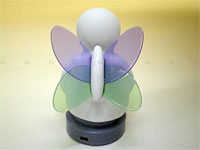 MSN has this exclusive i-Buddy design for their instant message customers. The idea is providing a visual message when a new instant message arrives. Akihabara reports the i-Buddy will perform various motions when an new instant message arrives which corresponds to the emotion of the sender. Not sure how that works, but…
The i-Buddy connects via USB port and cable and stands about 3″ tall. I’m not clear about the details, but it seems you must be apart of the i-Buddy community to use the i-Buddy USB figure. All features provided by the i-Buddy Community are free of charge, exclusively to those members. i-Buddy customers can login to express themselves through the innovative functions designed it.
Don’t get too excited for this IM buddy, as Japan will be the first to try it, before the i-Buddy community rolls out to other countries.
All major browsers are supported by i-Buddy.com, including Microsoft Internet Explorer 6/7, Mozilla Firefox 2, Safari 3 and Opera 9. However, to ensure maximum compatibility, we recommend users to use either Microsoft Internet Explorer 7.0+ or Mozilla Firefox 2.0+. Flash player is required to browse certain parts of i-Buddy.com
Source:Â
MSN has this exclusive i-Buddy design for their instant message customers. The idea is providing a visual message when a new instant message arrives. Akihabara reports the i-Buddy will perform various motions when an new instant message arrives which corresponds to the emotion of the sender. Not sure how that works, but…
The i-Buddy connects via USB port and cable and stands about 3″ tall. I’m not clear about the details, but it seems you must be apart of the i-Buddy community to use the i-Buddy USB figure. All features provided by the i-Buddy Community are free of charge, exclusively to those members. i-Buddy customers can login to express themselves through the innovative functions designed it.
Don’t get too excited for this IM buddy, as Japan will be the first to try it, before the i-Buddy community rolls out to other countries.
All major browsers are supported by i-Buddy.com, including Microsoft Internet Explorer 6/7, Mozilla Firefox 2, Safari 3 and Opera 9. However, to ensure maximum compatibility, we recommend users to use either Microsoft Internet Explorer 7.0+ or Mozilla Firefox 2.0+. Flash player is required to browse certain parts of i-Buddy.com
Source:Â