GetUSB.info Logo

Author Archive

Matt LeBoff

Kicking around in technology since 2002. I like to write about technology products and ideas, but at the consumer level understanding. Some tech, but not too techie.

AT&T Will Consider Limiting iPhone Data Plans

AT&T reports that smart phone users, which make up 3% of their market, are eating up nearly 40% of the data bandwidth on their mobile network.

att apple

To no surprise, AT&T is considering ways to free up network bandwidth so that everyone without a smartphone, isn’t effected.  So what does this mean?  It means AT&T might be giving a screw j_b to iPhone users. – by far the biggest consumers of bandwidth from smartphones.
iPhone users on average consume five to seven times more data per month than average wireless subscribers, according to analyst firm Sanford Bernstein. And all this usage is clogging the network, causing many iPhone users, especially in large cities such as New York and San Francisco, to experience dropped calls, slow 3G service, and issues connecting to the network at all.
So what is AT&T considering?  I would think upping the usage fees, but this might not work for those who don’t care about monthly fees.  Another approach are incentives.
“We’re going to try to focus on making sure we give incentives to those small percentages to either reduce or modify their usage so they don’t crowd out the other customers in those same cell sites,” said de la Vega according to a transcript of the conference. “And you’ll see us address that more in detail.”
Either way, I have a strong feeling AT&T will be limiting or slowing data usage for iPhone users.  Continue Reading

Press Release: Sugar on a Stick v2 Blueberry Now Available

Sugar Labs Nonprofit Announces v2 of Sugar on a Stick with Improved E-Book Readers, Recycles Any USB Stick Into Learning Environment for Children; Partners with Nexcopy, Inc.

PARIS, December 8, 2009 — Netbook World Summit — Sugar Labs(R), volunteer-driven nonprofit provider of the Sugar Learning Platform for over one-million children around the world, announces the release of Sugar on a Stick v2 Blueberry. Available for download at https://www.sugarlabs.org, Sugar on a Stick can be loaded onto any ordinary 1Gb or greater flash drive to reboot any PC, netbook or recent Mac directly into the child-friendly Sugar environment without touching the existing installation. Sugar is also available for GNU/Linux distributions, runs under virtualization on Windows and Apple OS X, and features built-in classroom collaboration and automatic backup to a Journal. The latest version of Sugar offers simpler navigation, improved wireless networking, streamlined updating of Activities for children, easier keyboard configuration, better Gnash support for Adobe Flash content, and more. New Activities such as Physics and OOo4Kids join updated favorites such as Browse and Read, suitable for reading e-books.

Sugar on a Stick logo

“Sugar on a Stick is a great way to experience Sugar”, commented Walter Bender, Sugar Labs executive director. “In this holiday season, we wish to remind parents and teachers that e-books are not only for costly reader units for the well-to-do, but freely available as part of the open-access to knowledge movement to help children everywhere develop critical learning skills and to bridge the digital divide wherever it exists.”

Sugar on a Stick includes several e-book reader Activities to find and display e-books in PDF, EPUB, and DejaVu formats. The Read Etexts Activity can read e-books out loud, converting any old PC or inexpensive netbook into a text-to-speech aid for disabled readers. With Sugar, children can even make their own e-books. Thousands of e-books for children are available on websites such as Project Gutenberg, the Internet Archive Children’s Library, epubBooks.com, Feedbooks.com, and ManyBooks.net. Other sites offer online reading, such as the International Children’s Digital Library.

Pilot Sugar projects are underway in American and European schools. School administrators wishing to deploy Sugar will be interested in OLPC’s recently updated XS school server software, which provides “safety net” and connectivity services at the school level: backup, content distribution, filtered access to the Internet, and Moodle integration. To assist schools interested in testing this technology, Sugar Labs has partnered with Nexcopy, Inc. of Rancho Santa Margarita, California, an industry leader in USB duplicator solutions, to open https://recycleusb.com. Nexcopy will collect used USB sticks, reload them with Sugar on a Stick, and forward them to Sugar Labs for distribution to schools. Nexcopy has also donated a 20-stick USB duplication unit to Sugar Labs.

Greg Morris, President of Nexcopy, commented,

“Nexcopy is proud to partner with a nonprofit organization such as Sugar Labs. We believe the Sugar Learning Platform is clearly a step in the right direction for getting children involved with personal computers. Our objective is to give Sugar Labs the back-end equipment support needed to make this philanthropy successful and help with producing the large number of Sugar Sticks needed for global deployment. I am very honored Nexcopy is a part of this process.”

For more information, please contact:

Sugar Labs: Sean Daly, Marketing Coordinator
website: https://www.sugarlabs.org
e-mail: pr!@!sugarlabs.org
telephone: +1-857-254-1100

Nexcopy Inc.: Greg Morris
website: https://www.nexcopy.com
e-mail: contact!@!nexcopy.com
telephone: +1-949-481-6478

About Sugar Labs
Sugar Labs, a volunteer-driven, nonprofit organization, is a member project of the Software Freedom Conservancy. Originally part of the One Laptop Per Child project, Sugar Labs coordinates volunteers around the world who are passionate about providing educational opportunities to children through the Sugar Learning Platform. Sugar Labs is supported by donations and is seeking funding to accelerate development. For more information, please visit https://www.sugarlabs.org.

About Nexcopy Incorporated
Nexcopy Incorporated specializes in developing and manufacturing the finest and most feature-rich flash memory duplicators in the market. Pioneering the solid-state memory duplication market, Nexcopy supplies Central and South America, Europe, India, Asia, Pacific Rim and serves the U.S. market through its headquarters in California.

Sugar Labs is a registered trademark of the Software Freedom Conservancy. Other names are trademarks of their respective owners.

Continue Reading

Video: SuperTalent Shows Off USB 3.0 Flash Drive

SuperTalent announce their USB 3.0 flash drive in November of 2009.  Today we have a short video of that drive in action.  You can see the performance of the device is much greater than any 2.0 device.  How would you like to copy files at 78MB per second?

USB 3.0 flash drive

I spoke with SuperTalent last night and still no word on official price or official launch date.
<a href="https://www.linkedtube.com/k2wDRWLl5zs99902a39a03bcacf374d260dad3d77fc.htm">LinkedTube</a>
Source: SuperTalent. Continue Reading

How To: Turn Off Autoplay XP Home For USB Sticks

How to turn off autoplay XP home edition for USB flash drives.

Windows XP Home edition requires a different method to turn off the USB autoplay function than XP Professional [which we reported on earlier].

It’s not difficult to turn off the USB autoplay, just a couple easy steps.

Note:  We are going into the Registry so be careful not to do anything other than what we suggest.

Got to>  START > RUN > type “regedit

Navegate to HKEY_CURRENT_USER
+ software
+ Microsoft
+ Windows
+ CurrentVersion
+ Policies
+ Explorer

**The “+” are the registry hives you must expand.

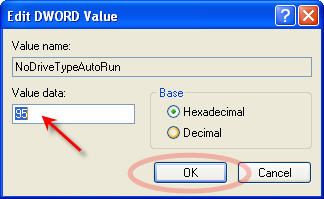
Now click the + Explorer directory just once so it is blue.  On the right side you will see “NoDriveTrypeAutoRun

Right click that and Select “Modify

turn off usb autoplay xp home

Here you most likely have b5 listed in the “Value data” field.  Simply replace that value with 95.

Click OK.

turn off autoplay usb

Close out of the Registry and reboot your machine.  Done!

Continue Reading

Sony USB Human Vein Reader

You learn something new every day.  Today I learned that Sony has been working on a new bio technology that reads vein structure of a human hand.  The project is called “Mofiria.”

USB vein reader

Object behind this project is taking the biometric finger reading technology one step further, and using vein structure as the authentication code [after all we have all seen movies where a fake silicon finger gets the burglars in]. So now the biometric technology is all buttoned up, Sony developed a USB vein reader that users could implement in the field. Continue Reading

Paper Thin USB Key Turns Magazines Into USB Distribution Method

usb webkey

It’s a bit complicated of a article title, but the point is this:  It is now possible to put a paper thin USB key into a magazine ad to drive customers to your site. This fresh approach to implement USB technology into marketing is extraordinary to say the least. Now don’t misunderstand me, I’m not talking about a flash drive with storage, I’m talking about a “web key.” A USB webkey is simply a device that auto launches your web browser to a specific web page.  That’s it.  But it’s incredibly powerful. Now a major retailer or manufacturer can send a magazine reader directly to a webpage via a paper thin USB key.  I’d try it just to see if it would work.  I would try it just to see if there was storage on there [if I wasn’t a USB-super-geek]. The process is simple.
  • Step 1 – Open magazine and see the ad
  • Step 2 – Pop out the webkey
  • Step 3 – Connect it to a USB port on your PC
That’s it.  Now your reader is on the web checking out your next greatest invention [Honda Unicycle] To learn more about the USB webkey contact USBcopier. Continue Reading

Kensignton Ultra Slim USB Key Board

The all new Kensington Ci70 USB keyboard is ultra slim for those seeking minimal usage of work space real estate.  In addition, the Ci70 includes a small USB hub for connecting those USB powered gadgets. The USB keyboard comes with two full size USB type A connectors to connect MP3 players, cameras and promotional USB drives and one mini-USB connector for syncing mobile phones and digital cameras.

kensington usb keyboard ci70

Kensington indicates the USB keyboard is 35% smaller then a typical keyboard, but don’t mention the height of this “slim design.”  It appears to be about 1.5cm at the keyboard and 3cm at the back where the hot buttons are located. The Ci70 retails for $50, but we found it at Amazon for just a little less. Continue Reading

USB Movie Sticks – Starts NOW

USB movie stick Actor Morgan Freeman and his production company Digiboo are trying to break ground with sales and distribution of movies via USB. We love the idea!

USB Movie sticks might become a thing of the future as Digiboo plans to launch over 100 kiosks in Hollywood Video stores next year; the first will roll out in January. People will be able to plug a USB device into the kiosk, download movies to rent or own, and then plug them in to any USB 2.0 or 3.0-compatible devices.

Before you ask, yes, DRM is layered into the movie content so put away your ideas of bit-for-bit USB copies to pirate your movies. However, you now own the content on a portable device which will plug into just about anything including Xbox or game consoles, cars, computers, and set-top boxes. No word on how transferable the format will be to get the rented video from USB to something like an iPhone or PDA for portable playback.

About two years ago we started reporting on the USB music albums and now it appears we’ll see more articles about USB movie sticks.

Continue Reading

Computer History Museum Honors First Microprocessor Intel’s 4004

Intel 4004

Today, a team of engineers will be recognized at the Computer History Museum for designing the first microprocessor in 1971, a 4-bit parallel CPU with 2,300 transistors. That project, from an infant Intel [3 years old], was a huge achievement and one can honestly say “it changed the world.” The Intel 4004 was the first general purpose microprocessor that could be customized with software to perform different functions on different devices. The 4004 started a new era in both hardware AND software, along with a never ending quest of silicon integration that continues to this day. The small team to be honored include: Continue Reading

iPhone Gets RFID For Quick Retail Purchase Opportunities

iCarte is a snap-on device for the iPhone to allow it to receive RFID signals.  This is great for all sorts of on-the-go applications.

The iCarte could be used for micro payments, such as public transportation payments or vendy machine purchasing.

icarte

Another application is getting RFID signals for promotional material.  Such as walking past a movie theater and you would be asked to download the trailer for an upcoming movie.  Or past a music store and you can get a sample of the latest releases.

Makes you wonder what the world will be like in a couple years, doesn’t it?

UberGizmo rumors that Apple might integrate an RFID feature in the next release, but who knows.

Source:  UberGizmo.  Product by: Wireless Dynamics.

Continue Reading

USB Registry Cleaner Tool

UPDATE: USB Scrub by Nexcopy now supports Win7, Win10 (32/64bit) and Windows 11

USB Registry Cleaner Tool which is FREE!

Review USB Scrub Cleans Your Registry Of Old USB Sticks

Did you know Windows can make over 260 registry entries with a single enumeration of a USB stick? This means for those with multiple flash drives, your registry will get extremely cluttered and bogged down.

With flash drives dirt cheap these days, you’ll find at least a couple dozen going into your computer throughout the year. That would be over 6,240 registry entries.

USB Scrub is a free utility from Nexcopy which performs a deep cleaning of those unused drivers and registry edits.

We gave USB Scrub a try, and it worked great. We went from enumerating a single USB stick in 45 seconds to enumerating that stick in less than 12 seconds.

In addition, if you have a USB stick that doesn’t perform correctly or the Windows OS doesn’t see it, chances are the USB Scrub will clear up those problems and your drive will work once again. This is because a registry entry can become corrupt, and simply clearing it out will resolve your issue.

So let’s take a closer look.

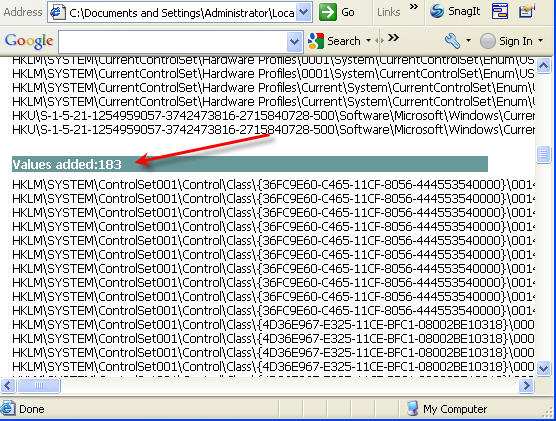
Using RegShot (a free application which takes a snapshot before and after an event and compares only the changed registry values), I took a snapshot before and after a USB stick was connected and ejected. The result was this:

  • 78 Registry Keys created
  • 183 Registry Values added
  • 261 Registry edits in total!

Here is a snapshot. Click the image to get the full text file:

USB Scrub registry clean example

Next, I took a snapshot of the registry before a stick was connected, then ran USB Scrub, then took the second registry snapshot. This is what I got:

  • 1 Registry Key added
  • 3 Registry Values added

Clearly we have a big difference. Clearly we have a great cleaning tool for USB devices in Windows.

USB Scrub cleaning registry after use

If you have a USB flash drive not working correctly, a slow computer, or you are a heavy user of removable drives, give USB Scrub a try. You’ll see a noticeable difference in USB enumeration.

As a closing note, when the enumeration speed went from 45 seconds to 12 seconds, USB Scrub reported that it cleared over 9,000 registry entries.

USB Scrub is a free utility. There is no malware or spyware.

Unfortunately, USB Scrub only supported Windows XP in the past. The maker, Nexcopy, has now updated support for Windows 7 and Windows 10. (Does not support Windows 8.)

UPDATE: Download link now supports Windows 7 and Windows 10 (32/64bit).

Download USB Scrub. Source: EverythingUSB.com.

Continue Reading

Copyright

Copyright © 2006 +

USB Powered Gadgets and more...

All Rights Reserved

Advertise with us

GetUSB Advertising

This is a high value website providing great exposure to your product and brand. Visit our advertising page to learn specifics.

For more information
Visit our advertising page.

Nexcopy Ad

Nexcopy Provides

USB copy protection with digital rights management for data loaded on USB flash drives.

Contact us learn more

Resources and References Page

Resources and References Page