Administator for GetUSB.info
GetUSB.info started in 2004 with the concept of providing USB information for everything USB related. At the time, USB was gaining momentum and every day new products, articles and news became published. Today, the site is focused on bringing technical information, tricks and hacks to USB related products. The site does publish off topic information as well, to keep the variety up. Please visit the footer area of any page if you or your company is interested in article or product placement via purchased advertising.
Hovercam X500 is great name for the function it performs, hovering over documents to project via camera. The Hovercam is meant to replace the age old overhead projector we are most familiar with from grade school.
The X500 USB imaging device has a 5 megapixel sensor mounted on a swing arm that can either scan and recognize or monitor and project anything on the surface underneath. As a scanner, the HoverCam performs as a 600dpi equivalent scanner. Scans are snapped as photos would be, in an instant. No more waiting for the slow trudging of the scan sensor to run up and down the page.
The free software that is included with the X500 is called HoverCam Flex. The Flex is not surprisingly built on the Adobe Air platform, and is a desktop based application that connects directly to their web services. Images can be uploaded, saved, published, shared and OCR’d with a quick drag and drop. The HoverCam Flex service also provides quick integration with other cloud services like Google OCR, Picassa, DropBox and e-Fax. The benefits of the software alone might be worth the $199 asking price of the HoverCam X500.
The mini RC helicopters have been in all the computer shops as of lately, and Brando just upped the ante with their USB rechargeable version, the Grand NANO.
I’ve seen these things in action, don’t use them around small children, the helicopter blades move so fast, it could cut off a finger if flown right into a child [by mistake of course!].
The Grand NANO is made of light weight metal alloy and has shockproof landing gear. This makes it a bit less likely you’ll smash the thing while landing.
The Grand NANO has an electronic gyroscope system which provides excellent stability, control and maneuverability.
Equally impressive, is the modified poker chip case for quick and easy storage of the USB rechargeable helicopter.
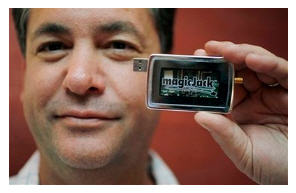
One of GetUSB.info’s most popular post’s is the Review: MagicJack Phone article that talks about the product and services as experienced by one of my contributing editors. Today, we find out that MagicJack paid $50Gs to Boing Boing in a defamation lawsuit pertaining to an article they wrote.
So what was all the fuss? Boing Boing uncovered some interesting information about the MagicJack which we didn’t realize during our review. The MagicJack uses customer profiles, locations and call habits to push targeted ads to the MagicJack software interface.
Boing Boing reports that during the purchase of the product, activation of the product or support for the product, at no time is the user aware of these terms and conditions.
Now, I don’t think the ad sponsored business plan is a bad one, but giving the users a heads-up or opt-out choice is definitely needed. Even with the small amount of ad space used for such an incredibly cheap and convenient product is not a big deal [in my eyes].
So here is our official notice: be aware of this fact before buying a MagicJack phone. To read the full review of this wonderful product, please visit the original article: Review: MagicJack Phone.
Source:Â Boing Boing.
Continue ReadingNo Comments
Banking giant UBS started deploying a device from IBM which ensures online banking transactions aren’t being manipulated by on-line hackers.
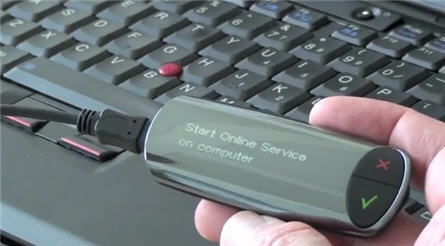
IBM’s ZTIC (Zone Trusted Information Channel) is a smart-card reader that attaches to computer via a USB cable. During an online banking transaction, it bypasses the Web browser and makes a direct connection with the bank. The connection is an industry standard SSL (Secure Sockets Layer) which enables the user to enjoy a secure link between their computer and the bank server.
What is great about the USB secure product is that a hacker could not cloak a transaction via the web and show the user a transaction of one amount, while robbing them blind with a different amount as the “actual” transaction.
What is funny about the UBS press release is the following:
If the transaction has been hacked and the account number is different, the customer can abort the payment by hitting a red “x,” or a green check if it’s fine
Well…if they knew the transaction was hacked, wouldn’t they stop it anyway?
Another nice feature of the UBS secure USB device is that a keylogger could not record keystrokes because the sync process between the user and bank happens through the UBS device, no account numbers are used or typed.
Continue ReadingNo Comments
The Japanese firm Hanwa’s announced today their solution to putting DTS digital sound on your computer via their USB Vacuum Tube dongle.
I seriously doubt the vacuum tube brings any value to enhancing the digital sound, but rather put a nestaligic look to a high tech product.
The USB vacuum tube will retail in Japan for $45 USD and include the USB dongle with DTS technology along with the headphones which support DTS sound. After all, the dongle doesn’t do you any good without some speakers for enjoyment.
I was given a tip today on how someone hacked the Motorola Android and now has USB connectivity. It’s a great little hack so now just about any USB device could potentially be connected to the Android. The question becomes what kind of drivers will the Android support so that printers, controllers, USB sticks etc can be used.
The hack is fairly simply. With a little amount of effort, it is possible to enable the B port of the Android as a host interface, meaning the cable USB hack supplies power and acts as the bus controller for connectivity.
You’ll need to make two things, a micro-dongle to enable the port (you plug it in during boot time) and a cable with the right connectors on each end (for connecting your peripheral). To do this you’ll need three cables:
A car charging cable (off-the-shelf at the Verizon store)
A Micro-USB cable (as above)
A USB extender cable (the teeny ones that sometimes come free with USB keys work great)
MSN did a nice article today about 9 new tech gadgets you can make with the stash of old stuff you probably have laying around. One which fits into the USB category, is this USB fan.
Retro and cool looking, you can put together a nice desk fan with just an old tower or power supply fan along with solder and USB connector.
Other new tech gear from old gadgets include a stone age cell phone tricked into a portable safe. Scanner table where you can display items under the glass cover of the scanner and a USB mouse turned up-side-down and carved out for a plant holder.
Not the most impressive conversion, but a fun article to read on your break or lunch hour.
MSN 9 Uses for Dead Tech Gear…
Continue ReadingNo Comments
MacBook laptops don’t come with VGA out or DVI out connectors for extending one’s video screens to more then the MacBook itself. Today Wisair announced a solution for just that with their Wireless USB DisplayDock Set.
Wisair’s DisplayDock solution allows Mac users to connect to a monitor, keyboard, mouse and speakers, via a single wireless link with a single adapter that connects to a USB port on the MacBook. Since we haven’t seen a big offering to help out MacBook users we expect this to be a big hit with the MacFanBoys.
Wisair will be OEMing the solutions via three vendors [Atlona, Source R&D, Cables Unlimited and Olidata in the UK.
Some major points to consider:
Point to point plug and play USB wireless
Universal solution for MacBooks
Distance up to 30 feet
Doesn’t load over WiFi so your internet USB gadget surfing remains fast
Wireless video supports up to 1440 x 1050 screen resolution
Mac Leopard (10.5) and Snow Leopard (10.6) OS support.
SAN JOSE, Calif.–(BUSINESS WIRE)–Jungo Ltd., a leading provider of connectivity systems and driver development tools, today announced the release of its ZeroDriver software, which enhances the user experience by enabling seamless connectivity between USB data cards (both 3G and 4G) and any laptop or PC, without the need to install drivers or applications on the host PC.
“We are pleased Jungo supports USB technology, by extending the simplicity and broad capabilities of USB to its customers.â€
ZeroDriver supports all data card features that in the past have required drivers or additional applications, including dial-up and high speed browsing, voice calls, SMS, diagnostics, network statistics and more.
Equipping a data card with ZeroDriver is a highly cost-effective and user-friendly solution, for example, it reduces installation support calls to a minimum, maximizing user satisfaction and in turn, increasing ARPU. With support for HSPA+ bandwidth standards, ZeroDriver is fast and extremely flexible – it is easily ported to a variety of hardware mobile platforms.
ZeroDriver is currently available for Windows XP, Vista and Windows 7 and is compatible with a wide range of PC applications, including Internet Explorer, Firefox, MS Office, Thunderbird and more. Future versions will support Mac and Linux. ZeroDriver is also available in “installation mode” for operators who want to offer enhanced system support.
“Due to its ease of use and global availability, USB has become the standard interface between mobile broadband modems and PCs,” said Jeff Ravencraft, president and chairman, USB Implementers Forum. “We are pleased Jungo supports USB technology, by extending the simplicity and broad capabilities of USB to its customers.”
Continue ReadingNo Comments
The Stanza app is a program for the iPhone which is an eBook reader. It is slick software, easy to use, and allows you to load books via USB cable. Well, it did.
The latest update from iTunes for the Stanza app indicates the USB connectivity feature will be removed from the application. So if you want it, don’t update it.
The Washington Post called the maker, Lexcycle, and asked about the details and their spokes person said, “[Lexcycle is] forbidden from discussing the specifics of the conversations with Apple on this matter.”
It’s fair to say that Apple is keeping complete control of the device so that additional storage [non iTunes content] cannot be loaded along with reducing any virus possibilities hitch-hiking in via removable storage.
To learn more visit the Washington Post article.
Continue ReadingNo Comments
iBin is a portable application designed for USB stick so users can restore files which have been accidentally deleted. Since Windows does not redirect a deleted file off the OS into the Recycle Bin, once a user clicks delete, it’s gone forever [well unless you use restore tools to get it back], but iBin resolves that problem.
iBin puts your deleted files in a container on the USB drive itself and sits quietly until your custom flash drive gets to capacity, then you’ll need to do a bit of house cleaning.
iBin includes a collection of management features to set the preferences of the iBin. Items such as confirmation of where to put the “deleted” file, iBin size, how to erase and when to dump the iBin data.
All in all, this is an excellent application for users to add one additional layer of safety for the delete button.
This is a Windows based product and runs on all OS’ from Microsoft, including Windows 7.
Continue ReadingNo Comments


 One of GetUSB.info’s most popular post’s is the


 The
The 
