Wi-Fi Hot Spot Detector – Simple – Cheap – Why Not?

Written by Richard Blanchard on January 28th, 2008. Posted in USB Fever, Wireless

It’s a well known fact if you belly-up to a Starbucks or any other major coffee chain you’ll have wi-fi access.  However, many other hot spots are available which you just don’t know about.  This is where a wi-fi detector comes in handy.
wi-fi detector

I know a wi-fi detector would have been handy during the hField wi-fi extender review.  As I was driving through my business complex looking for signal, I found it oddly ridiculous to have my laptop booted up on the front seat of my car.

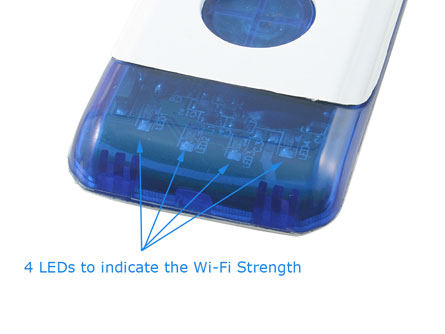
The USB Fever wi-fi detector is a simple, cheep gadget where a click of a button can detect wireless hot spots.  With 4 LED lights to communicate signal strength, you can spot the best signal in seconds.

wireless wi fi detector

The wi-fi detector has a 300 foot range  and detects 802.11b and 802.11g bands.  The only downfall I see, and this could be a big one, is the wi-fi detector doesn’t indicate if the network is secure.  I’d hate to power up the laptop, take valuable battery juice, just to find it’s a secure network.

However, for $13 bucks, not a bad gadget for the bag.

Tags: , , ,


Most Recent USB Tutorial »

    USB LED Lantern

    Instructables has a nice USB LED lantern DIY project.  I think the most important part about this project is getting a cool enough looking lantern.  Make sure it’s 50s-60s style [...]

New USB Gear

    Bootable Windows 8 Off USB

    Microsoft is looking to make their OS more portable.  With Windows8 one of the features the Redmond Washington company is featuring is a bootable OS.  True, we’ve seen both Windows [...]

Who’s Talking About Apple

USB Benchmark Software

Created for testing read / write speeds of a USB device. Free download.

Copyright ©

Copyright © 2011 by
USB Powered Gadgets and more...
All rights reserved.

Sponsor: Pocket Desktop

Pocket Desktop is a sponsored advertiser on GetUSB.info. The Pocket Desktop USB ensures your privacy while online and off. Keeping the sites you visit, the files you use and the people you chat with private and confidential, no matter what computer you use.