
It’s standard for mobile phones to sync and connect with your computer with limited or no access to the memory for storage. As with our Zune hack for making a Mass Storage Device, here is a tip for the Windows Phone 7 as well…
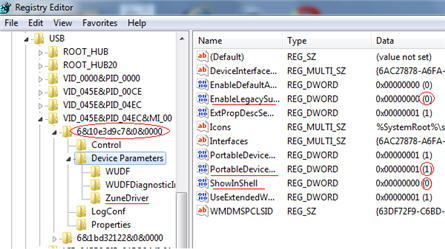
The caviet to this tutorial, is that you can only perform the tweak to your computer which you sync the Windows Phone 7 device with.
To get started, do the follwoing:
- Open the registry editor on your PC by typing regedit in your Start menu
- Go to HKEY_LOCAL_MACHINE\SYSTEM\CurrentControlSet\Enum\USB; search for ZuneDriver
Now you will modify three entries (note, if you have multiple WP7 phones, you have to do it for each one)
- Change ShowInShell from 0 to 1
- Change PortableDeviceNameSpaceExcludeFromShell from 1 to 0
- Change EnableLegacySupport from 0 to 1
Note: Perform registry entries at your own risk. It’s best if you back up the Reg before starting.
Source:Â IntoMoble.
Let GetUSB.info keep you updated.
Receive article notifications about USB storage, flash memory, and duplication updates in your preferred language. We average a couple of articles per week.


